cancel
Showing results for 
Search instead for 
Did you mean: 

Learn from the best! Meet the four finalists headed to the FINALS of the Power BI Dataviz World Championships! Register now

Reply
Anonymous
Not applicable

Count Function on Direct Query

Hi all,


I want to use count function in direct query mode.

I'm unable to use it. The formula does not return an error.

Measure = COUNT('Bölge Yöneticisi'[Bölge Yöneticisi Düzey 01])

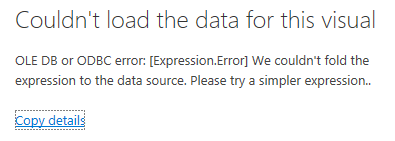
when i try to use it on chart I'm getting this error.
Screenshot_2.png

1 ACCEPTED SOLUTION
technolog
Super User
Super User

Firstly, when you're working with DirectQuery in Power BI, you have to remember that not all DAX functions behave the same way as they do in Import mode. DirectQuery sends the DAX calculations as native SQL queries to the source database, so there might be some limitations based on the database you're connected to.

The formula you provided, Measure = COUNT('Bölge Yöneticisi'[Bölge Yöneticisi Düzey 01]), seems straightforward. However, since you're getting an error when trying to use it on a chart, there might be a few reasons for that:

The column 'Bölge Yöneticisi Düzey 01' might have some blank or NULL values. In DirectQuery mode, handling of these values might be different. You might want to try the COUNTA function instead of COUNT if there are non-numeric values in the column.
The data type of the column might be causing an issue. Ensure that the column's data type is appropriate for counting.
There might be a compatibility issue with the underlying database. Some databases might not support certain DAX functions directly. In such cases, you might need to create a custom SQL query or view on the database side and then connect to that view/query in Power BI.
Lastly, ensure that there's no issue with the connection itself. Sometimes, connectivity issues or timeouts can lead to errors when trying to render visuals.
If you've tried all of the above and still face the issue, it would be helpful to know the exact error message you're getting. That would give more context on what might be going wrong. Also, always keep an eye on the Power BI documentation and forums, as they often have solutions for common issues faced by users.

View solution in original post

1 REPLY 1
technolog
Super User
Super User

Firstly, when you're working with DirectQuery in Power BI, you have to remember that not all DAX functions behave the same way as they do in Import mode. DirectQuery sends the DAX calculations as native SQL queries to the source database, so there might be some limitations based on the database you're connected to.

The formula you provided, Measure = COUNT('Bölge Yöneticisi'[Bölge Yöneticisi Düzey 01]), seems straightforward. However, since you're getting an error when trying to use it on a chart, there might be a few reasons for that:

The column 'Bölge Yöneticisi Düzey 01' might have some blank or NULL values. In DirectQuery mode, handling of these values might be different. You might want to try the COUNTA function instead of COUNT if there are non-numeric values in the column.
The data type of the column might be causing an issue. Ensure that the column's data type is appropriate for counting.
There might be a compatibility issue with the underlying database. Some databases might not support certain DAX functions directly. In such cases, you might need to create a custom SQL query or view on the database side and then connect to that view/query in Power BI.
Lastly, ensure that there's no issue with the connection itself. Sometimes, connectivity issues or timeouts can lead to errors when trying to render visuals.
If you've tried all of the above and still face the issue, it would be helpful to know the exact error message you're getting. That would give more context on what might be going wrong. Also, always keep an eye on the Power BI documentation and forums, as they often have solutions for common issues faced by users.

Helpful resources

Announcements
New to Fabric survey Carousel

New to Fabric Survey

If you have recently started exploring Fabric, we'd love to hear how it's going. Your feedback can help with product improvements.

Power BI DataViz World Championships carousel

Power BI DataViz World Championships - June 2026

A new Power BI DataViz World Championship is coming this June! Don't miss out on submitting your entry.

Join our Fabric User Panel

Join our Fabric User Panel

Share feedback directly with Fabric product managers, participate in targeted research studies and influence the Fabric roadmap.

March Power BI Update Carousel

Power BI Community Update - March 2026

Check out the March 2026 Power BI update to learn about new features.