FabCon is coming to Atlanta
Join us at FabCon Atlanta from March 16 - 20, 2026, for the ultimate Fabric, Power BI, AI and SQL community-led event. Save $200 with code FABCOMM.
Register now!- Power BI forums
- Get Help with Power BI
- Desktop
- Service
- Report Server
- Power Query
- Mobile Apps
- Developer
- DAX Commands and Tips
- Custom Visuals Development Discussion
- Health and Life Sciences
- Power BI Spanish forums
- Translated Spanish Desktop
- Training and Consulting
- Instructor Led Training
- Dashboard in a Day for Women, by Women
- Galleries
- Data Stories Gallery
- Themes Gallery
- Contests Gallery
- QuickViz Gallery
- Quick Measures Gallery
- Visual Calculations Gallery
- Notebook Gallery
- Translytical Task Flow Gallery
- TMDL Gallery
- R Script Showcase
- Webinars and Video Gallery
- Ideas
- Custom Visuals Ideas (read-only)
- Issues
- Issues
- Events
- Upcoming Events
The Power BI Data Visualization World Championships is back! Get ahead of the game and start preparing now! Learn more
- Power BI forums
- Forums
- Get Help with Power BI
- DAX Commands and Tips
- Re: Convert numbers into text
- Subscribe to RSS Feed
- Mark Topic as New
- Mark Topic as Read
- Float this Topic for Current User
- Bookmark
- Subscribe
- Printer Friendly Page

- Mark as New
- Bookmark
- Subscribe
- Mute
- Subscribe to RSS Feed
- Permalink
- Report Inappropriate Content
Convert numbers into text
Hi, I have a column with 4 different numbers, lets call them 1111, 2222, 3333, 4444. For a diagram, I want them to be named, e.g. for 1111, should be named AAAA, 2222 should be named BBBB etc.
What is the best way to do it? Is it with a convert()? Couldn't figure it out yet.
Thanks for any help!
Solved! Go to Solution.


- Mark as New
- Bookmark
- Subscribe
- Mute
- Subscribe to RSS Feed
- Permalink
- Report Inappropriate Content
Hi @Anonymous ,
What is the logic to give the names ?
If you have it mapped in another table, you can just merge both tables and use this column.
Did I answer your question? Mark my post as a solution!
Proud to be a Super User!
- Mark as New
- Bookmark
- Subscribe
- Mute
- Subscribe to RSS Feed
- Permalink
- Report Inappropriate Content
Hi @Anonymous ,
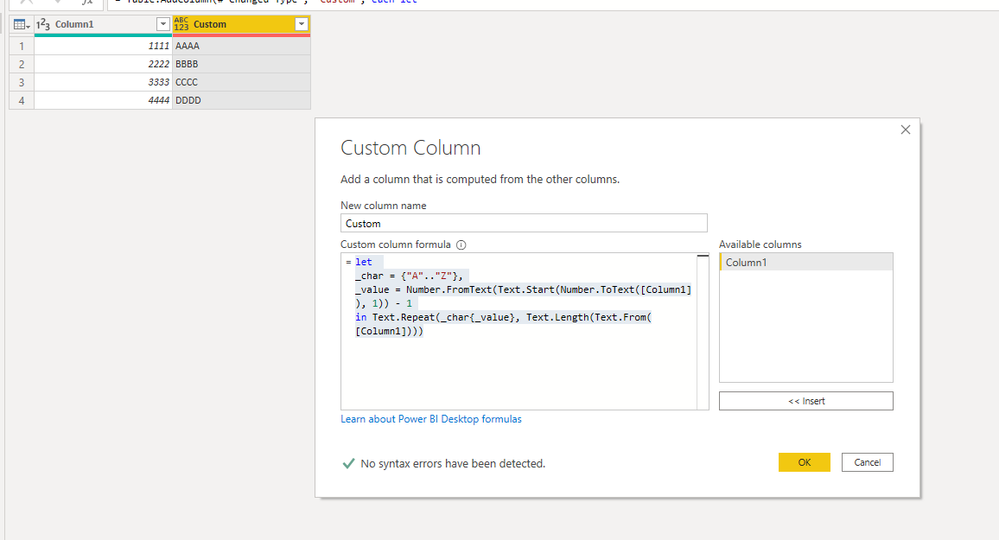
This is an Power Query solution using custom column:
let
_char = {"A".."Z"},
_value = Number.FromText(Text.Start(Number.ToText([Column1]), 1)) - 1
in Text.Repeat(_char{_value}, Text.Length(Text.From([Column1])))
Did I answer your question? Mark my post as a solution!
Proud to be a Super User!
- Mark as New
- Bookmark
- Subscribe
- Mute
- Subscribe to RSS Feed
- Permalink
- Report Inappropriate Content
Hi @camargos88 ,
thanks for that solution. It unfirtunatley also didn't worked out. Power Bi shows "error" in every row of the column.
As far as I understand your formula, I would say it is maybe not the right approach. But I'm not sure.
To make it more clear:
I have a column with four different numbers, that are in there.
like
Column1
1111
1111
3333
2222
1111
4444
2222
and I want to give every specific number of that four numbers, the right name.
Like for example: 1111 is Steven, 2222 is Christoph, 3333 is Larry, 4444 is Magdalen
So it should look like this:
Column1 Column2
1111 Steven
1111 Steven
3333 Larry
2222 Christoph
etc.
- Mark as New
- Bookmark
- Subscribe
- Mute
- Subscribe to RSS Feed
- Permalink
- Report Inappropriate Content
Hi @Anonymous ,
What is the logic to give the names ?
If you have it mapped in another table, you can just merge both tables and use this column.
Did I answer your question? Mark my post as a solution!
Proud to be a Super User!
- Mark as New
- Bookmark
- Subscribe
- Mute
- Subscribe to RSS Feed
- Permalink
- Report Inappropriate Content
Thank you. Since I had just 4 names to merge with the numbers it was easy to make a seperate table and merge it with the other one.
I made it more complicated than needed.
Thanks for the solution @camargos88 worked out perfect!

- Mark as New
- Bookmark
- Subscribe
- Mute
- Subscribe to RSS Feed
- Permalink
- Report Inappropriate Content
HI @Anonymous ,
Create a Calculated Column.
Column =
SWITCH(
TRUE(),
'Table'[Column] = 1111 , "AAAA",
'Table'[Column] = 2222 , "BBBB",
'Table'[Column] = 3333 , "CCCC",
'Table'[Column] = 4444 , "DDDD"
)
Regards,
Harsh Nathani
Appreciate with a Kudos!! (Click the Thumbs Up Button)
Did I answer your question? Mark my post as a solution!
- Mark as New
- Bookmark
- Subscribe
- Mute
- Subscribe to RSS Feed
- Permalink
- Report Inappropriate Content
Hi @harshnathani,
thanks for that solution. It unfortunatley didn't worked out. Power Bi shows me the following message:
DAX comparisons do not support comparisons between text and integer values. You can use the VALUE function or the FORMAT function to convert one of the values.But I think this is in general the right way to do it!
- Mark as New
- Bookmark
- Subscribe
- Mute
- Subscribe to RSS Feed
- Permalink
- Report Inappropriate Content
HI @Anonymous ,
What is the Data Type of 1111 ?? Is it Text or Integer.
Pls check and let me know.
Can you share a screen shot if your table.
Regards,
Harsh Nathani
Helpful resources

Power BI Dataviz World Championships
The Power BI Data Visualization World Championships is back! Get ahead of the game and start preparing now!

Power BI Monthly Update - November 2025
Check out the November 2025 Power BI update to learn about new features.

FabCon Atlanta 2026
Join us at FabCon Atlanta, March 16-20, for the ultimate Fabric, Power BI, AI and SQL community-led event. Save $200 with code FABCOMM.

| User | Count |
|---|---|
| 20 | |
| 10 | |
| 9 | |
| 4 | |
| 4 |


| User | Count |
|---|---|
| 32 | |
| 31 | |
| 18 | |
| 12 | |
| 11 |


