Join us at FabCon Atlanta from March 16 - 20, 2026, for the ultimate Fabric, Power BI, AI and SQL community-led event. Save $200 with code FABCOMM.
Register now!Learn from the best! Meet the four finalists headed to the FINALS of the Power BI Dataviz World Championships! Register now
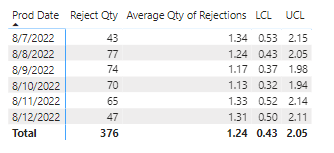
I am trying to create a control chart and I am having issues with the Average. I would like the Average Qty to relate to the average of the total reject qty.
Solved! Go to Solution.
@brich06 , Based on that I got try like
Average Qty of Rejections = CALCULATE(AVERAGEX(Values('Scrap Data'[Prod Date]),calculate(Sum('Scrap Data'[Reject Qty]) ) ) ,ALLSELECTED('Scrap Data') )
@brich06 , Based on that I got try like
Average Qty of Rejections = CALCULATE(AVERAGEX(Values('Scrap Data'[Prod Date]),calculate(Sum('Scrap Data'[Reject Qty]) ) ) ,ALLSELECTED('Scrap Data') )
Share feedback directly with Fabric product managers, participate in targeted research studies and influence the Fabric roadmap.
Check out the February 2026 Power BI update to learn about new features.
| User | Count |
|---|---|
| 6 | |
| 3 | |
| 3 | |
| 3 | |
| 2 |
| User | Count |
|---|---|
| 8 | |
| 8 | |
| 8 | |
| 7 | |
| 7 |