Join us at FabCon Atlanta from March 16 - 20, 2026, for the ultimate Fabric, Power BI, AI and SQL community-led event. Save $200 with code FABCOMM.
Register now!The Power BI Data Visualization World Championships is back! Get ahead of the game and start preparing now! Learn more
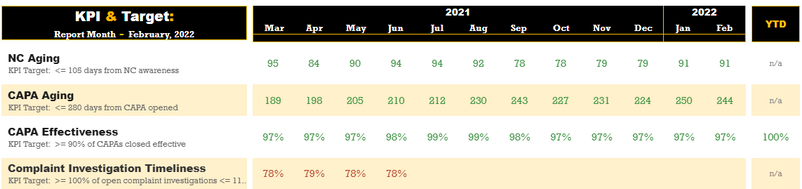
Hi, I have a KPI dashboard to make and was wondering if there was a way to have conditional formating per row? Each metric will have different targets and I am trying compare each target to the different results per date. Some metrics have more complex statements where it will have different targets per location as well. I have attached a picture of some dummy data that shows what I am trying to portray. Thanks!
Solved! Go to Solution.
Hi jostho99
Please consider this solution and remember I am an unpaid Power BI volunteer, so click the thumbs up button if you like me helping you and the solved button if I fix your problem.
Click here for an example solution
This example has the targets in table but you could hard code them in a switch statement.
A table is better because the users can edit the targets without a PBI developer changing DAX.
Create a dax measure like this
What field should we base this on = KPI Colour
Hi jostho99
Please consider this solution and remember I am an unpaid Power BI volunteer, so click the thumbs up button if you like me helping you and the solved button if I fix your problem.
Click here for an example solution
This example has the targets in table but you could hard code them in a switch statement.
A table is better because the users can edit the targets without a PBI developer changing DAX.
Create a dax measure like this
What field should we base this on = KPI Colour
Im assuming the Facts[Value] is a column in the table. What is the Facts[Value] is a measure? How to change the formula?
I have a similar situtaion where I have a measure "TurnOverRate" and I used the same formula you suggested but my measure is not detectable.
The Power BI Data Visualization World Championships is back! Get ahead of the game and start preparing now!
Check out the November 2025 Power BI update to learn about new features.
| User | Count |
|---|---|
| 19 | |
| 11 | |
| 9 | |
| 4 | |
| 4 |
| User | Count |
|---|---|
| 35 | |
| 32 | |
| 20 | |
| 12 | |
| 10 |