This time we’re going bigger than ever. Fabric, Power BI, SQL, AI and more. We're covering it all. You won't want to miss it.
Learn moreDid you hear? There's a new SQL AI Developer certification (DP-800). Start preparing now and be one of the first to get certified. Register now
I have The Following Table
| Status | Campaign type |
| Completed | A |
| Completed | A |
| Completed | B |
| Completed | R |
| Completed | D |
| Completed | A |
| Cancelled | F |
| Cancelled | GS |
| Cancelled | GS |
| Cancelled | W |
| Cancelled | E |
| Cancelled | T |
| Cancelled | U |
| Cancelled | W |
| Cancelled | HG |
| Cancelled | SF |
| Cancelled | AS |
| Cancelled | YF |
| Paused | A |
| Paused | N |
| Paused | N |
| Paused | J |
| Running | L |
So i want to condional formal the campaign type based on staus so like if completed the campaign type should be green, if canceled red, if paused yellow, if running blue
Solved! Go to Solution.
Hi @Anonymous
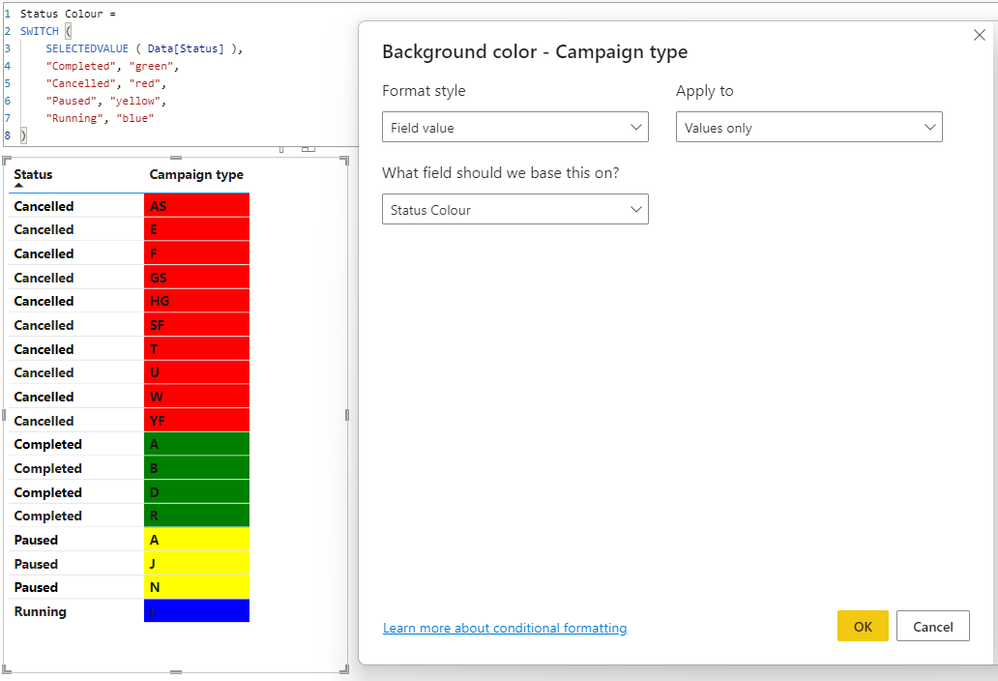
For this type of colouring rule, you would need to create a measure that depends on the value of Status, and returns the colour as a text value.
See here for details on the types of text values that are acceptable for defining colours.
The conditional formatting would then use Format style = "Field value" and be based on the measure.
Here is a simple example I created in a table visual:
Regards,
Owen
Hi @Anonymous
For this type of colouring rule, you would need to create a measure that depends on the value of Status, and returns the colour as a text value.
See here for details on the types of text values that are acceptable for defining colours.
The conditional formatting would then use Format style = "Field value" and be based on the measure.
Here is a simple example I created in a table visual:
Regards,
Owen
Check out the April 2026 Power BI update to learn about new features.
Sign up to receive a private message when registration opens and key events begin.
If you have recently started exploring Fabric, we'd love to hear how it's going. Your feedback can help with product improvements.
| User | Count |
|---|---|
| 6 | |
| 5 | |
| 5 | |
| 3 | |
| 1 |
| User | Count |
|---|---|
| 14 | |
| 8 | |
| 6 | |
| 6 | |
| 5 |