cancel
Showing results for 
Search instead for 
Did you mean: 

The Power BI Data Visualization World Championships is back! Get ahead of the game and start preparing now! Learn more

Reply
kilala
Resolver I
Resolver I

Conditional Calculation Based on Category

Hi all, 


I have quite complicated logic that I need to apply.


In his scenario, I have table Brand with their revenue amount. 


I need to re-allocate "Default" to brand where revenue > 0, except for D. Brand D is automatically excluded from reallocation no matter if its revenue >0.


For example:

BrandAmount
A3000
B-2000
C8000
D2000
Default-1000


In this case, I need to allocate Default(-1000) to Brand A and C only. How do I do the condition based on logic stated? Please help:(

1 ACCEPTED SOLUTION
v-zhangti
Community Support
Community Support

Hi, @kilala 


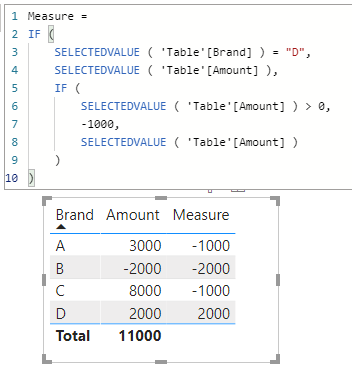
You can try the following methods.

Measure =
IF (
    SELECTEDVALUE ( 'Table'[Brand] ) = "D",
    SELECTEDVALUE ( 'Table'[Amount] ),
    IF (
        SELECTEDVALUE ( 'Table'[Amount] ) > 0,
        -1000,
        SELECTEDVALUE ( 'Table'[Amount] )
    )
)

vzhangti_0-1645067634311.png


Best Regards,

Community Support Team _Charlotte

If this post helps, then please consider Accept it as the solution to help the other members find it more quickly.

View solution in original post

4 REPLIES 4
v-zhangti
Community Support
Community Support

Hi, @kilala 


You can try the following methods.

Measure =
IF (
    SELECTEDVALUE ( 'Table'[Brand] ) = "D",
    SELECTEDVALUE ( 'Table'[Amount] ),
    IF (
        SELECTEDVALUE ( 'Table'[Amount] ) > 0,
        -1000,
        SELECTEDVALUE ( 'Table'[Amount] )
    )
)

vzhangti_0-1645067634311.png


Best Regards,

Community Support Team _Charlotte

If this post helps, then please consider Accept it as the solution to help the other members find it more quickly.

Anonymous
Not applicable

Please Try This
Screenshot 2022-02-14 140755.png

Hi @Anonymous ,

thank you for your suggestion, but currently i'm not able to add new column as i connect to live dataset. I can only create measures here. i think to use filter but it cannot return multiple columns. 


Anonymous
Not applicable

ok, Try it

Measure =
IF (
    SELECTEDVALUE ( 'Table (3)'[Brand] ) = "D",
    SELECTEDVALUE ( 'Table (3)'[Brand] ),
    IF (
        SELECTEDVALUE ( 'Table (3)'[Amount] ) > 0,
        "Default",
        SELECTEDVALUE ( 'Table (3)'[Brand] )
    )
)

Helpful resources

Announcements
Power BI DataViz World Championships

Power BI Dataviz World Championships

The Power BI Data Visualization World Championships is back! Get ahead of the game and start preparing now!

November Power BI Update Carousel

Power BI Monthly Update - November 2025

Check out the November 2025 Power BI update to learn about new features.

FabCon Atlanta 2026 carousel

FabCon Atlanta 2026

Join us at FabCon Atlanta, March 16-20, for the ultimate Fabric, Power BI, AI and SQL community-led event. Save $200 with code FABCOMM.