cancel
Showing results for 
Search instead for 
Did you mean: 

A new Data Days event is coming soon! This time we’re going bigger than ever. Fabric, Power BI, SQL, AI and more. Don't miss out.

Reply
JoaoKichel
Frequent Visitor

Concatenate text from four related columns

Hello guys,

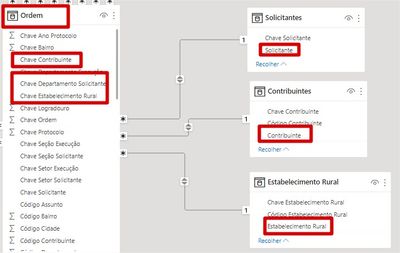
I would like to check if it is possible to concatenate four values (text) in only one column conditioned to the relation (Chave contribuinte, Chave solicitante and Estabelecimento rural) the code is getting data from three diferent table (all related).

Relations.jpg

Best regards. 


1 ACCEPTED SOLUTION
ValtteriN
Community Champion
Community Champion

Hi,

You can do this for example using RELATED and then CONCANETATE or & signs. e.g. this concanetates two columns:

Customer[name]&Customer[country]
So you can do something like this: Chave contribuinte & RELATED(Chave solicitante) & RELATED(Estabelecimento rura)

A word of caution: this kind of function is extremly unoptimized and if you have a lot of data you might need to consider a different way of doign this.

I hope this post helps to solve your issue and if it does consider accepting it as a solution and giving the post a thumbs up!

My LinkedIn: https://www.linkedin.com/in/n%C3%A4ttiahov-00001/


Did I answer your question? Mark my post as a solution!

Proud to be a Super User!


View solution in original post

2 REPLIES 2
ValtteriN
Community Champion
Community Champion

Hi,

You can do this for example using RELATED and then CONCANETATE or & signs. e.g. this concanetates two columns:

Customer[name]&Customer[country]
So you can do something like this: Chave contribuinte & RELATED(Chave solicitante) & RELATED(Estabelecimento rura)

A word of caution: this kind of function is extremly unoptimized and if you have a lot of data you might need to consider a different way of doign this.

I hope this post helps to solve your issue and if it does consider accepting it as a solution and giving the post a thumbs up!

My LinkedIn: https://www.linkedin.com/in/n%C3%A4ttiahov-00001/


Did I answer your question? Mark my post as a solution!

Proud to be a Super User!


VahidDM
Super User
Super User

Hi @JoaoKichel 


Can you post sample data as text and expected output?
Not enough information to go on;

please see this post regarding How to Get Your Question Answered Quickly:
https://community.powerbi.com/t5/Community-Blog/How-to-Get-Your-Question-Answered-Quickly/ba-p/38490

The most important parts are:
1. Sample data as text, use the table tool in the editing bar
2. Expected output from sample data
3. Explanation in words of how to get from 1. to 2.
4. Relation between your tables

Appreciate your Kudos!!
LinkedIn:www.linkedin.com/in/vahid-dm/

Helpful resources

Announcements
May Power BI Update Carousel

Power BI Monthly Update - May 2026

Check out the May 2026 Power BI update to learn about new features.

Fabric SQL PBI Data Days

Data Days 2026 coming soon!

Sign up to receive a private message when registration opens and key events begin.

New to Fabric survey Carousel

New to Fabric Survey

If you have recently started exploring Fabric, we'd love to hear how it's going. Your feedback can help with product improvements.

Power BI DataViz World Championships carousel

Power BI DataViz World Championships - June 2026

A new Power BI DataViz World Championship is coming this June! Don't miss out on submitting your entry.