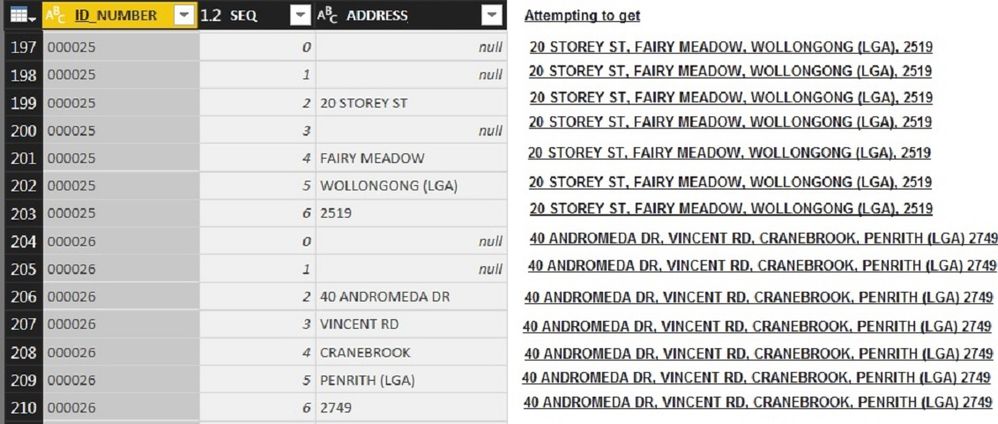
Your Desired output can be possible but we have to do some modelling with the source data.
Please have a look into the model which is suitable for holding the Address Records
Steps:-
1. Go to the Edit Query
2. Select both SEQ and ADDRESS Column
3. Go to the Transform tab and select Pivot Column(in Advanced option choose Don't Aggregate).
4. Close and Apply
5. Right click on your Dataset and click New Column
6. Paste the DAX
ADDRESS = IF(SEARCH(",",SUBSTITUTE(
CONCATENATE('Address'[0],
CONCATENATE(",",
CONCATENATE('Address'[1],
CONCATENATE(",",
CONCATENATE('Address'[2],
CONCATENATE(",",
CONCATENATE('Address'[3],
CONCATENATE(",",
CONCATENATE('Address'[4],
CONCATENATE(",",
CONCATENATE('Address'[5],
CONCATENATE(",",
CONCATENATE('Address'[6],"")
)
)
)
)
)
)
)
)
)
)
)
),",,",","
)
)=1,REPLACE(SUBSTITUTE(
CONCATENATE('Address'[0],
CONCATENATE(",",
CONCATENATE('Address'[1],
CONCATENATE(",",
CONCATENATE('Address'[2],
CONCATENATE(",",
CONCATENATE('Address'[3],
CONCATENATE(",",
CONCATENATE('Address'[4],
CONCATENATE(",",
CONCATENATE('Address'[5],
CONCATENATE(",",
CONCATENATE('Address'[6],"")
)
)
)
)
)
)
)
)
)
)
)
),",,",","
)
,1,1," "
),SUBSTITUTE(
CONCATENATE('Address'[0],
CONCATENATE(",",
CONCATENATE('Address'[1],
CONCATENATE(",",
CONCATENATE('Address'[2],
CONCATENATE(",",
CONCATENATE('Address'[3],
CONCATENATE(",",
CONCATENATE('Address'[4],
CONCATENATE(",",
CONCATENATE('Address'[5],
CONCATENATE(",",
CONCATENATE('Address'[6],"")
)
)
)
)
)
)
)
)
)
)
)
),",,",","
)
)
Now please note in the Dax we are using SUBSTITUTE function to remove unwanted (comma)
and again using a REPLACE function to remove comma if encountered at first place