Fabric Data Days starts November 4th!
Advance your Data & AI career with 50 days of live learning, dataviz contests, hands-on challenges, study groups & certifications and more!
Get registered- Power BI forums
- Get Help with Power BI
- Desktop
- Service
- Report Server
- Power Query
- Mobile Apps
- Developer
- DAX Commands and Tips
- Custom Visuals Development Discussion
- Health and Life Sciences
- Power BI Spanish forums
- Translated Spanish Desktop
- Training and Consulting
- Instructor Led Training
- Dashboard in a Day for Women, by Women
- Galleries
- Data Stories Gallery
- Themes Gallery
- Contests Gallery
- QuickViz Gallery
- Quick Measures Gallery
- Visual Calculations Gallery
- Notebook Gallery
- Translytical Task Flow Gallery
- TMDL Gallery
- R Script Showcase
- Webinars and Video Gallery
- Ideas
- Custom Visuals Ideas (read-only)
- Issues
- Issues
- Events
- Upcoming Events
Get Fabric Certified for FREE during Fabric Data Days. Don't miss your chance! Request now
- Power BI forums
- Forums
- Get Help with Power BI
- DAX Commands and Tips
- Re: Compile MeasureName by name parts and use this...
- Subscribe to RSS Feed
- Mark Topic as New
- Mark Topic as Read
- Float this Topic for Current User
- Bookmark
- Subscribe
- Printer Friendly Page

- Mark as New
- Bookmark
- Subscribe
- Mute
- Subscribe to RSS Feed
- Permalink
- Report Inappropriate Content
Compile MeasureName by name parts and use this dynamicaly measure(name) for calculation
I have en existing measure called [O_VOL_ACT] and from this measure I derived several other measures like previous year and many others (Time Intelligent)..:
[O_VOL_ACT]
[0_VOL_ACT_PYTD] = Previous Year To Date
[O_VOL_ACT_PY] = Previous Year
[O_VOL_ACT_PY_DEV] = Deviation between Previous- Actual Year
[O_VOL_ACT_PY_DOW] = Previous Year Day of Week
[O_VOL_ACT_YTD] = Actual Year To Date
......
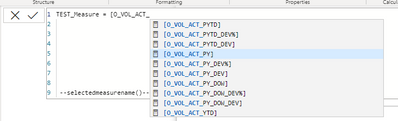
Now, what I try to archiv is, that I can compile the measurename by doint something like concatenate the base measure [O_VOL_ACT] with any suffix of the derived measures like _PY.
As a Result I want to get something like [O_VOL_ACT_PY] which I could use for example in a matrix.
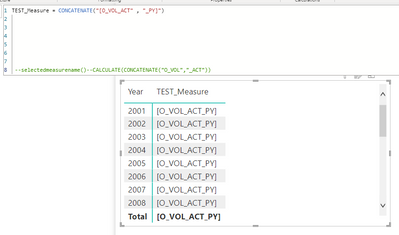
Based on outside criteria (IF/ELSE) suffix _PY or _PY_DOW must come to action.
Of course, concatenate doesn't work! Any other ideas how to solve this issue ?
Regards
Alex
Solved! Go to Solution.


- Mark as New
- Bookmark
- Subscribe
- Mute
- Subscribe to RSS Feed
- Permalink
- Report Inappropriate Content
You can achieve that with calculated groups.
I would probably do calculated groups to select 2nd measure to compare with actual and then use visual Column Chart with Relative Variance
So in this proposed solution you have actual added in visual and then another measure that changes value based on users selection.


- Mark as New
- Bookmark
- Subscribe
- Mute
- Subscribe to RSS Feed
- Permalink
- Report Inappropriate Content
Hi, @Anonymous
The requirement is to be able to switch the previous time selection between "previous year" and "previous year day of week".
At the end the user should be able to tick a switch and see eighter the upper- or lower variant of comparision.
Based on what I got above, the calculation group would be a good choice.
e.g.

Refer:
Introducing Calculation Groups
You can also use the Switch function with slicers
e.g.
Switch(
True(),
SelectedValue="PY",[O_VOL_ACT_PY],
SelectedValue="PYTD",[0_VOL_ACT_PYTD]
)
Best Regards,
Community Support Team _ Zeon Zheng
If this post helps, then please consider Accept it as the solution to help the other members find it more quickly.
- Mark as New
- Bookmark
- Subscribe
- Mute
- Subscribe to RSS Feed
- Permalink
- Report Inappropriate Content
I already solved my issue. But your solution with the "Switch" and "SelectedValue" is great. Will add that to my list of (best) code snippets :-).
Thanks


- Mark as New
- Bookmark
- Subscribe
- Mute
- Subscribe to RSS Feed
- Permalink
- Report Inappropriate Content
Hi @Anonymous
Whwn you say "Based on outside criteria (IF/ELSE) suffix _PY or _PY_DOW must come to action." what do you mean by "outside"?
- Mark as New
- Bookmark
- Subscribe
- Mute
- Subscribe to RSS Feed
- Permalink
- Report Inappropriate Content
Hey,
A bit unclear of the reason for such measure but perhaps Calculated Groups could work
e.g. final solution would give user a filter to choose what you they want to see PYTD, PY, etc. and depending on that you would give result
Calculated groups could have two measures, one to show text: using SWITCH, if SELECTEDMEASURE = PY then "PY" and etc.
and another to show correct value.
https://community.powerbi.com/t5/Desktop/using-calculation-item-in-another-calculation-items-Time/m-...
https://community.powerbi.com/t5/Desktop/Extract-name-calculation-item-from-calculation-group/m-p/16...
- Mark as New
- Bookmark
- Subscribe
- Mute
- Subscribe to RSS Feed
- Permalink
- Report Inappropriate Content
The requirement is to be able to switch the previous time selection between "previous year" and "previous year day of week".
At the end the user should be able to tick a switch and see eighter the upper- or lower variant of comparision.
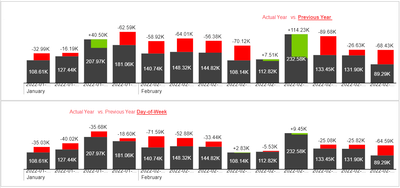
Calc-Group wont work.
- Mark as New
- Bookmark
- Subscribe
- Mute
- Subscribe to RSS Feed
- Permalink
- Report Inappropriate Content
You can achieve that with calculated groups.
I would probably do calculated groups to select 2nd measure to compare with actual and then use visual Column Chart with Relative Variance
So in this proposed solution you have actual added in visual and then another measure that changes value based on users selection.
- Mark as New
- Bookmark
- Subscribe
- Mute
- Subscribe to RSS Feed
- Permalink
- Report Inappropriate Content
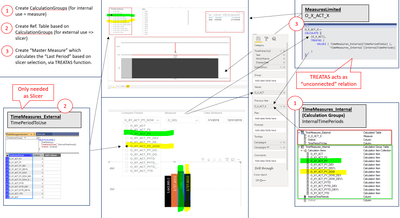
I could solve my problem with Calculation Groups, so you where right 😉 !!
Thanks for the hint.
I created an overview pic which more or less should explain my created solution.
Helpful resources

Fabric Data Days
Advance your Data & AI career with 50 days of live learning, contests, hands-on challenges, study groups & certifications and more!

Power BI Monthly Update - October 2025
Check out the October 2025 Power BI update to learn about new features.

FabCon Atlanta 2026
Join us at FabCon Atlanta, March 16-20, for the ultimate Fabric, Power BI, AI and SQL community-led event. Save $200 with code FABCOMM.

| User | Count |
|---|---|
| 8 | |
| 6 | |
| 5 | |
| 5 | |
| 4 |


| User | Count |
|---|---|
| 25 | |
| 16 | |
| 8 | |
| 7 | |
| 7 |


