cancel
Showing results for 
Search instead for 
Did you mean: 

The Power BI Data Visualization World Championships is back! Get ahead of the game and start preparing now! Learn more

Reply
andy919
New Member

Comparing 2 rows in a table based on a matching data

Hi,

I am trying to compare 2 rows based on the value in column 1 which has a matching value in column 2 and vice versa. Column 3 tells me the number of the row for the matching pair. eg the first row shows "2" meaning the row 2 is the other pair for comparision. 


I would then like to compare the rows with the data in columns 4 and 5 based on the above criteria. 
Column 4 shows row 1 and 2 has different values so it should as a pass.

Column 5 shows a duplicate value so it should show as a fail


AAABBB21231q1q
BBBAAA14561q1q


Is anyone able to help? 

Regards,

Andy

1 ACCEPTED SOLUTION
Anonymous
Not applicable

Hi @andy919 ,


I think you table should look like as below.

RicoZhou_0-1653284258452.png

Then create a table with column name 4 and 5. We need it to create a slicer.

Column Name = {"Column4","Column5"}

Measure:

Compare = 
VAR _SELECTVALUE =
    SELECTEDVALUE ( 'Column Name'[Column Name] )
VAR _VALUE_COLUMN4 =
    CALCULATE (
        MAX ( 'Table'[Column4] ),
        FILTER ( ALL ( 'Table' ), 'Table'[Compare Row ID] = MAX ( 'Table'[Row ID] ) )
    )
VAR _VALUE_COLUMN5 =
    CALCULATE (
        MAX ( 'Table'[Column5] ),
        FILTER ( ALL ( 'Table' ), 'Table'[Compare Row ID] = MAX ( 'Table'[Row ID] ) )
    )
RETURN
    SWITCH (
        _SELECTVALUE,
        "Column4", IF ( MAX ( 'Table'[Column4] ) = _VALUE_COLUMN4, "Fail", "Pass" ),
        "Column5", IF ( MAX ( 'Table'[Column5] ) = _VALUE_COLUMN5, "Fail", "Pass" )
    )

Result is as below.

Select Column4:

RicoZhou_1-1653284336605.png

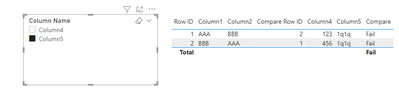
Select Column5:

RicoZhou_2-1653284342946.png


Best Regards,
Rico Zhou


If this post helps, then please consider Accept it as the solution to help the other members find it more quickly.


View solution in original post

2 REPLIES 2
Anonymous
Not applicable

Hi @andy919 ,


I think you table should look like as below.

RicoZhou_0-1653284258452.png

Then create a table with column name 4 and 5. We need it to create a slicer.

Column Name = {"Column4","Column5"}

Measure:

Compare = 
VAR _SELECTVALUE =
    SELECTEDVALUE ( 'Column Name'[Column Name] )
VAR _VALUE_COLUMN4 =
    CALCULATE (
        MAX ( 'Table'[Column4] ),
        FILTER ( ALL ( 'Table' ), 'Table'[Compare Row ID] = MAX ( 'Table'[Row ID] ) )
    )
VAR _VALUE_COLUMN5 =
    CALCULATE (
        MAX ( 'Table'[Column5] ),
        FILTER ( ALL ( 'Table' ), 'Table'[Compare Row ID] = MAX ( 'Table'[Row ID] ) )
    )
RETURN
    SWITCH (
        _SELECTVALUE,
        "Column4", IF ( MAX ( 'Table'[Column4] ) = _VALUE_COLUMN4, "Fail", "Pass" ),
        "Column5", IF ( MAX ( 'Table'[Column5] ) = _VALUE_COLUMN5, "Fail", "Pass" )
    )

Result is as below.

Select Column4:

RicoZhou_1-1653284336605.png

Select Column5:

RicoZhou_2-1653284342946.png


Best Regards,
Rico Zhou


If this post helps, then please consider Accept it as the solution to help the other members find it more quickly.


Hi Rico,

Thank you. That was great help. I was able to apply this to my data which has a few thousand rows and multiple columns to compare. 
Is there a way for me to filter or export the "Fails' into another table or list?


Regards,
Andy


Helpful resources

Announcements
Power BI DataViz World Championships

Power BI Dataviz World Championships

The Power BI Data Visualization World Championships is back! Get ahead of the game and start preparing now!

December 2025 Power BI Update Carousel

Power BI Monthly Update - December 2025

Check out the December 2025 Power BI Holiday Recap!

FabCon Atlanta 2026 carousel

FabCon Atlanta 2026

Join us at FabCon Atlanta, March 16-20, for the ultimate Fabric, Power BI, AI and SQL community-led event. Save $200 with code FABCOMM.