Join us at FabCon Atlanta from March 16 - 20, 2026, for the ultimate Fabric, Power BI, AI and SQL community-led event. Save $200 with code FABCOMM.
Register now!Learn from the best! Meet the four finalists headed to the FINALS of the Power BI Dataviz World Championships! Register now
Hi
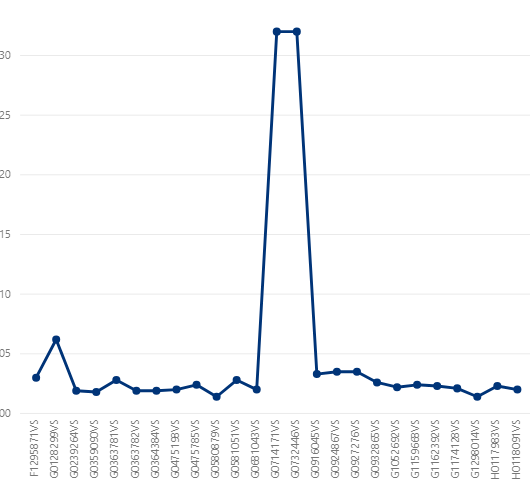
I am generating the below chart and I would like to be able to campare any two adjacent values in it
I thought of using the ERLEIER function that would give me the value of the point before the current one.
Hi @Anonymous ,
Measure =
var _curr = MyTable[Batch_number]
var _calc = CALCULATE(MAX(MyTable[Batch_number]),MyTable[Batch_number]<curr)
return _calcIt will be something like this, but not exactly because you did not provide enough info. Your column names would at least be helpful. However maybe this will give you the idea.
Let me know if you have any questions.
If this solves your issues, please mark it as the solution, so that others can find it easily. Kudos are nice too.
Nathaniel
Please read this post to get your question answered more quickly:
https://community.powerbi.com/t5/Community-Blog/How-to-Get-Your-Question-Answered-Quickly/ba-p/38490
Proud to be a Super User!
Share feedback directly with Fabric product managers, participate in targeted research studies and influence the Fabric roadmap.
Check out the February 2026 Power BI update to learn about new features.
| User | Count |
|---|---|
| 6 | |
| 3 | |
| 3 | |
| 3 | |
| 2 |
| User | Count |
|---|---|
| 8 | |
| 8 | |
| 8 | |
| 7 | |
| 7 |