cancel
Showing results for 
Search instead for 
Did you mean: 

Learn from the best! Meet the four finalists headed to the FINALS of the Power BI Dataviz World Championships! Register now

Reply
YASHASHRI
Helper I
Helper I

Color coding by using DAX

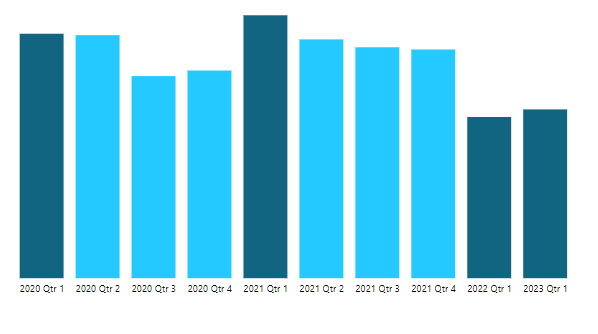
I would like to see the color coding same as below (dark color for current quarter or same quarter last year)

Screenshot 2023-03-09 154713.png


1 ACCEPTED SOLUTION
ValtteriN
Community Champion
Community Champion

Hi,

Here is one way to do this:

Measure 42 = var _currentQ = QUARTER(TODAY())
 var _year = YEAR(TODAY())
 var _date = MAX([Date])
 return

IF(QUARTER(_date)=_currentQ && OR(YEAR(_date)=YEAR(TODAY()),YEAR(_date)=YEAR(TODAY())-1),"Red","Blue")


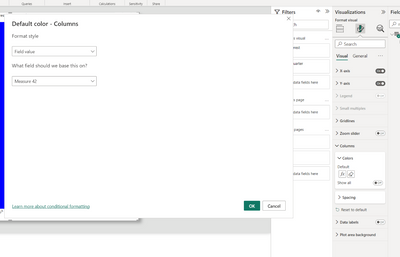
Now replace the colors with the one you want (hex codes) and place the measure as conditional formatting like this:
ValtteriN_0-1678361917008.png


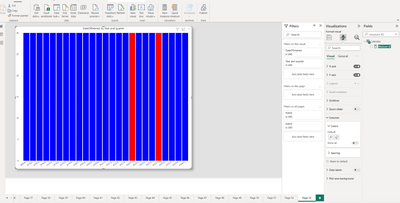
End result:

ValtteriN_1-1678361934674.png


I hope this post helps to solve your issue and if it does consider accepting it as a solution and giving the post a thumbs up!

My LinkedIn: https://www.linkedin.com/in/n%C3%A4ttiahov-00001/


Did I answer your question? Mark my post as a solution!

Proud to be a Super User!


View solution in original post

2 REPLIES 2
ValtteriN
Community Champion
Community Champion

Hi,

Here is one way to do this:

Measure 42 = var _currentQ = QUARTER(TODAY())
 var _year = YEAR(TODAY())
 var _date = MAX([Date])
 return

IF(QUARTER(_date)=_currentQ && OR(YEAR(_date)=YEAR(TODAY()),YEAR(_date)=YEAR(TODAY())-1),"Red","Blue")


Now replace the colors with the one you want (hex codes) and place the measure as conditional formatting like this:
ValtteriN_0-1678361917008.png


End result:

ValtteriN_1-1678361934674.png


I hope this post helps to solve your issue and if it does consider accepting it as a solution and giving the post a thumbs up!

My LinkedIn: https://www.linkedin.com/in/n%C3%A4ttiahov-00001/


Did I answer your question? Mark my post as a solution!

Proud to be a Super User!


Thanks for your help. 
I also tried using only one condition i.e. of the quarter it also worked for me.

Helpful resources

Announcements
Power BI DataViz World Championships carousel

Power BI DataViz World Championships - June 2026

A new Power BI DataViz World Championship is coming this June! Don't miss out on submitting your entry.

Join our Fabric User Panel

Join our Fabric User Panel

Share feedback directly with Fabric product managers, participate in targeted research studies and influence the Fabric roadmap.

March Power BI Update Carousel

Power BI Community Update - March 2026

Check out the March 2026 Power BI update to learn about new features.