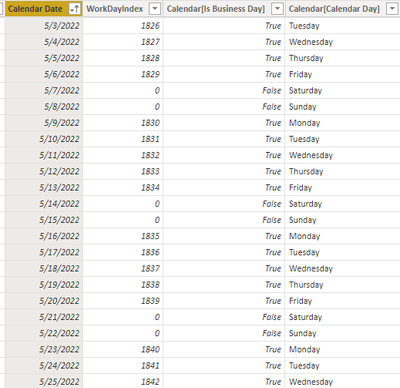
I am trying to create a line chart visual with status date on the X axis and status number on the Y axiz but can't use the measure index or date fields in the X axis.
This is related to a process going through different stages with an estimated duration known for each stage.
- First I select the process type I am interested in. This gives me the duration at each stage.
- Then I convert the start date to a workday index with a LOOKUPVALUE on a date table so I can count only workdays.
Start WorkDayIndex Col = CALCULATE(lookupvalue('Calendar2 (EDWn)'[WorkDayIndex],'Calendar2 (EDWn)'[Calendar Date],FIRSTDATE(MoldQual_RCGL[ProcessStart])))
- Adding the Start WorkDay Index to the Completed Total duration, I get a Status WorkDayIndex measure.
Status WorkDayIndex = [Start WorkDayIndex]+sum('Mold Qual Duration Categories'[Completed Total])
- I then use the Status WorkDayIndex measure to Lookup a Date.
ProjectedStatusDate = calculate(LOOKUPVALUE('Calendar2 (EDWn)'[Calendar Date],'Calendar2 (EDWn)'[WorkDayIndex],[Status WorkDayIndex]))
This all works in a table but I can seem to use the ProjectedStatusDate in a line chart visual. I can't drop the field in the field box.