cancel
Showing results for 
Search instead for 
Did you mean: 

Next up in the FabCon + SQLCon recap series: The roadmap for Microsoft SQL and Maximizing Developer experiences in Fabric. All sessions are available on-demand after the live show. Register now

Reply
JanCab
Frequent Visitor

Calculating future rolling average

Hello,


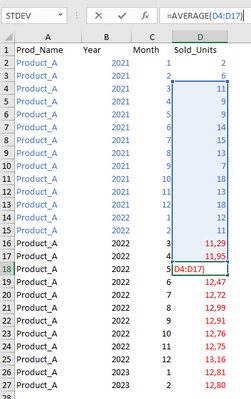
I would like to ask you for your help with a DAX formula which would calculate value of future unit sales, based on rolling average of previous 12 month.


See below - there are blue values as history and red ones as rolling average.


JanCab_0-1648580446935.png


I was able to calculate rolling average for historical values but not for future - basically from already calculated values, as the average is rolling.


Note - I do have a calendar table in place which is related to sales data.


Hope it makes sense.


Thank you very much! 


4 REPLIES 4
Anonymous
Not applicable

What is the solution for this?

Is exactly what I need!

Thank you!

Jihwan_Kim
Super User
Super User

Hi,

I am not sure if I understood your correctly, but I think the numbers are showing 14 months rolling average.

I tried to solve this in Power Query.

Please check the attached file. I do not know how your calendar table looks like, but I hope this helps to provide an idea.

Thanks.


If this post helps, then please consider accepting it as the solution to help other members find it faster, and give a big thumbs up.


Click here to visit my LinkedIn page

Dear all,


Let me update the topic, as I slightly move on, but still without solution. 


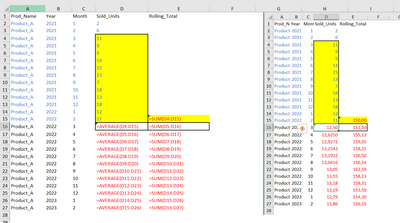
To recap - I have been trying to calculate forecast of future sales based sum of rolling average of last 12 months in DAX. Please find below a screenshot from an Excel calculation (formulas + results) -> blue is history, red is forecast:


JanCab_0-1649100369410.png


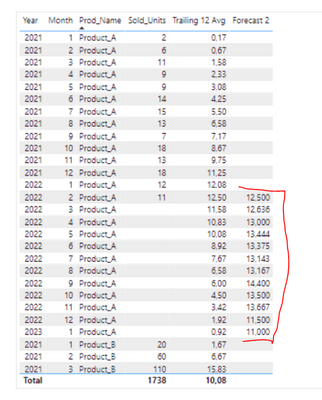
I put together a formula, which calculates average but slightly incorrectly - I do not know, what the problem is...:


Forecast 2 =

VAR LastDateSale = [Last_date]
VAR _MONTHRANK = CALCULATE(MAX('Date'[Rank]),FILTER(ALL('Date'),'Date'[Date] = LastDateSale))
VAR Rolling12_Months_AVG =
CALCULATE( AVERAGE('Tab_pro_test'[Sold_Units]), DATESINPERIOD ( 'Date'[Date], LASTDATE ( 'Date'[Date] ), -12, MONTH ))

return
if (
SELECTEDVALUE('Date'[Rank])>= _MONTHRANK,
CALCULATE(Rolling12_Months_AVG,'Date'[Date] = LastDateSale))


JanCab_1-1649100885250.png

The PBIX file is saved here: https://file.io/buLgvtZ1Asmi 


Thank you very much for any hint! 

Hi,

Thank you very much for the sample file and solution. You calculation is OK, but I would need something like this preferably in DAX, if it is possible... 

Thank you. 


Helpful resources

Announcements
New to Fabric survey Carousel

New to Fabric Survey

If you have recently started exploring Fabric, we'd love to hear how it's going. Your feedback can help with product improvements.

Power BI DataViz World Championships carousel

Power BI DataViz World Championships - June 2026

A new Power BI DataViz World Championship is coming this June! Don't miss out on submitting your entry.

Join our Fabric User Panel

Join our Fabric User Panel

Share feedback directly with Fabric product managers, participate in targeted research studies and influence the Fabric roadmap.

March Power BI Update Carousel

Power BI Community Update - March 2026

Check out the March 2026 Power BI update to learn about new features.