cancel
Showing results for 
Search instead for 
Did you mean: 

The Power BI Data Visualization World Championships is back! Get ahead of the game and start preparing now! Learn more

Reply
ashrat001
Helper I
Helper I

Calculating a measure on the dates of a selected month...

Hi Experts,


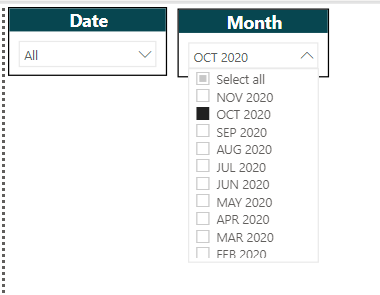
I'm calculating a measure on a date and below in the DAX for measure Overdue Amount it is today. My goal is to calculate this same measure for all the dates of a Selected Month. I need to show this in a Bar Chart as a trend of Overdu Amount. How to achieve this and I do not want the selection of Calendar Month should impact entire data set rather it should only give dates to the following DAX formula. 


Overdue Amount  =
VAR LastDay= TODAY() //should return last date in selected period
RETURN
SUMX(
FILTER(
'Table',
'Table'[Net due date.Net due date Level 01]<TODAY() && 'Table'[Item Status.Item Status Level 01] = "O"
),
'Table'[Debit amt in LC]
)
 
 
Date and Calendar Month Slicer Dropdown.PNG


I would appreciate your inputs. 

Many thanks!
 
Tariq Ashraf
4 REPLIES 4
amitchandak
Super User
Super User

@ashrat001 , Try measure like with date table

Date table not joined

Overdue Amount =
VAR LastDay= maxx(allselected('Date') , 'Date'[Date]) //should return last date in selected period
RETURN
SUMX(
FILTER(
'Table',
'Table'[Net due date.Net due date Level 01]< LastDay && 'Table'[Item Status.Item Status Level 01] = "O"
),
'Table'[Debit amt in LC]
)


Date table joined


Overdue Amount =
VAR LastDay= maxx(allselected('Date') , 'Date'[Date]) //should return last date in selected period
RETURN
calculate(
FILTER(sum('Table'[Debit amt in LC])
All('Date'),
'Date'[Date]< LastDay),
FILTER(
'Table','Table'[Item Status.Item Status Level 01] = "O"
)
)


To get the best of the time intelligence function. Make sure you have a date calendar and it has been marked as the date in model view. Also, join it with the date column of your fact/s. Refer :radacad sqlbi My Video Series Appreciate your Kudos.

Share with Power BI Enthusiasts: Full Power BI Video (20 Hours) YouTube
Microsoft Fabric Series 60+ Videos YouTube
Microsoft Fabric Hindi End to End YouTube

Hi Amit,


Thanks for your reply. As per your reply, I have modified my measure. But unfortunately I'm not getting the desired outcome. As the MAX funciton is giving today's date for selected month and therefore filtering data on today's date. I want accumulative values for selected Month dates on each date say November's date should have values for 1 Nov , 2 Nov till 27 Nov so on. 


MTD Openonly =
VAR LastDay= MAXX(ALLSELECTED(CurrentYear[Date]),CurrentYear[Date]) //should return last date in selected period
RETURN
SUMX(
FILTER(
'Table',
'Table'[Net due date.Net due date Level 01]<LastDay && 'Table)'[Item Status.Item Status Level 01] = "O"
),
'Table'[Debit amt in LC]
)
 
Please see below screen shot. MAXX function filter the data on November Max date 27th, Nov and spilt the values for that date only which 16.75 Million. Rather 27th Nov should have 187.34 value and like wise other dates should have their accumulative values. Thanks!
 
Not accumulating values.PNG


kumar27
Advocate V
Advocate V

Do you want that the month filter should not impat your metric and evrytime it gives the same answer irrespective of any months seleted ?

Hi Kumar,


Thanks for your reply. I want to replace Today() with dates of selected Calendar Month and this selected month should only give dates to the formula and should not impact the table/query. Thanks!

Helpful resources

Announcements
Power BI DataViz World Championships

Power BI Dataviz World Championships

The Power BI Data Visualization World Championships is back! Get ahead of the game and start preparing now!

November Power BI Update Carousel

Power BI Monthly Update - November 2025

Check out the November 2025 Power BI update to learn about new features.

FabCon Atlanta 2026 carousel

FabCon Atlanta 2026

Join us at FabCon Atlanta, March 16-20, for the ultimate Fabric, Power BI, AI and SQL community-led event. Save $200 with code FABCOMM.