Join us at FabCon Atlanta from March 16 - 20, 2026, for the ultimate Fabric, Power BI, AI and SQL community-led event. Save $200 with code FABCOMM.
Register now!The Power BI Data Visualization World Championships is back! Get ahead of the game and start preparing now! Learn more
Problem : I want to create a calculated column by checking the value comparing the value of a cases column of the current year(2023) and return the same value for thhat given ID for all year.
My Approach: I am trying to create a calculated column (Segment) with the below expression and having a trouble to get the desired outcome of the calculated column
Segment =
SWITCH (
TRUE(),
Table[cases] >= 100, "Very High",
Table[cases] >= 50, "High",
Table[cases] >= 20, "Medium",
"Low"
)
I am geeting the result as below
ID Cases Fiscal Year Segment
1 785.55 2023 Very High
1 315.1 2022 Very High
1 7.23 2021 Low
1 1.37 2020 Low
2 5.73 2023 Low
2 3.93 2022 Low
2 7.05 2021 Low
2 6.01 2020 Low
3 35.58 2023 Medium
3 19.57 2022 Low
3 21.96 2021 Medium
3 4.36 2020 Low
Desired Outcome I want is below
ID Cases Fiscal Year Segment
1 785.55 2023 Very High
1 315.1 2022 Very High
1 7.23 2021 Very High
1 1.37 2020 Very High
2 5.73 2023 Low
2 3.93 2022 Low
2 7.05 2021 Low
2 6.01 2020 Low
3 35.58 2023 Medium
3 19.57 2022 Medium
3 21.96 2021 Medium
3 4.36 2020 Medium
I am not sure how can I get the desired column.
Solved! Go to Solution.
hi @rksharma86 ,
not sure if i fully get you, try like:
column =
VAR _total =
SUMX(
FILTER(
data,
data[ID]=EARLIER(data[ID])
&&data[Fiscal Year]<MAX(data[Fiscal Year])
),
data[cases]
)
VAR _result =
SWITCH(
TRUE(),
_total>=100, "Very High",
_total>=50, "High",
_total>=20, "Medium",
"Low"
)
RETURN _result
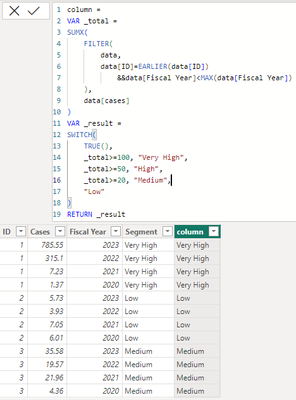
it worked like:
hi @rksharma86 ,
not sure if i fully get you, try like:
column =
VAR _total =
SUMX(
FILTER(
data,
data[ID]=EARLIER(data[ID])
&&data[Fiscal Year]<MAX(data[Fiscal Year])
),
data[cases]
)
VAR _result =
SWITCH(
TRUE(),
_total>=100, "Very High",
_total>=50, "High",
_total>=20, "Medium",
"Low"
)
RETURN _result
it worked like:
The Power BI Data Visualization World Championships is back! Get ahead of the game and start preparing now!
Check out the November 2025 Power BI update to learn about new features.
| User | Count |
|---|---|
| 20 | |
| 10 | |
| 9 | |
| 4 | |
| 4 |
| User | Count |
|---|---|
| 32 | |
| 31 | |
| 18 | |
| 12 | |
| 11 |