FabCon is coming to Atlanta
Join us at FabCon Atlanta from March 16 - 20, 2026, for the ultimate Fabric, Power BI, AI and SQL community-led event. Save $200 with code FABCOMM.
Register now!- Power BI forums
- Get Help with Power BI
- Desktop
- Service
- Report Server
- Power Query
- Mobile Apps
- Developer
- DAX Commands and Tips
- Custom Visuals Development Discussion
- Health and Life Sciences
- Power BI Spanish forums
- Translated Spanish Desktop
- Training and Consulting
- Instructor Led Training
- Dashboard in a Day for Women, by Women
- Galleries
- Data Stories Gallery
- Themes Gallery
- Contests Gallery
- Quick Measures Gallery
- Notebook Gallery
- Translytical Task Flow Gallery
- TMDL Gallery
- R Script Showcase
- Webinars and Video Gallery
- Ideas
- Custom Visuals Ideas (read-only)
- Issues
- Issues
- Events
- Upcoming Events
To celebrate FabCon Vienna, we are offering 50% off select exams. Ends October 3rd. Request your discount now.
- Power BI forums
- Forums
- Get Help with Power BI
- DAX Commands and Tips
- Re: Calculated column of previous value by date & ...
- Subscribe to RSS Feed
- Mark Topic as New
- Mark Topic as Read
- Float this Topic for Current User
- Bookmark
- Subscribe
- Printer Friendly Page


- Mark as New
- Bookmark
- Subscribe
- Mute
- Subscribe to RSS Feed
- Permalink
- Report Inappropriate Content
Calculated column of previous value by date & customer

Hi guys,
i wish to add a calculated column as in E column above which calculates the previous grade (by date and customer). please note that in my table i have rows which do not hold a grade and presenting blank value.
Solved! Go to Solution.


- Mark as New
- Bookmark
- Subscribe
- Mute
- Subscribe to RSS Feed
- Permalink
- Report Inappropriate Content
We may reduce the number of columns if you have too many. For now please try this
Previous Grade =
VAR CurrentDate = 'Table'[Date]
VAR T1 =
    CALCULATETABLE ( 'Table', ALLEXCEPT ( 'Table', 'Table'[Customer Code] ) )
VAR T2 =
    FILTER ( 'T1', [Date] < CurrentDate )
VAR T3 =
    TOPN ( 1, 'T2', [Date] )
VAR T4 =
    SELECTCOLUMNS ( 'T3', "@PGrade", [Grade] )
RETURN
Result- Mark as New
- Bookmark
- Subscribe
- Mute
- Subscribe to RSS Feed
- Permalink
- Report Inappropriate Content
Previous Date =
VAR CurrentDate = 'Table'[Date]
VAR T1 =
    CALCULATETABLE ( 'Table', ALLEXCEPT ( 'Table', 'Table'[Customer Code] ) )
VAR T2 =
    FILTER ( 'T1', [Date] < CurrentDate )
VAR T3 =
    TOPN ( 1, 'T2', [Date] )
VAR Result =
    SELECTCOLUMNS ( 'T3', "@Date", [Date] )
RETURN
    Result
- Mark as New
- Bookmark
- Subscribe
- Mute
- Subscribe to RSS Feed
- Permalink
- Report Inappropriate Content
Try this
First Purchase Channel =
CALCULATE (
    VALUES ( Data[Purchase Channel] ),
    ALLEXCEPT ( Data, Data[Customer Code] ),
    Data[Date] = Data[First Purchase Date]
)- Mark as New
- Bookmark
- Subscribe
- Mute
- Subscribe to RSS Feed
- Permalink
- Report Inappropriate Content
thanks!
and if i wish to add a column of its first purchase channel related to this first purchase date?
- Mark as New
- Bookmark
- Subscribe
- Mute
- Subscribe to RSS Feed
- Permalink
- Report Inappropriate Content
Try this
First Purchase Channel =
CALCULATE (
    VALUES ( Data[Purchase Channel] ),
    ALLEXCEPT ( Data, Data[Customer Code] ),
    Data[Date] = Data[First Purchase Date]
)- Mark as New
- Bookmark
- Subscribe
- Mute
- Subscribe to RSS Feed
- Permalink
- Report Inappropriate Content
Hi my friend,
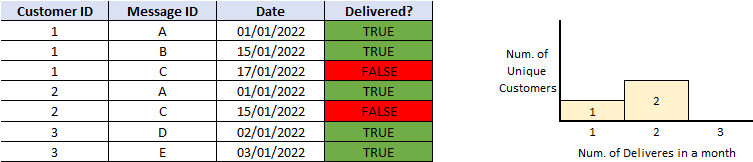
i have this kind of data table and i wish to build the correct measures/calculations in order to show this kind of bar chart.
i actually need to calculate how many customers were sent X messages successfully.
can you please assist me with the right DAX for it?
thanks in advance.
- Mark as New
- Bookmark
- Subscribe
- Mute
- Subscribe to RSS Feed
- Permalink
- Report Inappropriate Content
is there a way doing this on Power Query and not DAX?
- Mark as New
- Bookmark
- Subscribe
- Mute
- Subscribe to RSS Feed
- Permalink
- Report Inappropriate Content


- Mark as New
- Bookmark
- Subscribe
- Mute
- Subscribe to RSS Feed
- Permalink
- Report Inappropriate Content
Prev grade =
var currentDate = 'Grades'[Date]
return SELECTCOLUMNS( CALCULATETABLE(
TOPN( 1, 'Grades', 'Grades'[Date]), ALLEXCEPT(Grades,Grades[Customer code]),
'Grades'[Date] < currentDate ),
"@prev grade", 'Grades'[Grade] )
Create this as a new column

Helpful resources

Power BI Monthly Update - September 2025
Check out the September 2025 Power BI update to learn about new features.

Fabric Community Update - August 2025
Find out what's new and trending in the Fabric community.

| User | Count |
|---|---|
| 15 | |
| 11 | |
| 9 | |
| 5 | |
| 4 |


