cancel
Showing results for 
Search instead for 
Did you mean: 

Next up in the FabCon + SQLCon recap series: The roadmap for Microsoft SQL and Maximizing Developer experiences in Fabric. All sessions are available on-demand after the live show. Register now

Reply
KWelsh8144
Helper II
Helper II

Calculated Column

I’m trying to set up a column that would be used as a flag, using conditionals.


I have an ‘informational’ table, and another table named ‘repeatable’. There is one record per record_id in my informational table, but multiple records per record_id in my repeatable table. It’s joining on record_id (one to many).


I need a conditional column created in my informational table, referencing a column (followupvisit) in my repeatable table.


It would go something like this….

if followupvisit has 0 only, then "first follow up visit completed",

if followupvisit includes a 0 and 1, then "2nd follow up visit completed",

if followupvisit includes a 0, 1, and 2, then "all follow up visits completed",

else “no follow up visits completed”.


Here's an example of my data

 

KWelsh8144_1-1664192016704.png


So for record_id 3, after I would create this new column, I’d have one row reflected here and it would say “2nd follow up visit completed” since there are 2 records in the repeatable table showing one with a 0 and one with a 1 in the followupvisit column. For records 4 and 5, it would say “no follow up visits completed”, since there weren’t any values in the followupvisit column in the repeatable table..


Can anyone assist me with the dax for this?


Thanks!


1 ACCEPTED SOLUTION
Anonymous
Not applicable

Hi @KWelsh8144 ,


Like this?

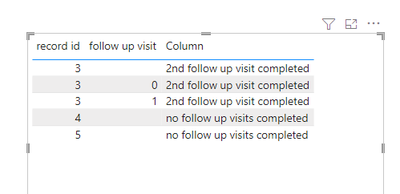
vmengzhumsft_0-1664264000255.png

you can create one measure and one calculated column to meet your needs:


sum = CALCULATE(SUM('Table'[follow up visit]),FILTER(ALL('Table'),'Table'[record id]=SELECTEDVALUE('Table'[record id])))


Column = IF([sum]=BLANK(),"no follow up visits completed",IF([sum]=0,"first follow up visit completed",IF([sum]=1,"2nd follow up visit completed","all follow up visits completed")))


Best regards,

Community Support Team Selina zhu

If this post helps, then please consider Accept it as the solution to help the other members find it more quickly


View solution in original post

3 REPLIES 3
wdx223_Daniel
Community Champion
Community Champion

CalculatedColumn=SWITCH(CONCATENATEX(CALCULATETABLE(VALUES(repeatable[followupvisit])),repeatable[followupvisit],"",repeatable[followupvisit]),"0","first follow up visit completed","01","2nd follow up visit completed","012","all follow up visits completed",“no follow up visits completed”)

Anonymous
Not applicable

Hi @KWelsh8144 ,


Like this?

vmengzhumsft_0-1664264000255.png

you can create one measure and one calculated column to meet your needs:


sum = CALCULATE(SUM('Table'[follow up visit]),FILTER(ALL('Table'),'Table'[record id]=SELECTEDVALUE('Table'[record id])))


Column = IF([sum]=BLANK(),"no follow up visits completed",IF([sum]=0,"first follow up visit completed",IF([sum]=1,"2nd follow up visit completed","all follow up visits completed")))


Best regards,

Community Support Team Selina zhu

If this post helps, then please consider Accept it as the solution to help the other members find it more quickly


AnthonyJoseph
Resolver III
Resolver III

Hi @KWelsh8144 

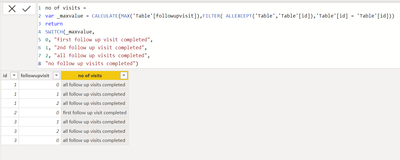
I mocked up a table (persumed as information table in your case), can you please try the below code:

no of visits = 
var _maxvalue = CALCULATE(MAX('Table'[followupvisit]),FILTER( ALLEXCEPT('Table','Table'[id]),'Table'[id] = 'Table'[id]))
return  
SWITCH(_maxvalue, 
0, "first follow up visit completed",
1, "2nd follow up visit completed",
2, "all follow up visits completed",
"no follow up visits completed"
)


AnthonyJoseph_0-1664262066581.png


I think this is what you are expecting...


Thanks,

AnthonyJoseph

Helpful resources

Announcements
New to Fabric survey Carousel

New to Fabric Survey

If you have recently started exploring Fabric, we'd love to hear how it's going. Your feedback can help with product improvements.

Power BI DataViz World Championships carousel

Power BI DataViz World Championships - June 2026

A new Power BI DataViz World Championship is coming this June! Don't miss out on submitting your entry.

Join our Fabric User Panel

Join our Fabric User Panel

Share feedback directly with Fabric product managers, participate in targeted research studies and influence the Fabric roadmap.

March Power BI Update Carousel

Power BI Community Update - March 2026

Check out the March 2026 Power BI update to learn about new features.