Hello everyone,
I have a table that looks like this:
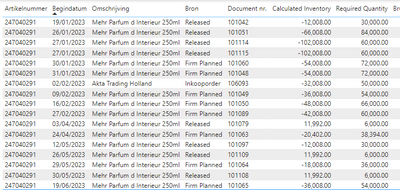
This table is currently filtered on article (first column). Within this filter I want to have a measure which calculates the inventory based on the required quantity of each row. The inventory is currently 17.992 so, based on the first row in the table, the new inventory number should be 17.992 - 30.000 = -12.008. So far so good. However, the calculated inventory on the second row should be -12.008 - 84.000 = -96.008. What it does now, is look back at the at the starting inventory (17.992) and use that to calculate the new value, instead of using the calculated inventory from the new row. The first 4 rows should look like this (ignore the top most row seeing I've put the inventory there for better understanding):

I'm currently using the following measure to calculate the inventory:
CALCULATE(
SUM(Articles[Inventory])-SUM(Articlelines[Required Quantity]),
FILTER(ALL(Articlelines),
Articlelines[Startdate] >= SELECTEDVALUE(Articlelines[Startdate]) &&
Articlelines[Startdate] <= SELECTEDVALUE(Articlelines[Startdate]) &&
Articlelines[Status] = "Open" &&
Articlelines[Artikelnummer] = SELECTEDVALUE(Artikelregels[Artikelnummer])))
I imagine the mistake is somewhere in the first line because I'm using the SUM of the inventory number. However, I don't know how to get around this. Any help would be much appreciated!


