FabCon is coming to Atlanta
Join us at FabCon Atlanta from March 16 - 20, 2026, for the ultimate Fabric, Power BI, AI and SQL community-led event. Save $200 with code FABCOMM.
Register now!- Power BI forums
- Get Help with Power BI
- Desktop
- Service
- Report Server
- Power Query
- Mobile Apps
- Developer
- DAX Commands and Tips
- Custom Visuals Development Discussion
- Health and Life Sciences
- Power BI Spanish forums
- Translated Spanish Desktop
- Training and Consulting
- Instructor Led Training
- Dashboard in a Day for Women, by Women
- Galleries
- Data Stories Gallery
- Themes Gallery
- Contests Gallery
- QuickViz Gallery
- Quick Measures Gallery
- Visual Calculations Gallery
- Notebook Gallery
- Translytical Task Flow Gallery
- TMDL Gallery
- R Script Showcase
- Webinars and Video Gallery
- Ideas
- Custom Visuals Ideas (read-only)
- Issues
- Issues
- Events
- Upcoming Events
The Power BI Data Visualization World Championships is back! Get ahead of the game and start preparing now! Learn more
- Power BI forums
- Forums
- Get Help with Power BI
- DAX Commands and Tips
- Re: Calculate total workers where total days > tha...
- Subscribe to RSS Feed
- Mark Topic as New
- Mark Topic as Read
- Float this Topic for Current User
- Bookmark
- Subscribe
- Printer Friendly Page

- Mark as New
- Bookmark
- Subscribe
- Mute
- Subscribe to RSS Feed
- Permalink
- Report Inappropriate Content
Calculate total workers where total days > than value as a %
Hi
I am trying to create a DAX to calculate how many workers have total days > than / buy total candidates
Data example below
for example, I need to count how many workers have total days worker > 15 / but total workers
| Wk | Worker ID | Days Worker |
| 1 | 1 | 4 |
| 1 | 2 | 5 |
| 1 | 3 | 1 |
| 1 | 4 | 3 |
| 2 | 1 | 3 |
| 2 | 2 | 5 |
| 2 | 3 | 5 |
| 2 | 4 | 5 |
| 3 | 1 | 1 |
| 3 | 2 | 5 |
| 3 | 3 | 5 |
| 3 | 4 | 5 |
Thanks
Solved! Go to Solution.


- Mark as New
- Bookmark
- Subscribe
- Mute
- Subscribe to RSS Feed
- Permalink
- Report Inappropriate Content
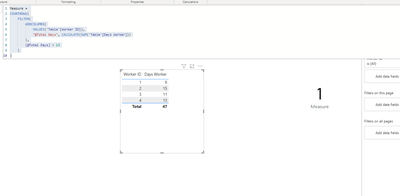
@Sully86 you mean like this (I changed to 13 casue you don't have any workers there with more then 15):
Measure =
COUNTROWS(
    FILTER(
        ADDCOLUMNS(
            VALUES('Table'[Worker ID]),
            "@Total Days", CALCULATE(SUM('Table'[Days Worker]))
        ),
        [@Total Days] > 13
    )
)





- Mark as New
- Bookmark
- Subscribe
- Mute
- Subscribe to RSS Feed
- Permalink
- Report Inappropriate Content
@Sully86
my pleasure 🙂
Please don't forget to accept the previous message as a solution for community visabilty.
P.S. Check out my showcase report - got some high level stuff there. Sure you will find there a lot of cool ideas.
https://community.powerbi.com/t5/Data-Stories-Gallery/SpartaBI-Feat-Contoso-100K/td-p/2449543
Give it a thumbs up over there if you liked it 🙂
- Mark as New
- Bookmark
- Subscribe
- Mute
- Subscribe to RSS Feed
- Permalink
- Report Inappropriate Content
@Sully86 you mean like this?
Measure =
COUNTROWS(
    FILTER(
        ADDCOLUMNS(
            VALUES('Table'[Worker ID]),
            "@Total Days", CALCULATE(SUM('Table'[Days Worker]))
        ),
        [@Total Days] > 1 && [@Total Days] < 6
    )
)


- Mark as New
- Bookmark
- Subscribe
- Mute
- Subscribe to RSS Feed
- Permalink
- Report Inappropriate Content
Hi, @Sully86
Please try the following methods.
Total days =
CALCULATE(SUM('Table'[Days Worker]),ALLEXCEPT('Table','Table'[Worker ID]))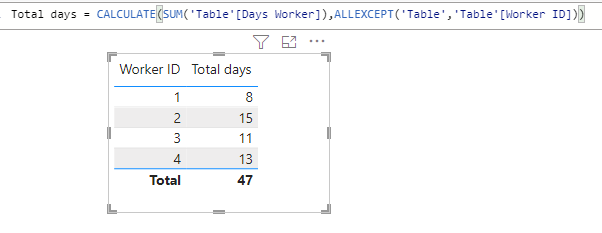
1. >= 15
Measure =
Var N1=CALCULATE(COUNT('Table'[Worker ID]),FILTER(ALL('Table'),[Total days]>=15))
Var N2=CALCULATE(COUNT('Table'[Worker ID]))
return
DIVIDE(N1,N2)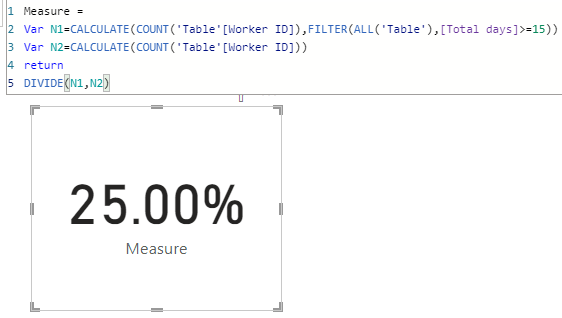
2. >1 but < 6
Measure 1 =
Var N1=CALCULATE(COUNT('Table'[Worker ID]),FILTER(ALL('Table'),[Total days]>1&&[Total days]<6))
Var N2=CALCULATE(COUNT('Table'[Worker ID]))
return
DIVIDE(N1,N2)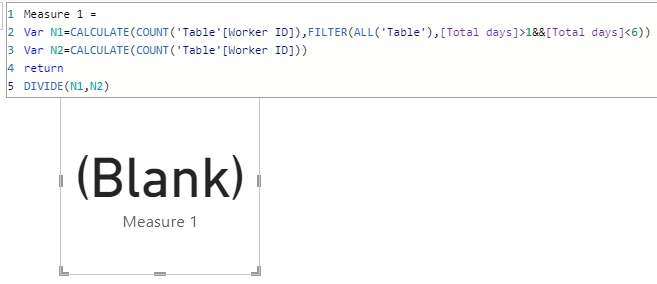
3. >6 but < 10
Measure 2 =
Var N1=CALCULATE(COUNT('Table'[Worker ID]),FILTER(ALL('Table'),[Total days]>6&&[Total days]<10))
Var N2=CALCULATE(COUNT('Table'[Worker ID]))
return
DIVIDE(N1,N2)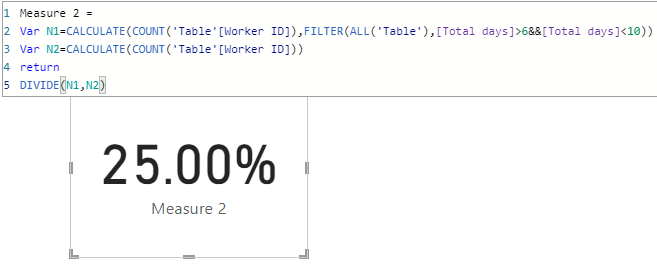
Are these the outputs you expect?
Best Regards,
Community Support Team _Charlotte
If this post helps, then please consider Accept it as the solution to help the other members find it more quickly.
- Mark as New
- Bookmark
- Subscribe
- Mute
- Subscribe to RSS Feed
- Permalink
- Report Inappropriate Content
- Mark as New
- Bookmark
- Subscribe
- Mute
- Subscribe to RSS Feed
- Permalink
- Report Inappropriate Content
@Sully86 you mean like this?
Measure =
COUNTROWS(
    FILTER(
        ADDCOLUMNS(
            VALUES('Table'[Worker ID]),
            "@Total Days", CALCULATE(SUM('Table'[Days Worker]))
        ),
        [@Total Days] > 1 && [@Total Days] < 6
    )
)
- Mark as New
- Bookmark
- Subscribe
- Mute
- Subscribe to RSS Feed
- Permalink
- Report Inappropriate Content
- Mark as New
- Bookmark
- Subscribe
- Mute
- Subscribe to RSS Feed
- Permalink
- Report Inappropriate Content
- Mark as New
- Bookmark
- Subscribe
- Mute
- Subscribe to RSS Feed
- Permalink
- Report Inappropriate Content
@Sully86
my pleasure 🙂
Please don't forget to accept the previous message as a solution for community visabilty.
P.S. Check out my showcase report - got some high level stuff there. Sure you will find there a lot of cool ideas.
https://community.powerbi.com/t5/Data-Stories-Gallery/SpartaBI-Feat-Contoso-100K/td-p/2449543
Give it a thumbs up over there if you liked it 🙂
- Mark as New
- Bookmark
- Subscribe
- Mute
- Subscribe to RSS Feed
- Permalink
- Report Inappropriate Content
@Sully86 you mean like this (I changed to 13 casue you don't have any workers there with more then 15):
Measure =
COUNTROWS(
    FILTER(
        ADDCOLUMNS(
            VALUES('Table'[Worker ID]),
            "@Total Days", CALCULATE(SUM('Table'[Days Worker]))
        ),
        [@Total Days] > 13
    )
)

Helpful resources

Power BI Dataviz World Championships
The Power BI Data Visualization World Championships is back! Get ahead of the game and start preparing now!

Power BI Monthly Update - November 2025
Check out the November 2025 Power BI update to learn about new features.

FabCon Atlanta 2026
Join us at FabCon Atlanta, March 16-20, for the ultimate Fabric, Power BI, AI and SQL community-led event. Save $200 with code FABCOMM.

| User | Count |
|---|---|
| 20 | |
| 10 | |
| 9 | |
| 4 | |
| 4 |


| User | Count |
|---|---|
| 32 | |
| 31 | |
| 18 | |
| 12 | |
| 11 |


