cancel
Showing results for 
Search instead for 
Did you mean: 

The Power BI Data Visualization World Championships is back! Get ahead of the game and start preparing now! Learn more

Reply
sfernamer
Helper III
Helper III

Calculate filter not working when adding dimension

Good morning,


Firstly, wishing you a merry x-mas! 🙂 


I'm working on a dashboard that it has to show different measures based on different subsets. There's a database with rows representing actions. All the rows have a column named Date that shows the date of the game. The subsets are:


Last_Game = MAX(database[Date])

Other_Games = database[Date] <> MAX(database[Date])


So, to represent the data of the last game, I used:


Pts/G_Last = CALCULATE([Pts/G], database[Date] = MAX(database[Date])) 
* With this CALCULATE, I take, from all games, the measure [Pts/G] for the subset created for the database[Date] = MAX(database[Date])
 
This is working when I represent the data alone but not when I add a column to see the same amount [Pts/G] separated by that column/dimension. The example below:
 
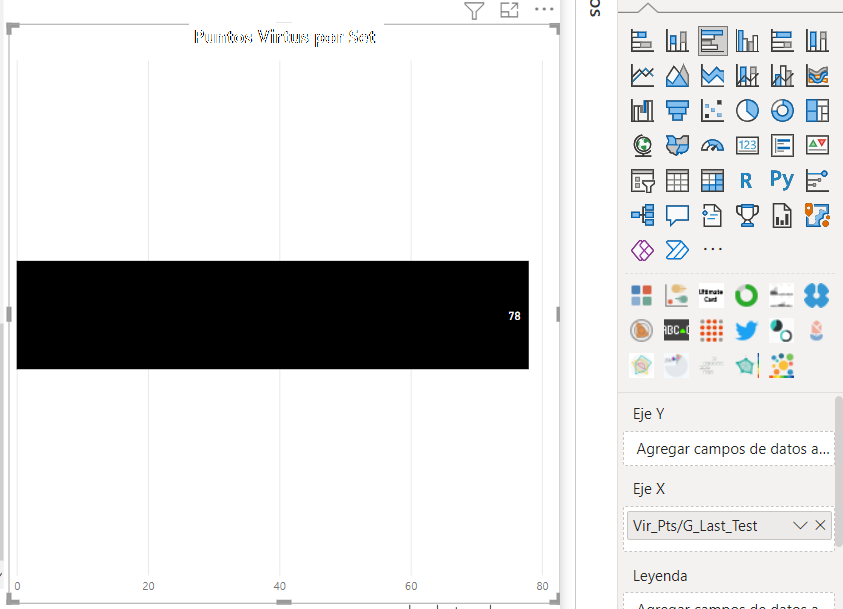
- When using the measure alone, the expected result is correct (78). (Image 1)
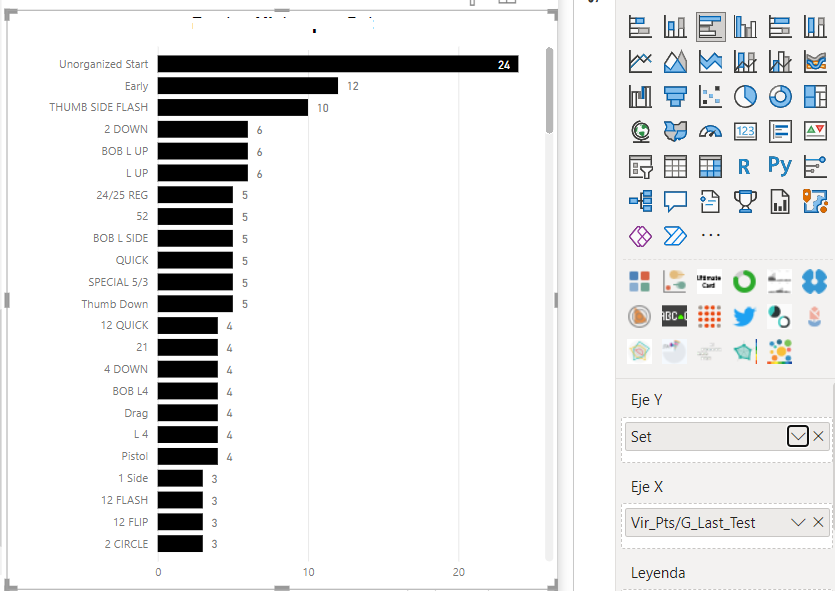
- When adding the dimension, the total is changing to show all games, ignoring the calculate filter. I tried also with KEEPFILTERS but not working [Pts/G_Last = CALCULATE([Pts/G], KEEPFILTERS(database[Date] = MAX(database[Date])))]. (Image 2)
 
Could anyone tell me how I could do it, please? Thank you in advance.
 
Ex1.pngEx2.png
1 ACCEPTED SOLUTION
FreemanZ
Super User
Super User

hi   @sfernamer 

try like:
 
Pts/G_Last = 
VAR _date = CALCULATE( MAX(database[Date]), ALL(database))
RETURN CALCULATE( [Pts/G], database[Date] = _date )


View solution in original post

2 REPLIES 2
FreemanZ
Super User
Super User

hi   @sfernamer 

try like:
 
Pts/G_Last = 
VAR _date = CALCULATE( MAX(database[Date]), ALL(database))
RETURN CALCULATE( [Pts/G], database[Date] = _date )


Hi @FreemanZ ,


Thank you for your answer. I already checked your advice and worked for me. I did some tests and all worked so thank you so much for your info.


I guessed that I can't use the measure as a filter so it's better to create the variable and then use it as a filter in calculate.


Merry X-Mas! 🙂

Helpful resources

Announcements
Power BI DataViz World Championships

Power BI Dataviz World Championships

The Power BI Data Visualization World Championships is back! Get ahead of the game and start preparing now!

November Power BI Update Carousel

Power BI Monthly Update - November 2025

Check out the November 2025 Power BI update to learn about new features.

FabCon Atlanta 2026 carousel

FabCon Atlanta 2026

Join us at FabCon Atlanta, March 16-20, for the ultimate Fabric, Power BI, AI and SQL community-led event. Save $200 with code FABCOMM.