cancel
Showing results for 
Search instead for 
Did you mean: 

The Power BI Data Visualization World Championships is back! Get ahead of the game and start preparing now! Learn more

Reply
nigel_s
Frequent Visitor

Calculate daily budget from monthly budget

Hello,

I have a budget that is monthly and I want to convert that into daily values, simple in SQL but I'm new to DAX.

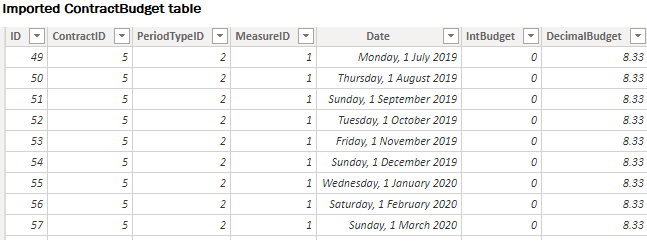
The ContractBudget table is imported from SQL

ContractBudget.png


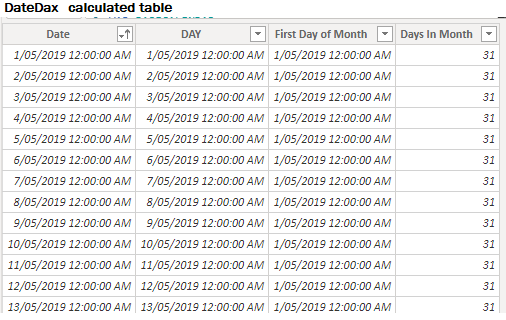
The DateDax is a date table generated by DAX. I currently have no relationship between the tables. In SQL I'd join ContractBudget.Date=DateDax.FirstDayOfMonth to get a budget value for every day of the month but PowerBI says that's a many to many, and there be grumpy dragons ahead.

How do I get a budget value for each day where I divide DecimalBudget by Days In Month to arrive at my daily value?

I'd do a merge in Power Query but calculated tables don't show up there. Is that correct?

DateDax.png


1 ACCEPTED SOLUTION
nigel_s
Frequent Visitor

I did the join in SQL, much easier than messing around with this in DAX.

View solution in original post

5 REPLIES 5
nigel_s
Frequent Visitor

I did the join in SQL, much easier than messing around with this in DAX.

Anonymous
Not applicable

Hi Nigel,

I have basically the same problem as you, and DAX syntax seems very complicated. Can you share your SQL solution?


Regards,

//Peter

Hi Peter,


The simplest way is to have a Date table in SQL, just like you'd generate with DAX. You can cover 100 years with ~30K records. This table has at minimum the following columns Date, FirstDayOfMonth, DaysInMonth. You need a budget table with entries for the first of each month. 

Date        FirstOfMonth  DaysInMonth
01/01/2020  01/01/2020    31
02/01/2020  01/01/2020    31
03/01/2020  01/01/2020    31
...
01/02/2020  01/02/2020    28
02/02/2020  01/02/2020    28

Join Contract.Month to Date.FirstOfMonth and you'll get an entry for each day in the calendar.

SELECT DateKey.Date, ContractBudget.ContractID, SUM(ContractBudget.DecimalBudget) / DateKey.DaysInMonth AS BudgetAmount
FROM ContractBudget 
INNER JOIN DateKey ON DateKey.FirstDayOfMonth = ContractBudget.Month 
GROUP BY DateKey.Date, DateKey.DaysInMonth, ContractBudget.ContractID
AlB
Community Champion
Community Champion

Hi @nigel_s 

Since the Date column in your table seems to always have the first day of the month, you can create a calcualted column:

Calc column =
VAR daysInMonth_ =
    LOOKUPVALUE (
        DateTable[Days In Month],
        DateTable[First Day Of Month], Table1[Date]
    )
RETURN
    DIVIDE ( Table1[DecimalBudget], daysInMonth_ )


Please mark the question solved when done and consider giving kudos if posts are helpful.

Contact me privately for support with any larger-scale BI needs, tutoring, etc.

Cheers 

SU18_powerbi_badge

nigel_s
Frequent Visitor

That gave me the daily budget for each month but what about if I want to build a visual based on days? Where I need a ContractBudget row for each day in the month? Basically a join on ContractBudget[Date]=DateDax[First Day of Month].


Essentially it would be a CROSSJOIN with a Filter but that's terribly inefficient. How do I make use of the common field?


Helpful resources

Announcements
Power BI DataViz World Championships

Power BI Dataviz World Championships

The Power BI Data Visualization World Championships is back! Get ahead of the game and start preparing now!

November Power BI Update Carousel

Power BI Monthly Update - November 2025

Check out the November 2025 Power BI update to learn about new features.

FabCon Atlanta 2026 carousel

FabCon Atlanta 2026

Join us at FabCon Atlanta, March 16-20, for the ultimate Fabric, Power BI, AI and SQL community-led event. Save $200 with code FABCOMM.