Join us at FabCon Atlanta from March 16 - 20, 2026, for the ultimate Fabric, Power BI, AI and SQL community-led event. Save $200 with code FABCOMM.
Register now!The Power BI Data Visualization World Championships is back! Get ahead of the game and start preparing now! Learn more
On the following table "QuoteConvertionStartDate" I have columns for Date, Total, and Accepted
I need to calculate the "Total 12 moth roll" and "Accepted 12 Moth Roll".
I did the numbers manually to give a result.
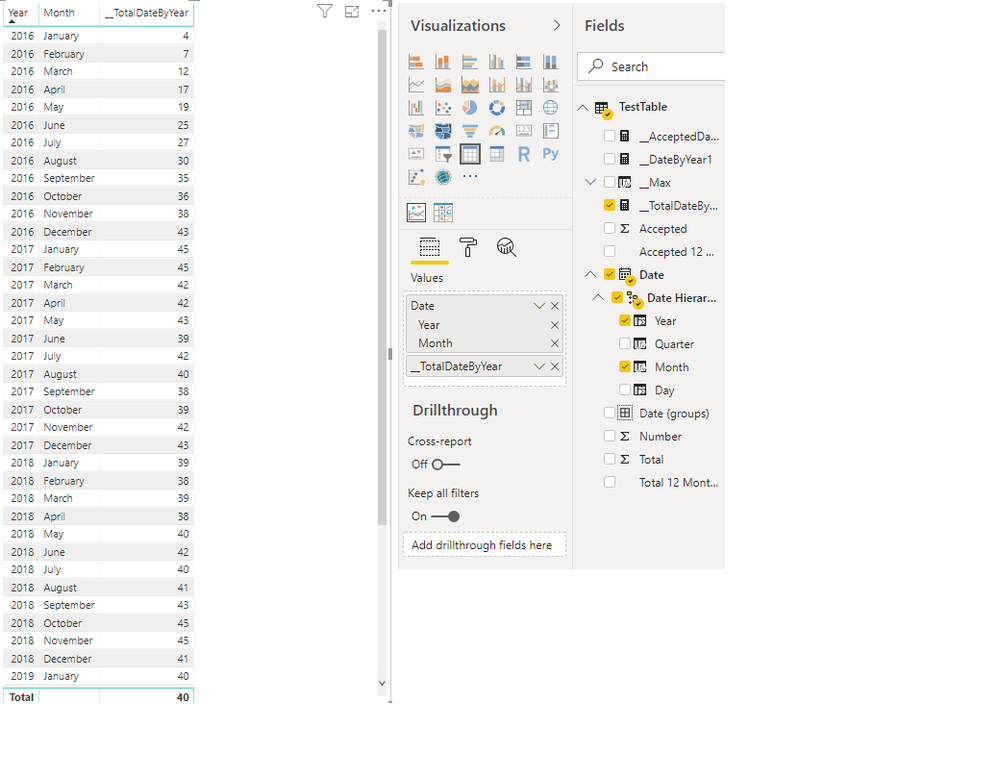
For example to calculate the Total 12 months roll for Tusday January 1 2019 I have to sum:
Tusday January 1 2019 to Thrusday February 1 2018 = 40
To calculate the Total 12 months roll for Saturday December 1 2018 I have to sum:
Saturday December 1 2018 to Monday January 1, 2018 = 41
To calculate the Total 12 months roll for Thusday November 1 2018 I have to sum:
Thusday November 1 2018 to Friday December 1, 2017 = 45
and so on.
I have to do the same for Accepted.
I tried the following DAX but is giving me the total by month and is giving me the total by 12 months or rolling back 12 months:
Can someone help please.
Thanks
Solved! Go to Solution.
Thank you for the help.
This solution works but only if I select the year and the month.
I am using Power KPI 2.0 to show the rolling average and date hierarchy only shows the year. This gives me a really bad chart.
I am new at Power BI and I don't know what to do to fix this problem.
You need a calendar table to write time intelligence formulas
here are some articles that I wrote
https://exceleratorbi.com.au/power-pivot-calendar-tables/
https://exceleratorbi.com.au/dax-time-intelligence-beginners/
you could write something like
CALCULATE(sum(table[column]),datesinperiod(calendar[date],max(calendar[date]),-1,year))
Thank you for the help.
This solution works but only if I select the year and the month.
I am using Power KPI 2.0 to show the rolling average and date hierarchy only shows the year. This gives me a really bad chart.
I am new at Power BI and I don't know what to do to fix this problem.
I fixed the problem with this solution
The Power BI Data Visualization World Championships is back! Get ahead of the game and start preparing now!
| User | Count |
|---|---|
| 13 | |
| 5 | |
| 5 | |
| 3 | |
| 3 |
| User | Count |
|---|---|
| 25 | |
| 10 | |
| 10 | |
| 6 | |
| 6 |