cancel
Showing results for 
Search instead for 
Did you mean: 

The Power BI Data Visualization World Championships is back! Get ahead of the game and start preparing now! Learn more

Reply
JM94
Regular Visitor

Calculate average time per maschine and per task

Hi there


I have just started my Power BI journey. I am trying to calculate the average time a specific maschine needed to complete a specifict task in order to compare it with the planned data. 


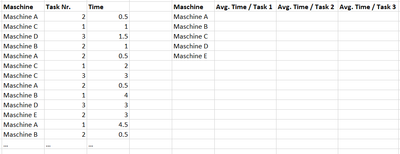
In the screen shot below you can see my sample data, which includes:

- 5 different Maschine types (A, B C, D an E)

- 3 different Tasks (Nr 1, 2 and 3)

- Time needed for completing the task


JM94_0-1642093201935.png


Since there are many more maschine types and tasks in my real data set, I am looking for a way to build a table or a matrix, where I do not have to manually write the reffered machine ( = "Maschine A") or task, into the function. Any ideas how to do that?


Thanks in advance! 


1 ACCEPTED SOLUTION
ValtteriN
Super User
Super User

Hi,

Since measures work using current filter context a basic average measure should do what you want:

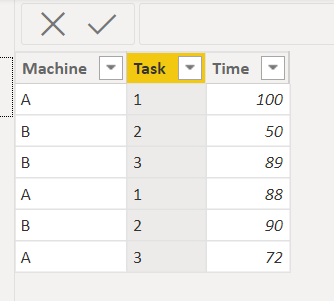
Example data:

ValtteriN_0-1642100572661.png


Dax:

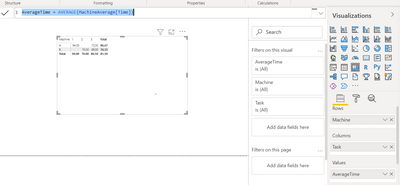
AverageTime = AVERAGE(MachineAverage[Time])

End result:
ValtteriN_1-1642100625637.png


I hope this post helps to solve your issue and if it does consider accepting it as a solution and giving the post a thumbs up!


Did I answer your question? Mark my post as a solution!

Proud to be a Super User!


View solution in original post

2 REPLIES 2
smpa01
Super User
Super User

@JM94  use the following measure

Avg by Maschine and task =
CALCULATE (
    AVERAGE ( tbl[Time] ),
    ALLEXCEPT ( tbl, tbl[Maschine], tbl[Task Nr.] )
)
Did I answer your question? Mark my post as a solution!
Proud to be a Super User!
My custom visualization projects
Plotting Live Sound: Viz1
Beautiful News:Viz1, Viz2, Viz3
Visual Capitalist: Working Hrs
ValtteriN
Super User
Super User

Hi,

Since measures work using current filter context a basic average measure should do what you want:

Example data:

ValtteriN_0-1642100572661.png


Dax:

AverageTime = AVERAGE(MachineAverage[Time])

End result:
ValtteriN_1-1642100625637.png


I hope this post helps to solve your issue and if it does consider accepting it as a solution and giving the post a thumbs up!


Did I answer your question? Mark my post as a solution!

Proud to be a Super User!


Helpful resources

Announcements
November Power BI Update Carousel

Power BI Monthly Update - November 2025

Check out the November 2025 Power BI update to learn about new features.

Fabric Data Days Carousel

Fabric Data Days

Advance your Data & AI career with 50 days of live learning, contests, hands-on challenges, study groups & certifications and more!

FabCon Atlanta 2026 carousel

FabCon Atlanta 2026

Join us at FabCon Atlanta, March 16-20, for the ultimate Fabric, Power BI, AI and SQL community-led event. Save $200 with code FABCOMM.