FabCon is coming to Atlanta
Join us at FabCon Atlanta from March 16 - 20, 2026, for the ultimate Fabric, Power BI, AI and SQL community-led event. Save $200 with code FABCOMM.
Register now!- Power BI forums
- Get Help with Power BI
- Desktop
- Service
- Report Server
- Power Query
- Mobile Apps
- Developer
- DAX Commands and Tips
- Custom Visuals Development Discussion
- Health and Life Sciences
- Power BI Spanish forums
- Translated Spanish Desktop
- Training and Consulting
- Instructor Led Training
- Dashboard in a Day for Women, by Women
- Galleries
- Data Stories Gallery
- Themes Gallery
- Contests Gallery
- QuickViz Gallery
- Quick Measures Gallery
- Visual Calculations Gallery
- Notebook Gallery
- Translytical Task Flow Gallery
- TMDL Gallery
- R Script Showcase
- Webinars and Video Gallery
- Ideas
- Custom Visuals Ideas (read-only)
- Issues
- Issues
- Events
- Upcoming Events
The Power BI Data Visualization World Championships is back! Get ahead of the game and start preparing now! Learn more
- Power BI forums
- Forums
- Get Help with Power BI
- DAX Commands and Tips
- Calculate Difference Between the last non blank va...
- Subscribe to RSS Feed
- Mark Topic as New
- Mark Topic as Read
- Float this Topic for Current User
- Bookmark
- Subscribe
- Printer Friendly Page

- Mark as New
- Bookmark
- Subscribe
- Mute
- Subscribe to RSS Feed
- Permalink
- Report Inappropriate Content
Calculate Difference Between the last non blank value and the second last nonblank value with filter
| Reg no | Mileage |
| CCN 342D | 3342 |
| CCN 455A | 880 |
| VWT 403B | 10935 |
| CCN 342D | 4000 |
| CCN 455A | 1000 |
Please help with the dax function to calculate difference between the last non blank row and the second last non blank row.The reg number is repeated.
Solved! Go to Solution.


- Mark as New
- Bookmark
- Subscribe
- Mute
- Subscribe to RSS Feed
- Permalink
- Report Inappropriate Content
Hi,
Please check the below picture and the attached pbix file.
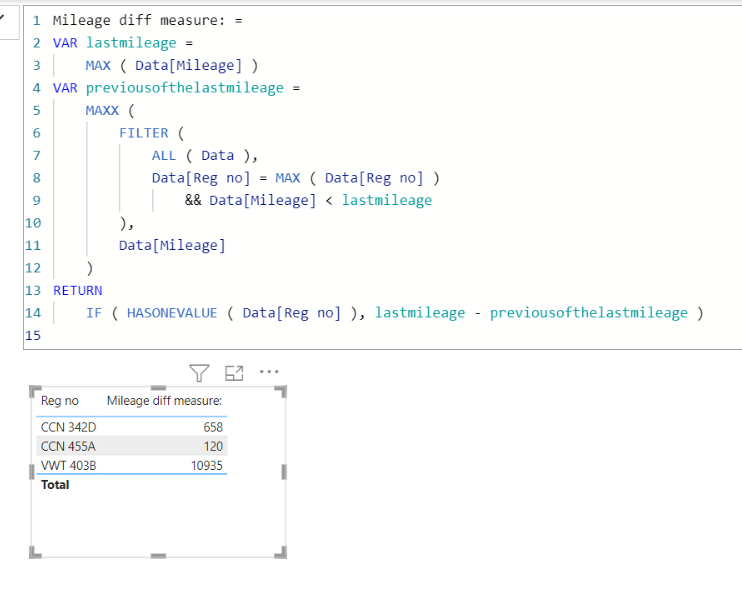
Mileage diff measure: =
VAR lastmileage =
    MAX ( Data[Mileage] )
VAR previousofthelastmileage =
    MAXX (
        FILTER (
            ALL ( Data ),
            Data[Reg no] = MAX ( Data[Reg no] )
                && Data[Mileage] < lastmileage
        ),
        Data[Mileage]
    )
RETURN
    IF ( HASONEVALUE ( Data[Reg no] ), lastmileage - previousofthelastmileage )
If this post helps, then please consider accepting it as the solution to help other members find it faster, and give a big thumbs up.
Click here to visit my LinkedIn page
Click here to schedule a short Teams meeting to discuss your question.

- Mark as New
- Bookmark
- Subscribe
- Mute
- Subscribe to RSS Feed
- Permalink
- Report Inappropriate Content
Hi @Faith_Data
Here you go https://we.tl/t-Mrey2dTPxa
First of all make sure the have the mileage column as intiger data type.
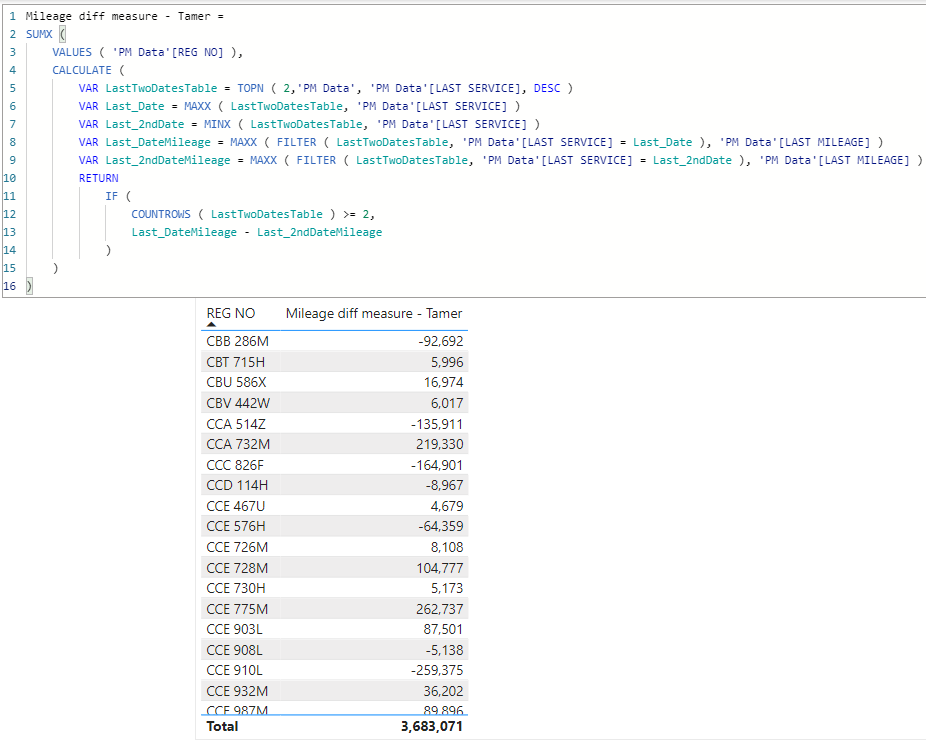
Mileage diff measure - Tamer =
SUMX (
    VALUES ( 'PM Data'[REG NO] ),
    CALCULATE (
        VAR LastTwoDatesTable = TOPN ( 2,'PM Data', 'PM Data'[LAST SERVICE], DESC )
        VAR Last_Date = MAXX ( LastTwoDatesTable, 'PM Data'[LAST SERVICE] )
        VAR Last_2ndDate = MINX ( LastTwoDatesTable, 'PM Data'[LAST SERVICE] )
        VAR Last_DateMileage = MAXX ( FILTER ( LastTwoDatesTable, 'PM Data'[LAST SERVICE] = Last_Date ), 'PM Data'[LAST MILEAGE] )
        VAR Last_2ndDateMileage = MAXX ( FILTER ( LastTwoDatesTable, 'PM Data'[LAST SERVICE] = Last_2ndDate ), 'PM Data'[LAST MILEAGE] )
        RETURN
            IF (
                COUNTROWS ( LastTwoDatesTable ) >= 2,
                Last_DateMileage - Last_2ndDateMileage
            )
    )
)
- Mark as New
- Bookmark
- Subscribe
- Mute
- Subscribe to RSS Feed
- Permalink
- Report Inappropriate Content
Hi,
Please check the below picture and the attached pbix file.
Mileage diff measure: =
VAR lastmileage =
    MAX ( Data[Mileage] )
VAR previousofthelastmileage =
    MAXX (
        FILTER (
            ALL ( Data ),
            Data[Reg no] = MAX ( Data[Reg no] )
                && Data[Mileage] < lastmileage
        ),
        Data[Mileage]
    )
RETURN
    IF ( HASONEVALUE ( Data[Reg no] ), lastmileage - previousofthelastmileage )
If this post helps, then please consider accepting it as the solution to help other members find it faster, and give a big thumbs up.
Click here to visit my LinkedIn page
Click here to schedule a short Teams meeting to discuss your question.
- Mark as New
- Bookmark
- Subscribe
- Mute
- Subscribe to RSS Feed
- Permalink
- Report Inappropriate Content
Thank you @Jihwan_Kim for faster response ,however the measure on my end is bringing all blanks
- Mark as New
- Bookmark
- Subscribe
- Mute
- Subscribe to RSS Feed
- Permalink
- Report Inappropriate Content
Hi,
Please share your sample pbix file's link, and then I can try to look into it to come up with a more accurate solution.
Thanks.
If this post helps, then please consider accepting it as the solution to help other members find it faster, and give a big thumbs up.
Click here to visit my LinkedIn page
Click here to schedule a short Teams meeting to discuss your question.
- Mark as New
- Bookmark
- Subscribe
- Mute
- Subscribe to RSS Feed
- Permalink
- Report Inappropriate Content
- Mark as New
- Bookmark
- Subscribe
- Mute
- Subscribe to RSS Feed
- Permalink
- Report Inappropriate Content
Hi @Faith_Data
Please provide the expected results as per the sample data provided.

Helpful resources

Power BI Dataviz World Championships
The Power BI Data Visualization World Championships is back! Get ahead of the game and start preparing now!

Power BI Monthly Update - November 2025
Check out the November 2025 Power BI update to learn about new features.

FabCon Atlanta 2026
Join us at FabCon Atlanta, March 16-20, for the ultimate Fabric, Power BI, AI and SQL community-led event. Save $200 with code FABCOMM.

| User | Count |
|---|---|
| 20 | |
| 10 | |
| 9 | |
| 4 | |
| 4 |


| User | Count |
|---|---|
| 32 | |
| 31 | |
| 18 | |
| 12 | |
| 11 |


