
Join us at FabCon Atlanta from March 16 - 20, 2026, for the ultimate Fabric, Power BI, AI and SQL community-led event. Save $200 with code FABCOMM.
Register now!The Power BI Data Visualization World Championships is back! Get ahead of the game and start preparing now! Learn more
Hi,
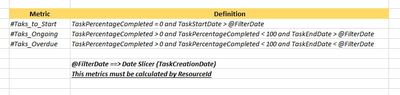
I need your help to calculate 3 metrics based on the shared data in the image.
I've tried several ways but I can't find a solution. 😞
Thank you for your help!
Solved! Go to Solution.
So, you should be able to use a pattern like:
Tasks to Start =
VAR __date = MAX([Slicer Date])
VAR __table = FILTER('Table',[TaskPercentageComplete]=0 && [TaskStartDate]>__date)
RETURN
COUNTROWS(__table)
The Power BI Data Visualization World Championships is back! Get ahead of the game and start preparing now!
Check out the November 2025 Power BI update to learn about new features.
| User | Count |
|---|---|
| 20 | |
| 11 | |
| 10 | |
| 4 | |
| 4 |
| User | Count |
|---|---|
| 34 | |
| 32 | |
| 19 | |
| 12 | |
| 10 |