cancel
Showing results for 
Search instead for 
Did you mean: 

The Power BI Data Visualization World Championships is back! Get ahead of the game and start preparing now! Learn more

Reply
ns292022
Regular Visitor

Calculate CY sales based on weeks

Hello Friends,


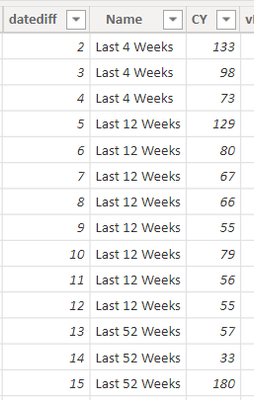
I have the following table, where datediff is the difference in weeks from current date

ns292022_0-1669347998520.png

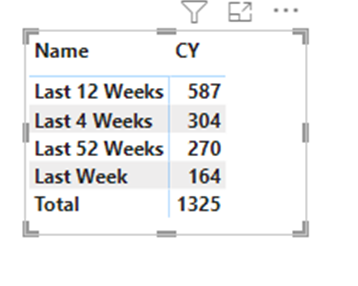
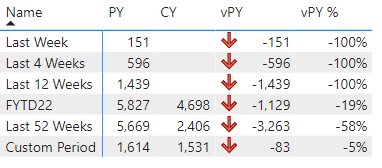
The output should be:

ns292022_2-1669348409107.png

I created a new column Name using the formula: 

Name = if(Enrolment_new[datediff]=1,"Last Week",if(Enrolment_new[datediff]<=4 && Enrolment_new[datediff]>0 ,"Last 4 Weeks",if(Enrolment_new[datediff]<=12 && Enrolment_new[datediff]>0,"Last 12 Weeks",if(Enrolment_new[datediff]<=52 && Enrolment_new[datediff]>0,"Last 52 Weeks"," "))))

However the summarize table is excluding Last Week data from Last week 4 weeks data, Last 4 weeks data from Last 12 weeks data and so on. Can someone help me on how to get data in correct form where CY, PY values of Last 4 weeks should include Last week and so on.


Thanks!


7 REPLIES 7
Anonymous
Not applicable

Hi @ns292022 ,


Please share some sample data in text format so that we could test formulas.


NikhilChenna
Skilled Sharer
Skilled Sharer

Hi @ns292022 , I think below is the solution for you.


1. In the table you are not showing the datediff where it is 1, so i used the sample data provided by you and also and one entry for datediff 1 as below.


NikhilChenna_0-1669351993966.png

2. Please use this below calculated dax column for Name column - 


Name =
IF('Table (2)'[datediff]=1,"Last Week",
IF('Table (2)'[datediff]>1 && 'Table (2)'[datediff]<=4,"Last 4 Weeks",
IF('Table (2)'[datediff]>4 && 'Table (2)'[datediff]<=12,"Last 12 Weeks",
IF('Table (2)'[datediff]>12 && 'Table (2)'[datediff]<=52,"Last 52 Weeks",BLANK()
))))
 
3. in this just replace the table name and nothing else. this is the output I'm getting,
NikhilChenna_1-1669352163225.pngNikhilChenna_2-1669352172540.png


This will work for you.
 
 
Regards,
Nikhil Chenna
 
Appreciate with a Kudos!! (Click the Thumbs Up Button)
Did I answer your question? Mark my post as a solution!

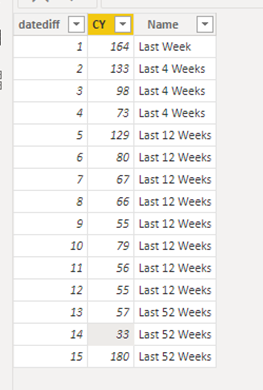
Thanks for sharing this, however the output that I need should give the summation of last week and last 4 weeks values as CY, i;e Last week = 164, Last 4 Weeks = 164+304=468, as last 4 weeks also includes last week but with my approach as I have already tagged datediff 1 as Last Week it is excluding 1 from last 4 weeks. Here is the sample data


ns292022_0-1669355313592.png


Hi @ns292022 ,


Correct , as you have tagged it has 1 it is showing separtely as last week. If you remove the last week condition and just keep >=1 and <=4,"Last 4 Weeks", it will work.


Regards,

Nikhil Chenna


Appreciate with a Kudos!! (Click the Thumbs Up Button)
Did I answer your question? Mark my post as a solution!

yes, but I have to show data separately for Last Week, Last 4 Weeks, Last 12 Weeks and Last 52 Weeks and thats where I am stuck badly.

FreemanZ
Super User
Super User

Grouping with IF needs the the groups to be mutually exclusive. In your case, i would suggest to do it with measures. Try to create measures with the code below:

CYLW :=

CALCULATE (

    SUM(TableName[CY]),

    TableName[datediff] <=1

)


CY4W :=

CALCULATE (

    SUM(TableName[CY]),

    TableName[datediff] <=4

)


CY12W :=

CALCULATE (

    SUM(TableName[CY]),

    TableName[datediff] <=12

)


CY52W :=

CALCULATE (

    SUM(TableName[CY]),

    TableName[datediff] <=52

)


then try to plot the Table Visual with these measures.

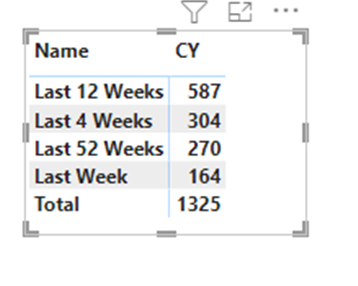
Thanks for sharing this but in this way I have to create 4 diffrent measures for CY whereas I need the values in 1 column like this: 


ns292022_0-1669357858491.png


here is the sample data 

ns292022_2-1669355467069.png


I cannot change the output . Thanks!

Helpful resources

Announcements
November Power BI Update Carousel

Power BI Monthly Update - November 2025

Check out the November 2025 Power BI update to learn about new features.

Fabric Data Days Carousel

Fabric Data Days

Advance your Data & AI career with 50 days of live learning, contests, hands-on challenges, study groups & certifications and more!

FabCon Atlanta 2026 carousel

FabCon Atlanta 2026

Join us at FabCon Atlanta, March 16-20, for the ultimate Fabric, Power BI, AI and SQL community-led event. Save $200 with code FABCOMM.