
cancel
Showing results for 
Search instead for 
Did you mean: 

The Power BI Data Visualization World Championships is back! Get ahead of the game and start preparing now! Learn more

Reply
Berl21
Helper III
Helper III

Bucket Sales Managers by their performance for a specific time frame

Hi,


I am trying to male a report with buckets for our managers according to the performance they had last quarter. The goal is to make a matrix where I can report the number of managers belonging to each group according to how many leads they generated.

To do this, I started by setting up a new table which looks like this:


Berl21_1-1663342637426.png

After that I added a measure counting the number of unique leads: 

Unique Leads = DISTINCTCOUNT(Leads_Table[DimLeadId])

Thirdly, I added a measure with filter and values functions:

Leads Group =

CALCULATE([Unique Leads],
      FILTER(VALUES(Leads_Table[LeadRecordId__c]),
        COUNTROWS(
            FILTER('Bucket Table',
            [Count Leads] >= 'Bucket Table'[Lower Bucket]
            &&   [Count Leads] <= 'Bucket Table'[Upper Bucket]))
            > 0))

I tried using this measure in a matrix and got no results. There is something here that I really don't understand as to how create a segmentation based on a measure. Can anybody check this logic and explain how to write the measure correctly?
1 ACCEPTED SOLUTION
tamerj1
Super User
Super User

Hi @Berl21 
I assume that you will be slicing by 'Bucket Table'[# Leads] column. You can try the following measure

Leads Group =
VAR LowerLimit =
    SELECTEDVALUE ( 'Bucket Table'[Lower Bucket] )
VAR UpperLimit =
    SELECTEDVALUE ( 'Bucket Table'[Upper Bucket] )
VAR T1 =
    VALUES ( Leads_Table[LeadRecordId__c] )
VAR T2 =
    ADDCOLUMNS ( T1, "@Leads", [Unique Leads] )
VAR T3 =
    FILTER ( T2, [@Leads] >= LowerLimit && [@Leads] <= UpperLimit )
RETURN
    COUNTROWS ( T3 )

View solution in original post

5 REPLIES 5
Berl21
Helper III
Helper III

@tamerj1 

Here you go for the desired result:


Expected result: 

Berl21_0-1663601070990.png

As a new user it seems I can't upload a pbix file here. Maybe I am wrong about this, can you let me know how that works? Unfortunately Dropbox is also not cooperating as of now.

@Berl21 

try to upload to upload to any file transfer service and share the link. 

Berl21
Helper III
Helper III

Hi @tamerj1 

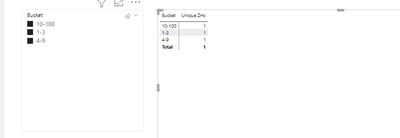
not sure how you mean the slicing? For now, it is uneffective:

Berl21_0-1663587641849.png

The measure in this graph should be the number of unique managers, right? I used distinctcount for this one.


@Berl21 
Would you please present sample data and the expected result based on the same sample? Otherwise please try the following

Unique ZHs =
SUMX (
    VALUES ( 'Bucket Table'[Bucket] ),
    VAR LowerLimit = 'Bucket Table'[Lower Bucket]
    VAR UpperLimit = 'Bucket Table'[Upper Bucket]
    VAR T1 =
        ADDCOLUMNS ( VALUES ( Leads_Table[ManagerID] ), "@Leads", [Unique Leads] )
    VAR T2 =
        FILTER ( T1, [@Leads] >= LowerLimit && [@Leads] <= UpperLimit )
    RETURN
        COUNTROWS ( T2 )
)
tamerj1
Super User
Super User

Hi @Berl21 
I assume that you will be slicing by 'Bucket Table'[# Leads] column. You can try the following measure

Leads Group =
VAR LowerLimit =
    SELECTEDVALUE ( 'Bucket Table'[Lower Bucket] )
VAR UpperLimit =
    SELECTEDVALUE ( 'Bucket Table'[Upper Bucket] )
VAR T1 =
    VALUES ( Leads_Table[LeadRecordId__c] )
VAR T2 =
    ADDCOLUMNS ( T1, "@Leads", [Unique Leads] )
VAR T3 =
    FILTER ( T2, [@Leads] >= LowerLimit && [@Leads] <= UpperLimit )
RETURN
    COUNTROWS ( T3 )

Helpful resources

Announcements
November Power BI Update Carousel

Power BI Monthly Update - November 2025

Check out the November 2025 Power BI update to learn about new features.

Fabric Data Days Carousel

Fabric Data Days

Advance your Data & AI career with 50 days of live learning, contests, hands-on challenges, study groups & certifications and more!

FabCon Atlanta 2026 carousel

FabCon Atlanta 2026

Join us at FabCon Atlanta, March 16-20, for the ultimate Fabric, Power BI, AI and SQL community-led event. Save $200 with code FABCOMM.