Join us at FabCon Atlanta from March 16 - 20, 2026, for the ultimate Fabric, Power BI, AI and SQL community-led event. Save $200 with code FABCOMM.
Register now!The Power BI Data Visualization World Championships is back! Get ahead of the game and start preparing now! Learn more
Hello Everybody,
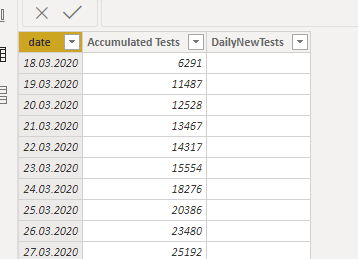
I've seen lots of explanations to create a running/accumulating total, however the raw data I have begins with a running total and I would like break this down to the value added on. Simple enough in Excel, I believe, but I would rather do it in BI.
I am looking at California's Testing rate for COVID-19 and would like to create a Calculated Column called DailyNewTests:
Which is to say, the first value would be 6291, the second would be 11487-6291 = 5196, the third would be 12528 - 11487 = 1041 and so on..
Would anyone be able to help me? Much appreciated!
Solved! Go to Solution.
Hi @Anonymous ,
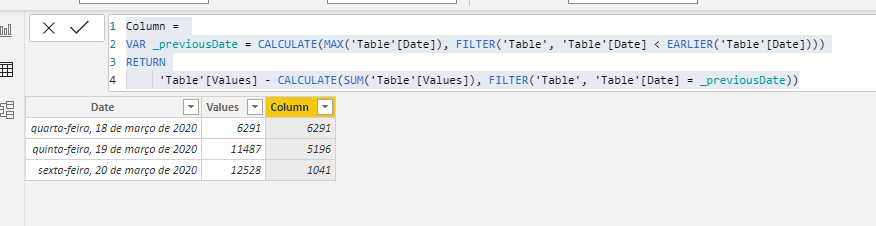
Try this code for a calculated column:
Column =
VAR _previousDate = CALCULATE(MAX('Table'[Date]), FILTER('Table', 'Table'[Date] < EARLIER('Table'[Date])))
RETURN
'Table'[Values] - CALCULATE(SUM('Table'[Values]), FILTER('Table', 'Table'[Date] = _previousDate))
@Anonymous ,
If you have non continous date
column =
var _last_date =maxx(filter(Table,Table[Date] <earlier(Table[Date])),Table[Date])
return Table[accumulated total]-maxx(filter(Table,Table[Date] =_last_date),Table[Date])
continuous Date
Total = Table[accumulated total]-maxx(filter(Table,Table[Date] =earlier(Table[Date])),Table[Date])
Refer this to have measures https://medium.com/@amitchandak.1978/power-bi-day-intelligence-questions-time-intelligence-5-5-5c3243d1f9
Hi @Anonymous ,
Try this code for a calculated column:
Column =
VAR _previousDate = CALCULATE(MAX('Table'[Date]), FILTER('Table', 'Table'[Date] < EARLIER('Table'[Date])))
RETURN
'Table'[Values] - CALCULATE(SUM('Table'[Values]), FILTER('Table', 'Table'[Date] = _previousDate))
The Power BI Data Visualization World Championships is back! Get ahead of the game and start preparing now!
| User | Count |
|---|---|
| 14 | |
| 5 | |
| 4 | |
| 3 | |
| 2 |
| User | Count |
|---|---|
| 25 | |
| 10 | |
| 10 | |
| 6 | |
| 6 |