cancel
Showing results for 
Search instead for 
Did you mean: 

The Power BI Data Visualization World Championships is back! Get ahead of the game and start preparing now! Learn more

Reply
New_hello188
Helper I
Helper I

Bar chart to show cumulative total from current month to next N-month (using what-if parameter)

 Hello !

Would like to show cumulative total based on current month till next N month(what-if parameter) . 


Fact table : 

I am only able to show sum of each month , but fail to show cumulative total 
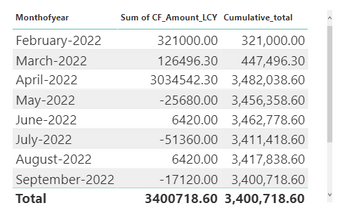
New_hello188_0-1650961030160.png

Measure A : Cumulative total  ( Working correctly) 


Cumulative_total = 
var max_date = MAX('Date'[Date])
var result = CALCULATE(CF_Table[CF_Sum],
'Date'[Date] <= max_date )
return result 


Measure B : To show the sum of next N months data  with what if parameter  ( Working correctly) 


CF_next_N = 
var slected = today()
var result = CALCULATE(sum(CF_Table[CF_Amount_LCY]),
DATESINPERIOD('Date'[Date],slected,+[Parameter Value],MONTH))
return result​


Bar chart will show the total for next month that is based on my what-if parameter slicer. 
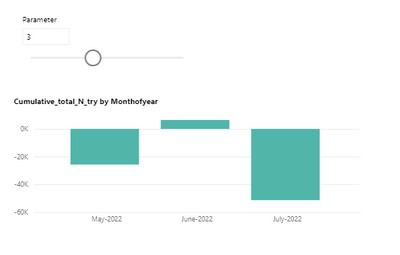
New_hello188_3-1650961266132.png


- Facing error after edited the dax to show cumulative total instead of just total of  each month. 

- This is my attempt to show cumulative total for next N months. 


Cumulative_total_N_try = 
var slected = today()
var max_date = MAX('Date'[Date])
var result = 
CALCULATE(sum(CF_Table[CF_Amount_LCY]),
DATESINPERIOD('Date'[Date],slected,+[Parameter Value],MONTH),
filter(ALL(CF_Table), CF_Table[Cash_Flow_Date] <= max_date ))
return result ​


My file  is here. 


Thanks in advance !  


6 REPLIES 6
SpartaBI
Community Champion
Community Champion

@New_hello188 what do you mean by error? The measure is breaking or the result is wrong?
Anyway, without going deep on your model, just looking at the measure, try this:
Replace this part:
FILTER(CF_Table, CF_Table[Cash_Flow_Date] <= max_date)
with this:
CF_Table[Cash_Flow_Date] <= max_date
if not try this:
FILTER(ALL(CF_Table), CF_Table[Cash_Flow_Date] <= max_date).

Hi @SpartaBI  ,

Thanks for the response ! 

I tried and it is still showing total. 


Just upload my file for your better reference. 

Please get it from here :  My file


Cool, could you please share an example of that are the numbers (the actual value) you want to get in the specific chart that is not working

Hey, I looked at the measure you tried, this is not what I meant, write this:

Cumulative_total_N_try = 
VAR slected =
    TODAY ()
VAR max_date =
    MAX ( 'Date'[Date] )
VAR result =
    CALCULATE (
        CF_Table[CF_Sum],
        DATESINPERIOD ( 'Date'[Date], slected, + [Parameter Value], MONTH ),
        FILTER ( ALL ( CF_Table ), CF_Table[Cash_Flow_Date] <= max_date )
    )
RETURN
    result

@SpartaBI , 

Thanks for review ! 


I tried the measure as you suggested;  the number looks like adding up and the interaction between bar chart and N-parameter slicer is weird .... 

The cumulative total change according to the N-Parameter with still showing the same number of month on X-axis. 


The final chart that I want to achieve is the bar chart that shows the cumulative total for next N-month on x-axis based on N-parameter. 

- I can only able to shows the total but struggle with cumulative total. 

- Below screenshot can be found in another page of my file. 

New_hello188_0-1651023807405.png

Could you pls help to take a look ? 

Anonymous
Not applicable

Hi @New_hello188,

Did the above suggestions help with your scenario? if that is the case, you can consider Kudo or accept the helpful suggestions to help others who faced similar requirements.

If these also don't help, can you please share a pbix or some dummy data that keep raw data structure with expected results? They will help us clarify your scenario and test to coding formula.

How to Get Your Question Answered Quickly  

Regards,

Xiaoxin Sheng

Helpful resources

Announcements
Power BI DataViz World Championships

Power BI Dataviz World Championships

The Power BI Data Visualization World Championships is back! Get ahead of the game and start preparing now!

December 2025 Power BI Update Carousel

Power BI Monthly Update - December 2025

Check out the December 2025 Power BI Holiday Recap!

FabCon Atlanta 2026 carousel

FabCon Atlanta 2026

Join us at FabCon Atlanta, March 16-20, for the ultimate Fabric, Power BI, AI and SQL community-led event. Save $200 with code FABCOMM.