Join us at FabCon Atlanta from March 16 - 20, 2026, for the ultimate Fabric, Power BI, AI and SQL community-led event. Save $200 with code FABCOMM.
Register now!The Power BI Data Visualization World Championships is back! Get ahead of the game and start preparing now! Learn more
Hi, I'm a relatively new user of DAX, with an insanely simple question. I want to get the average of products at these stores in my sample date. Here's my table:
StoreAmountProduct
| Store 1 | 6 | Apple |
| Store 1 | 7 | Oranges |
| Store 1 | 8 | Pears |
| Store 1 | 9 | Bananas |
| Store 1 | 10 | Apple |
| Store 1 | 11 | Oranges |
| Store 1 | 7 | Pears |
| Store 1 | 8 | Bananas |
| Store 1 | 9 | Apple |
| Store 1 | 10 | Oranges |
| Store 1 | 20 | Pears |
| Store 1 | 12 | Bananas |
| Store 1 | 13 | Apple |
| Store 1 | 14 | Oranges |
| Store 2 | 8 | Pears |
| Store 2 | 9 | Bananas |
| Store 2 | 10 | Apple |
| Store 2 | 11 | Oranges |
| Store 2 | 7 | Pears |
| Store 2 | 8 | Bananas |
| Store 2 | 9 | Apple |
| Store 2 | 10 | Oranges |
| Store 2 | 50 | Pears |
I wrote a measure:
AVERAGEX(VALUES(Table1[Product]),SUM([Amount])
But the pivot table looks like this (see pic below). Why, at the store level does it not iterate over my products and return the average 36 (for Store 1) instead of the sum 144??
I am so frustrated by this, and it seems like it should be so basic. I thought AVERAGEX solved all those problems of an average being different for subtotal and total levels, but either that theory is wrong or I'm doing something wrong...
Thanks in advance for your help!
William
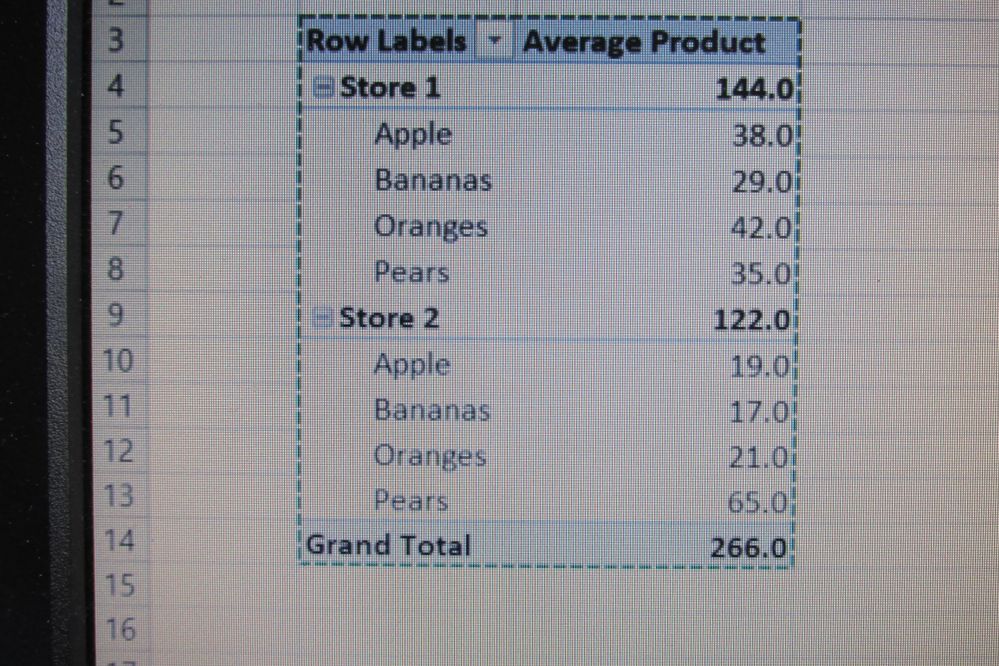
My Pivot Table
Solved! Go to Solution.
@Anonymous here is your measure:
Avg = AVERAGEX(VALUES(Table4[Product]),CALCULATE(SUM([Amount])))
Subscribe to the @PowerBIHowTo YT channel for an upcoming video on List and Record functions in Power Query!!
Learn Power BI and Fabric - subscribe to our YT channel - Click here: @PowerBIHowTo
If my solution proved useful, I'd be delighted to receive Kudos. When you put effort into asking a question, it's equally thoughtful to acknowledge and give Kudos to the individual who helped you solve the problem. It's a small gesture that shows appreciation and encouragement! ❤
Did I answer your question? Mark my post as a solution. Proud to be a Super User! Appreciate your Kudos 🙂
Feel free to email me with any of your BI needs.
Note (I can't figure out how to edit this post so I'm just adding this): I want the average of the totals of the products. So in other words, on a product level this measure is pretty much meaningless--I just want, at a store level, so see the number 36 (for store 1) and 30.5 for store 2. And I thought AVERAGEX would get me there with ease... Sadly, I seem to have been mistaken!
@Anonymous here is your measure:
Avg = AVERAGEX(VALUES(Table4[Product]),CALCULATE(SUM([Amount])))
Subscribe to the @PowerBIHowTo YT channel for an upcoming video on List and Record functions in Power Query!!
Learn Power BI and Fabric - subscribe to our YT channel - Click here: @PowerBIHowTo
If my solution proved useful, I'd be delighted to receive Kudos. When you put effort into asking a question, it's equally thoughtful to acknowledge and give Kudos to the individual who helped you solve the problem. It's a small gesture that shows appreciation and encouragement! ❤
Did I answer your question? Mark my post as a solution. Proud to be a Super User! Appreciate your Kudos 🙂
Feel free to email me with any of your BI needs.
Amazing! Thanks so much! I've heard about the thing of using calculate to transition "row context" to "filter context"... is that what is going on here?
Again, thanks for helping remove a very frustrating roadblock for me!
William
@Anonymous that's exactly what the issue was. glad it worked out.
Subscribe to the @PowerBIHowTo YT channel for an upcoming video on List and Record functions in Power Query!!
Learn Power BI and Fabric - subscribe to our YT channel - Click here: @PowerBIHowTo
If my solution proved useful, I'd be delighted to receive Kudos. When you put effort into asking a question, it's equally thoughtful to acknowledge and give Kudos to the individual who helped you solve the problem. It's a small gesture that shows appreciation and encouragement! ❤
Did I answer your question? Mark my post as a solution. Proud to be a Super User! Appreciate your Kudos 🙂
Feel free to email me with any of your BI needs.
The Power BI Data Visualization World Championships is back! Get ahead of the game and start preparing now!
Check out the November 2025 Power BI update to learn about new features.
| User | Count |
|---|---|
| 20 | |
| 10 | |
| 9 | |
| 4 | |
| 4 |
| User | Count |
|---|---|
| 34 | |
| 31 | |
| 20 | |
| 12 | |
| 11 |