
cancel
Showing results for 
Search instead for 
Did you mean: 

The Power BI Data Visualization World Championships is back! It's time to submit your entry. Live now!

Reply
Anonymous
Not applicable

Apply RLS on horizontal level

Hello everyone,


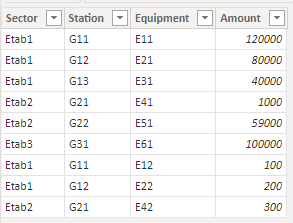
Here is an example of data i am working with :

Fact table 

sp260_1-1685019269356.png

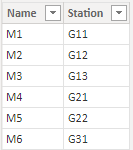
Managers table

sp260_2-1685019289595.png


And here is the role that i've created  for test : 

sp260_3-1685019369818.png


I am working on a business need who requires that a manager could see the global amount of his collegues but not the details.

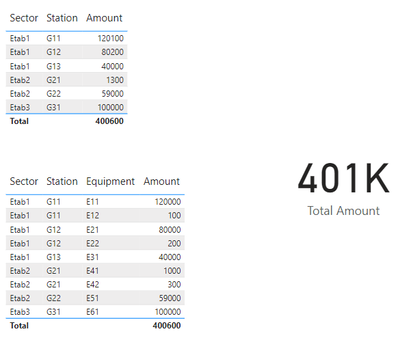
Initial report looks like that :

sp260_4-1685019439974.png

Below the result when i apply my role : 

sp260_5-1685019517867.png

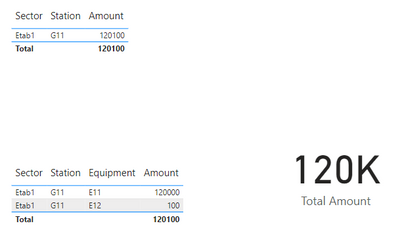
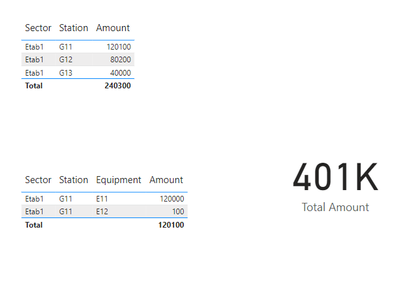
But what i really need is this : 

sp260_7-1685020353372.png

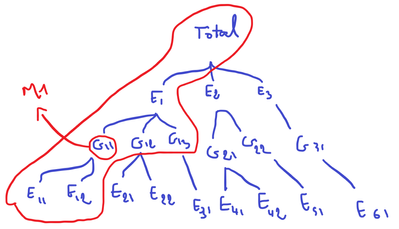
A picture is worth a thousand words : the manager (M1) have to access only the data of his station (G11) or the global amounts of his hierarchy.

sp260_6-1685020153506.png


Do you have any idea how could i achieve this ? I would greatly appreciate any insights or help.


Kind regards,


3 REPLIES 3
lbendlin
Super User
Super User

I don't think you can use static RLS for that.  Consider using dynamic RLS.

Anonymous
Not applicable

Any idea how to do this with dynamic RLS ?

It's as simple as maintaining a permissions mapping table that you control via USERPRINCIPALNAME.

Helpful resources

Announcements
Power BI DataViz World Championships

Power BI Dataviz World Championships

The Power BI Data Visualization World Championships is back! It's time to submit your entry.

January Power BI Update Carousel

Power BI Monthly Update - January 2026

Check out the January 2026 Power BI update to learn about new features.

FabCon Atlanta 2026 carousel

FabCon Atlanta 2026

Join us at FabCon Atlanta, March 16-20, for the ultimate Fabric, Power BI, AI and SQL community-led event. Save $200 with code FABCOMM.