Get certified for free when you join Fabric Data Days 2026 and dive into Fabric, Power BI, SQL, AI, and other essential data skills.
Join nowTry your skills in the Power BI Dataviz World Championship! Round one ends June 26. Join now
We have loaded huge volume of data(> 1M) from database into PowerBI through ODBC connection.
Need to create a custom column based on if-else-if statement with several and conditions . I have used Custom column option but once I apply changes , the report is again hitting DB for loading data which is taking lot of time.
Is there any other alternative where we can prevent report refreshing data from database.
Thanks !
Solved! Go to Solution.
@Anonymous , In power query it will. In DAX you can use Switch, bit costly but will work with loaded data
Switch-Case statement of #PowerBI: https://www.youtube.com/watch?v=gelJWktlR80&list=PLPaNVDMhUXGaaqV92SBD5X2hk3TMNlHhb&index=56
Hi @Anonymous ,
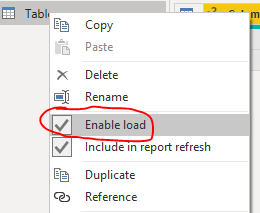
You could try unchecking the Enable load option before creating custom column and enable it after the columns being created.
Best Regards,
Jay
Thanks worked as expected
Hi @Anonymous ,
You could try unchecking the Enable load option before creating custom column and enable it after the columns being created.
Best Regards,
Jay
@Anonymous , In power query it will. In DAX you can use Switch, bit costly but will work with loaded data
Switch-Case statement of #PowerBI: https://www.youtube.com/watch?v=gelJWktlR80&list=PLPaNVDMhUXGaaqV92SBD5X2hk3TMNlHhb&index=56
Don't miss out on Data Days, June 15 through August 7. Learn Fabric, Power BI, SQL, AI and more.
Check out the May 2026 Power BI update to learn about new features.
| User | Count |
|---|---|
| 3 | |
| 2 | |
| 2 | |
| 2 | |
| 1 |
| User | Count |
|---|---|
| 6 | |
| 4 | |
| 3 | |
| 3 | |
| 3 |