Huge last-minute discounts for FabCon Vienna from September 15-18, 2025
Supplies are limited. Contact info@espc.tech right away to save your spot before the conference sells out.
Get your discount- Power BI forums
- Get Help with Power BI
- Desktop
- Service
- Report Server
- Power Query
- Mobile Apps
- Developer
- DAX Commands and Tips
- Custom Visuals Development Discussion
- Health and Life Sciences
- Power BI Spanish forums
- Translated Spanish Desktop
- Training and Consulting
- Instructor Led Training
- Dashboard in a Day for Women, by Women
- Galleries
- Data Stories Gallery
- Themes Gallery
- Contests Gallery
- Quick Measures Gallery
- Notebook Gallery
- Translytical Task Flow Gallery
- TMDL Gallery
- R Script Showcase
- Webinars and Video Gallery
- Ideas
- Custom Visuals Ideas (read-only)
- Issues
- Issues
- Events
- Upcoming Events
Score big with last-minute savings on the final tickets to FabCon Vienna. Secure your discount
- Power BI forums
- Forums
- Get Help with Power BI
- DAX Commands and Tips
- Re: Always display last 7 days of quantity dependi...
- Subscribe to RSS Feed
- Mark Topic as New
- Mark Topic as Read
- Float this Topic for Current User
- Bookmark
- Subscribe
- Printer Friendly Page

- Mark as New
- Bookmark
- Subscribe
- Mute
- Subscribe to RSS Feed
- Permalink
- Report Inappropriate Content
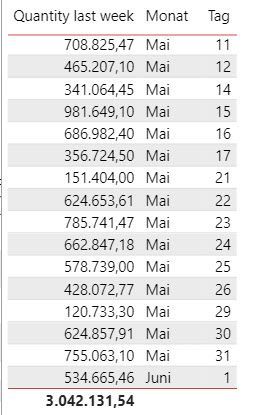
Always display last 7 days of quantity depending on the most recent selected date
Solved! Go to Solution.
- Mark as New
- Bookmark
- Subscribe
- Mute
- Subscribe to RSS Feed
- Permalink
- Report Inappropriate Content
Hi @daveinitiv ,
For showing only the last 7 days, you could create a measure for filtering.
Measure = var _max=MAXX(ALL('Table'),[Date])
return IF(_max>=MAX('Table'[Date])&&_max-7<MAX('Table'[Date]),1)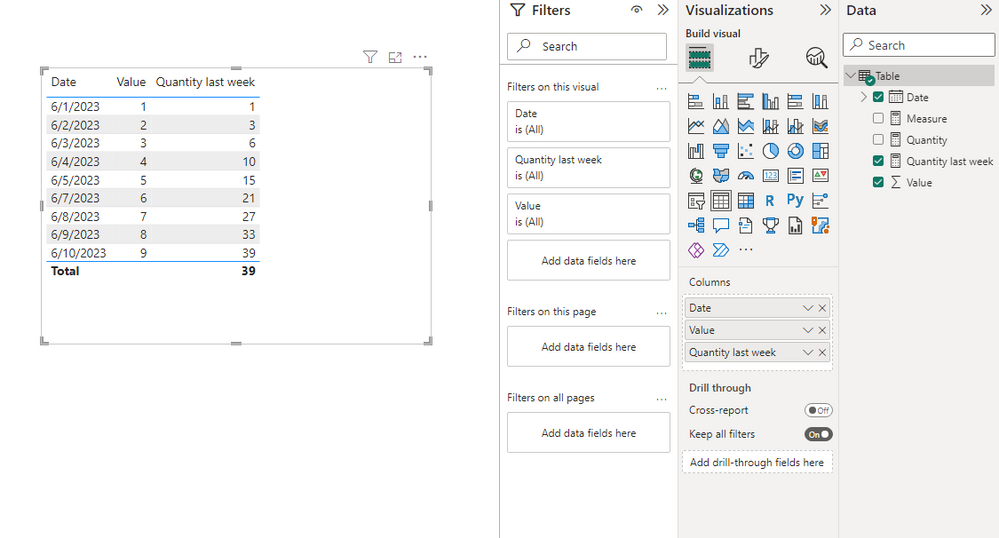
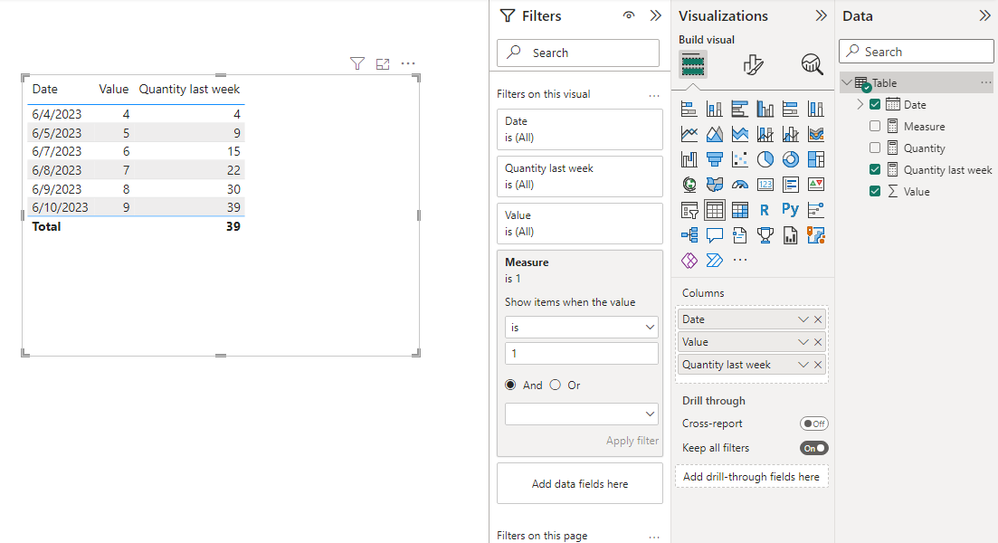
After putting the measure into the visual-level filters and setting up show items when the value is 1, the visual shows the last 7 days only.
Best Regards,
Stephen Tao
If this post helps, then please consider Accept it as the solution to help the other members find it more quickly.

- Mark as New
- Bookmark
- Subscribe
- Mute
- Subscribe to RSS Feed
- Permalink
- Report Inappropriate Content
Last7day_qty=
VAR datetb= datesinperiod(dimtable[date],max(dimtable[date],-7,day)
VAR last7qty=calculate ([ total quantity],datetb)
VAR selection _fliter=selected value (dimtable [ date]
VAR max_date_last7qty=MAXX (SUMMARIZE (dimtable, dimtable [ date],"maxdate",MAX(dimtable [date])),[total quantity])
return
IF(selection_filter,last7qty,max_date_last7qty)
Feel free to contact:6304729084

- Mark as New
- Bookmark
- Subscribe
- Mute
- Subscribe to RSS Feed
- Permalink
- Report Inappropriate Content
Hi @daveinitiv ,
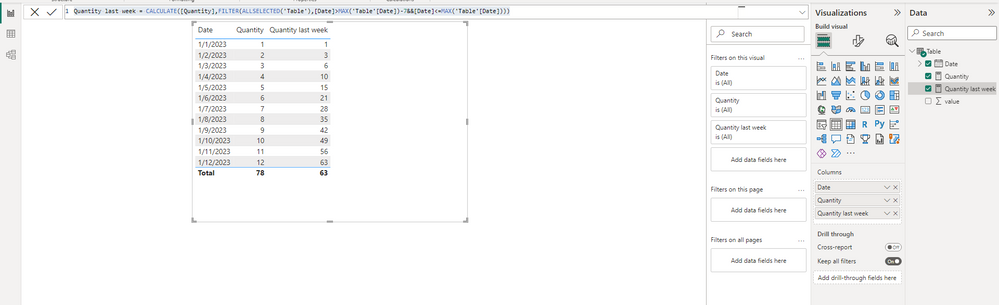
You should try
Quantity last week = CALCULATE([Quantity],FILTER(ALLSELECTED('Table'),[Date]>MAX('Table'[Date])-7&&[Date]<=MAX('Table'[Date])))Here's an example for this measure.
Best Regards,
Stephen Tao
If this post helps, then please consider Accept it as the solution to help the other members find it more quickly.
- Mark as New
- Bookmark
- Subscribe
- Mute
- Subscribe to RSS Feed
- Permalink
- Report Inappropriate Content
Hi Stephen,
thanks a lot for your efforts!
But I need something different, actually (sorry I wasn't 100% clear about that, I just noticed):
I want the visual to display to always only the last 7 days in dates. So the daily value for each datapoint, but in the date column only the last 7 days displayed.
I know there is a possibility to achieve a similar thing via the visual filters, but this gives me not enough flexibility (it always calculates last 7 days from today, so when I change the filtercontext to, say, 2 months ago, nothing will be displayed anymore).
It should always work like this: maximum date selected minus 7 on the date value. if no filter selection is made, max date in sales data minus 7 days.
I hope it was kind of clear (sorry, english is not my native language).
Thank you!
BR
David
- Mark as New
- Bookmark
- Subscribe
- Mute
- Subscribe to RSS Feed
- Permalink
- Report Inappropriate Content
Hi @daveinitiv ,
For showing only the last 7 days, you could create a measure for filtering.
Measure = var _max=MAXX(ALL('Table'),[Date])
return IF(_max>=MAX('Table'[Date])&&_max-7<MAX('Table'[Date]),1)
After putting the measure into the visual-level filters and setting up show items when the value is 1, the visual shows the last 7 days only.
Best Regards,
Stephen Tao
If this post helps, then please consider Accept it as the solution to help the other members find it more quickly.
- Mark as New
- Bookmark
- Subscribe
- Mute
- Subscribe to RSS Feed
- Permalink
- Report Inappropriate Content
Hi Stephen,
that's brilliant thanks, I was able to get the solution with a slightly modified formula, which I would never arrived at without your help!
This was the final one that got it solved:
Helpful resources

Power BI Monthly Update - August 2025
Check out the August 2025 Power BI update to learn about new features.

Fabric Community Update - August 2025
Find out what's new and trending in the Fabric community.

| User | Count |
|---|---|
| 12 | |
| 11 | |
| 8 | |
| 6 | |
| 6 |


| User | Count |
|---|---|
| 25 | |
| 19 | |
| 14 | |
| 8 | |
| 7 |


