cancel
Showing results for 
Search instead for 
Did you mean: 

The Power BI Data Visualization World Championships is back! Get ahead of the game and start preparing now! Learn more

Reply
redbird
New Member

Aggregate over groups dynamically

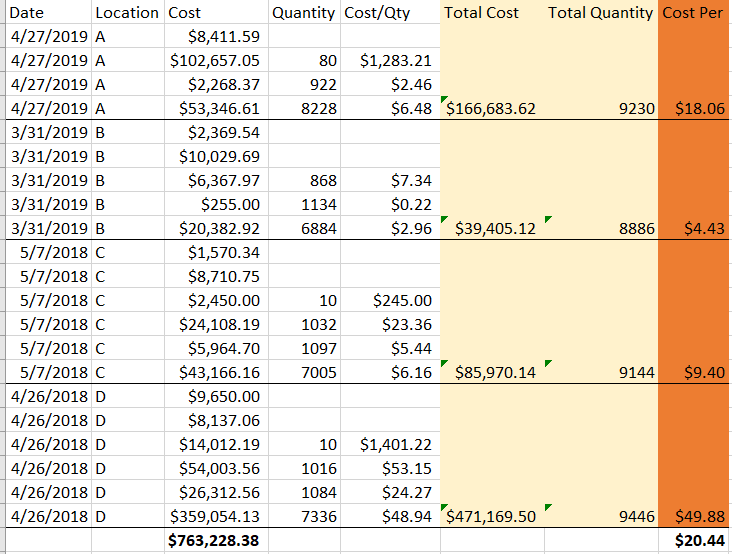
I have a table that looks like this:

Capture.PNG


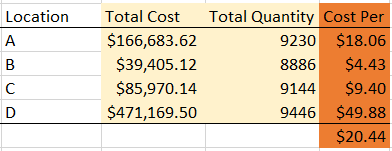
The end result would need to look like this:


Capture2.PNG


The table result will change based on other filters selected, so I don't think it can be a calculated column. A measure makes more sense, but have struggled trying to figure out how to sum the data dynamically based on filters selected. Any assistance is appreciated! Thank you.

3 REPLIES 3
Greg_Deckler
Community Champion
Community Champion

Unless I am missing something, you should just be able to do something like:


Total Cost = SUM([Cost])

Total Quantity = SUM([Quantity])

Cost Per = DIVIDE([Total Cost],[Total Quantity],BLANK())


Follow on LinkedIn
@ me in replies or I'll lose your thread!!!
Instead of a Kudo, please vote for this idea
Become an expert!: Enterprise DNA
External Tools: MSHGQM
YouTube Channel!: Microsoft Hates Greg
Latest book!:
DAX For Humans

DAX is easy, CALCULATE makes DAX hard...

Thank you for the suggestion. I tried it and it gave the same results as my calculation below, but both are still not quite the right answer. It needs to be the summation of all costs / the summation of all quantities averaged over all locations depending on the filter selected. 


Value =
var __Numerator = CALCULATE(sum(Table[Cost]),FILTER(Table, Table[Location]=SELECTEDVALUE(Table[Location])))
var __Denominator = CALCULATE(sum(Table[Quantity]),FILTER(Table, Table[Location]=SELECTEDVALUE(Table[Location])))

return DIVIDE(__Numerator/__Denominator)

Anonymous
Not applicable

[Total Cost] = sum ( 'Table'[Cost] )
[Total Quantity] = sum ( 'Table'[Quantity] )
[Average Cost] = divide ( [Total Cost], [Total Quantity] )

[Your Measure] =
averagex(
	
	addcolumns(
		summarize(
			'Table',
			'Table'[Location]
		),
		"'Table'[AvgCostPerLocation]", [Average Cost]
	),
	
	'Table'[AvgCostPerLocation]
)

Please never use the table name in front of a measure and always use the table name before a column. This is one of the most important things in good DAX. Never deviate from this. EVER.


Best

Darek

Helpful resources

Announcements
Power BI DataViz World Championships

Power BI Dataviz World Championships

The Power BI Data Visualization World Championships is back! Get ahead of the game and start preparing now!

December 2025 Power BI Update Carousel

Power BI Monthly Update - December 2025

Check out the December 2025 Power BI Holiday Recap!

FabCon Atlanta 2026 carousel

FabCon Atlanta 2026

Join us at FabCon Atlanta, March 16-20, for the ultimate Fabric, Power BI, AI and SQL community-led event. Save $200 with code FABCOMM.