Learn from the best! Meet the four finalists headed to the FINALS of the Power BI Dataviz World Championships! Register now
Good day,
I have data quesry consists of number of Execel files.
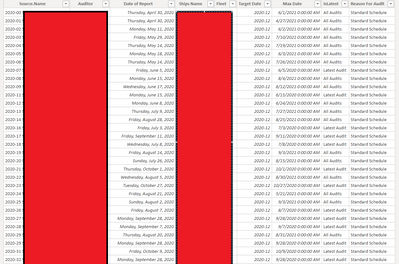
Query has colunms "SHIP NAME" and "Date of Reports". Some of the "SHIP NAME" repeats various times with different "DATES". While ago I was interested to filter out only latest date lines for visuals and used following measures and custom colums:
@AleksandrMe can you provide sample data
Hi @AleksandrMe
Can you add a sample of your data and result here?
For the Max Date measure, you can use LASTDATE ('RNA Date of Report'[Date of Report])
Max Date=LASTDATE ('RNA Date of Report'[Date of Report])
and then if you want to use that in the other measure, you can add a variable in your measure like this:
IsLatest =
VAR _MaxDate =
CALCULATE (
LASTDATE ( 'RNA Date of Report'[Date of Report] ),
ALLEXCEPT ( 'RNA Date of Report', 'RNA Date of Report'[Ships Name] )
)
RETURN
IF (
'RNA Date of Report'[Date of Report] = _MaxDate,
"Latest Audit",
"All Audits"
)
If this post helps, please consider accepting it as the solution to help the other members find it more quickly.
Appreciate your Kudos✌️!!
Good day,
Thnaks for reply. What I'm looking for is the new measure which will filter out date previous to last. The above one is not helping me, or I;m doing something wrong.
Kidn Regards
Aleks
Raally looking for solution how to use DAX function to recognize LATEST, Previous Date for each line.
I use below functions to recognize latest, but cannot progress more ("all audit"s need to be broken down on more conditions)
A new Power BI DataViz World Championship is coming this June! Don't miss out on submitting your entry.
Share feedback directly with Fabric product managers, participate in targeted research studies and influence the Fabric roadmap.
| User | Count |
|---|---|
| 5 | |
| 4 | |
| 3 | |
| 2 | |
| 2 |
| User | Count |
|---|---|
| 12 | |
| 10 | |
| 9 | |
| 7 | |
| 5 |