Join us at FabCon Atlanta from March 16 - 20, 2026, for the ultimate Fabric, Power BI, AI and SQL community-led event. Save $200 with code FABCOMM.
Register now!Get Fabric Certified for FREE during Fabric Data Days. Don't miss your chance! Request now
Hi Team,
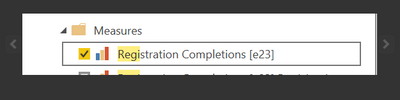
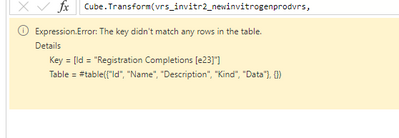
I am trying to connect adobe analytics with power bi using power query with Cubes. However, I am not sure why few of the metrics are not pulling and throwing error. For example, I want to oull in adobe registration completions and using same name in query but it's not showing up. Please help - it's urgent.
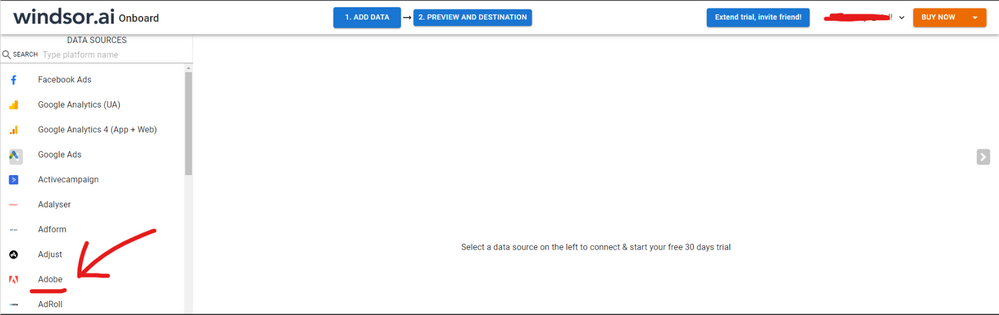
Hi @Rimple_Manni were you able to find a solution? Sorry for the late response. I've previously used the Adobe native connector but I had some issues with my connection. As a workaround, maybe you can try to connect using a 3rd party connector. I've tried windsor.ai , supemetrics and funnel.io. I stayed with windsor because it is much cheaper so just to let you know other options. In case you wonder, to make the connection first search for the Adobe connector in the data sources list:
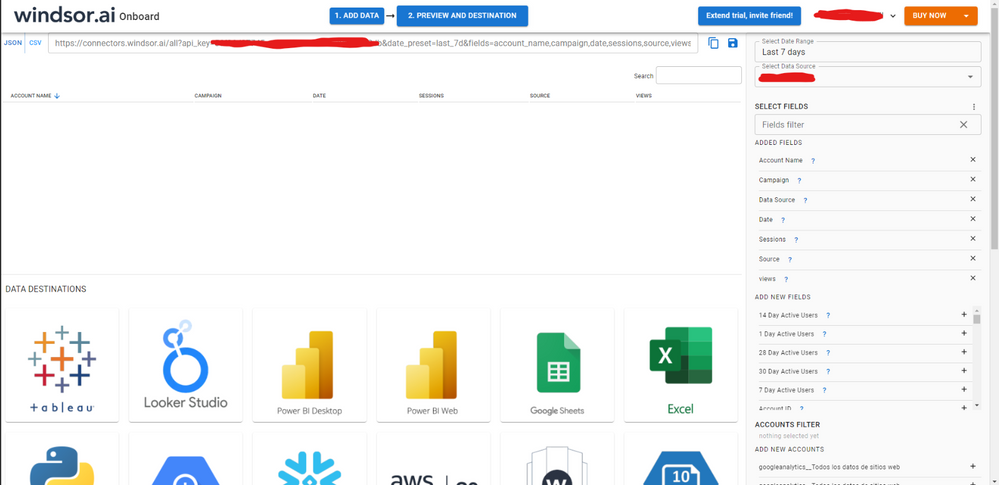
Then, you should enter your Adobe credentials to make the connection. After that, you'll see a preview of your data where you can select the fields you want to see in PBI.
Finally, you just have to choose PBI as destination and copy and paste the url that will appear there in PBI desktop --> Get Data --Web > --> Paste the link
Check out the November 2025 Power BI update to learn about new features.
Advance your Data & AI career with 50 days of live learning, contests, hands-on challenges, study groups & certifications and more!
| User | Count |
|---|---|
| 12 | |
| 9 | |
| 8 | |
| 5 | |
| 3 |
| User | Count |
|---|---|
| 28 | |
| 22 | |
| 20 | |
| 18 | |
| 12 |