Join us at FabCon Atlanta from March 16 - 20, 2026, for the ultimate Fabric, Power BI, AI and SQL community-led event. Save $200 with code FABCOMM.
Register now!Get Fabric Certified for FREE during Fabric Data Days. Don't miss your chance! Request now
I have a dataset for Australia for various variables. The data is at suburb label with data on states as well. I have created a clustered bar chart in powerbi for all the variables for a selected suburb. I want to add bars for average values in overall Australia and the state of the selected suburb as well. How do i do this in powerbi?
Example DataSets:
SubUrb | State| Age under 18 | age 18-60 | age 60+
ABC |DEF | 10 | 20 | 30
Steps and demonstration highly welcome!
hi @ujjwalkc
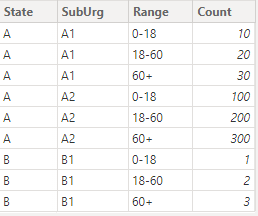
supposing your table looks like:
| State | SubUrg | 0-18 | 18-60 | 60+ |
| A | A1 | 10 | 20 | 30 |
| A | A2 | 100 | 200 | 300 |
| B | B1 | 1 | 2 | 3 |
try to:
1) unpivot it to a table like:
About unpivot: https://learn.microsoft.com/en-us/power-query/unpivot-column
2) plot a slicer with the suburb column
3) plot a clustered column chart with necessary columns and feed two measures as constant line like:
StateAvg =
CALCULATE(
AVERAGE(data[Count]),
ALL(data),
data[State]=MAX(data[State])
)CountryAvg =
CALCULATE(
AVERAGE(data[Count]),
ALL(data)
)
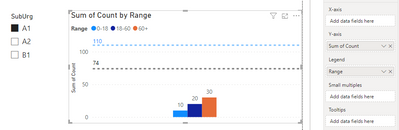
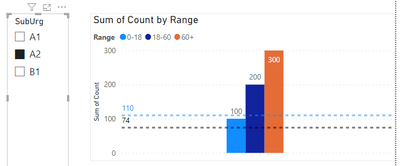
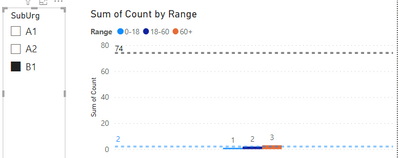
it worked like:
Thanks so much! But, I wanted the values for the state and the country as an additional bar in the clustered bar chart. On top of that, I want the legend to have the selected suburb, state and Australia as legend items. CHeers!
Check out the November 2025 Power BI update to learn about new features.
Advance your Data & AI career with 50 days of live learning, contests, hands-on challenges, study groups & certifications and more!
| User | Count |
|---|---|
| 11 | |
| 9 | |
| 9 | |
| 6 | |
| 5 |
| User | Count |
|---|---|
| 27 | |
| 22 | |
| 19 | |
| 17 | |
| 11 |