Don't miss your chance to take exam DP-600 or DP-700 on us!
Request nowLearn from the best! Meet the four finalists headed to the FINALS of the Power BI Dataviz World Championships! Register now
Hello Community,
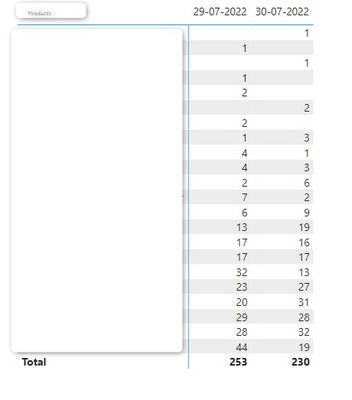
I have a report with a table (below image) that shows Products and sales for each day
I have created a measure to calculate the sum of all sales for each product:
Total Sales = SUM(Table[Sales_Invoice])
In this table I have applied a filter to show only the product that have less than 100 units sold.
For 1 day it works fine, but if the range of dates is more than 1, the behaviour is that it sums the units of the dates.
Thank you in advance for your help.
Solved! Go to Solution.
HI,
Please check the attached file. Or, please share your sample pbix file's link here and then I can try to look into it.
Hi @yellow43 ,
Here are the steps you can follow:
1. Create calculated column.
Month =
FORMAT('Table'[Date],"dd")
&"/"&
FORMAT('Table'[Date],"mmm")
2. Create measure.
Sum_Measure =
var _sum=
CALCULATE(
SUM('Table'[Qty Sold]),FILTER(ALL('Table'),
'Table'[Product]=MAX('Table'[Product])&&
'Table'[Month]=MAX('Table'[Month])))
return
IF(
_sum>=100,BLANK(),_sum)
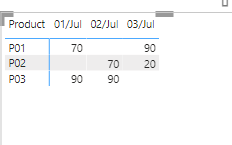
3. Result:
If you need pbix, please click here.
Best Regards,
Liu Yang
If this post helps, then please consider Accept it as the solution to help the other members find it more quickly
Hi,
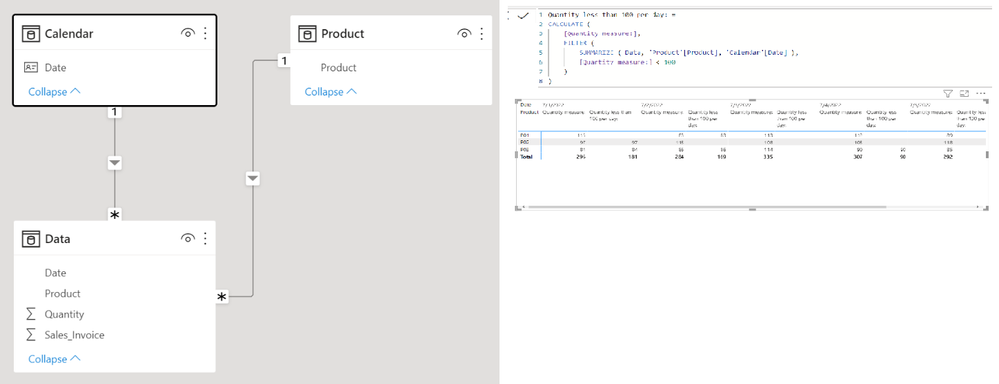
I tried to create a sample pbix file like below.
The below is finding quantity that is lower than 100 per day per product.
Please check the below picture and the attached pbix file.
I hope the below can provide some ideas on how to create a solution for your dataset.
Quantity less than 100 per day: =
CALCULATE (
[Quantity measure:],
FILTER (
SUMMARIZE ( Data, 'Product'[Product], 'Calendar'[Date] ),
[Quantity measure:] < 100
)
)
Hello @Jihwan_Kim,
Thank you for your help! But I have not explained well.
Please see the image with desired output
HI,
Please check the attached file. Or, please share your sample pbix file's link here and then I can try to look into it.
Share feedback directly with Fabric product managers, participate in targeted research studies and influence the Fabric roadmap.
Check out the February 2026 Power BI update to learn about new features.
| User | Count |
|---|---|
| 6 | |
| 4 | |
| 3 | |
| 3 | |
| 2 |
| User | Count |
|---|---|
| 7 | |
| 7 | |
| 6 | |
| 6 | |
| 5 |