cancel
Showing results for 
Search instead for 
Did you mean: 

The Power BI Data Visualization World Championships is back! Get ahead of the game and start preparing now! Learn more

Reply

Add a measure to unpivoted data

Hi all,


How can I add a measure to the matrix visual with unpivoted data? I already created some measures to be able to filter Month0 and Month1 as I need. But the matrix doesn't allow me to add another row after the 'Sales' row. My measure called 'SPH' should dynamically recalculate based on what values are in the 'Hours' and 'Sales' rows.

powerbiuser444_0-1624062625001.png

Please see the attached pbix.

Appreciate your help!

1 ACCEPTED SOLUTION
daxer-almighty
Solution Sage
Solution Sage

@powerbiuser444 


Here's what you have to do. First and foremost, never, ever use a single-table model. I mean NEVER. If you want to know what's the reason for this not-to-ever-be-violated rule, watch this eye-opening and warning video that everyone using PBI should watch (it's mandatory): Auto-exist on clusters or numbers - Unplugged #22 - YouTube


With the basics out of the way, let's focus on the task at hand. First, you've got to get your model into this shape:
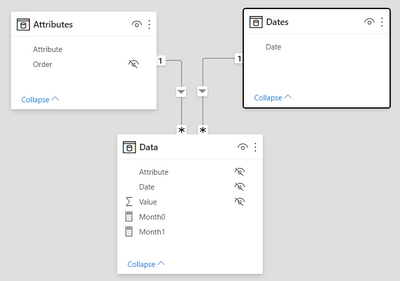
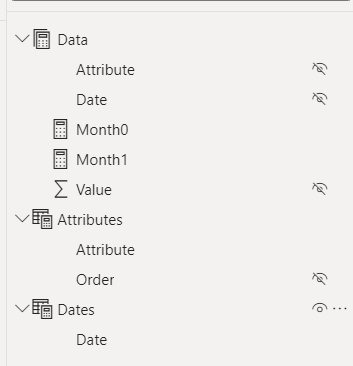
daxeralmighty_0-1624122628937.pngdaxeralmighty_1-1624122657005.png

Then your measures become:

DEFINE 

MEASURE Data[Month1] = 
var DateSelected = SELECTEDVALUE( Dates[Date] )
VAR StartMonth = EOMONTH ( DateSelected, 0 ) + 1
VAR EndMonth = EOMONTH ( DateSelected, 1 )
var SelectedAttribute = SELECTEDVALUE( Attributes[Attribute] )
return
SWITCH( TRUE(),

    SelectedAttribute in {"Hours", "Sales"},
        VAR Result =
            CALCULATE (
                SUM ( Data[Value] ),
                Dates[Date] >= StartMonth,
                Dates[Date] <= EndMonth
            )
        return
            Result,

    SelectedAttribute in {"SPH"},
        VAR Sales =
            CALCULATE (
                SUM ( Data[Value] ),
                Dates[Date] >= StartMonth,
                Dates[Date] <= EndMonth,
                Attributes[Attribute] = "Sales",
                ALL( Attributes )
            )
        VAR Hours =
            CALCULATE (
                SUM ( Data[Value] ),
                Dates[Date] >= StartMonth,
                Dates[Date] <= EndMonth,
                Attributes[Attribute] = "Hours",
                ALL( Attributes )
            )
        VAR Result = DIVIDE( Sales, Hours )
        RETURN
            Result
)

MEASURE Data[Month0] = 
var SelectedAttribute = SELECTEDVALUE( Attributes[Attribute] )
var DateSelected = SELECTEDVALUE( Dates[Date] )
var EndMonth = EOMONTH ( DateSelected, 0 )
return
SWITCH( TRUE(),

    SelectedAttribute in {"Hours", "Sales"},
        VAR Result =
            CALCULATE (
                SUM ( Data[Value] ),
                Dates[Date] >= DateSelected,
                Dates[Date] <= EndMonth
            )
        return
            Result,

    SelectedAttribute in {"SPH"},
        VAR Sales =
            CALCULATE (
                SUM ( Data[Value] ),
                Dates[Date] >= DateSelected,
                Dates[Date] <= EndMonth,
                Attributes[Attribute] = "Sales",
                ALL( Attributes )
            )
        VAR Hours =
            CALCULATE (
                SUM ( Data[Value] ),
                Dates[Date] >= DateSelected,
                Dates[Date] <= EndMonth,
                Attributes[Attribute] = "Hours",
                ALL( Attributes )
            )
        VAR Result = DIVIDE( Sales, Hours )
        RETURN
            Result
)

And here's your Attributes table:
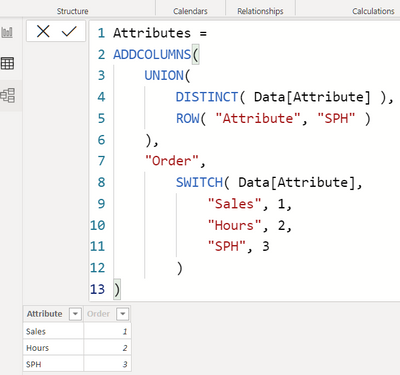
daxeralmighty_2-1624122780069.png

And the final result:

daxeralmighty_3-1624122820869.png


View solution in original post

2 REPLIES 2

@daxer-almighty Appreciate your time and help!

daxer-almighty
Solution Sage
Solution Sage

@powerbiuser444 


Here's what you have to do. First and foremost, never, ever use a single-table model. I mean NEVER. If you want to know what's the reason for this not-to-ever-be-violated rule, watch this eye-opening and warning video that everyone using PBI should watch (it's mandatory): Auto-exist on clusters or numbers - Unplugged #22 - YouTube


With the basics out of the way, let's focus on the task at hand. First, you've got to get your model into this shape:

daxeralmighty_0-1624122628937.pngdaxeralmighty_1-1624122657005.png

Then your measures become:

DEFINE 

MEASURE Data[Month1] = 
var DateSelected = SELECTEDVALUE( Dates[Date] )
VAR StartMonth = EOMONTH ( DateSelected, 0 ) + 1
VAR EndMonth = EOMONTH ( DateSelected, 1 )
var SelectedAttribute = SELECTEDVALUE( Attributes[Attribute] )
return
SWITCH( TRUE(),

    SelectedAttribute in {"Hours", "Sales"},
        VAR Result =
            CALCULATE (
                SUM ( Data[Value] ),
                Dates[Date] >= StartMonth,
                Dates[Date] <= EndMonth
            )
        return
            Result,

    SelectedAttribute in {"SPH"},
        VAR Sales =
            CALCULATE (
                SUM ( Data[Value] ),
                Dates[Date] >= StartMonth,
                Dates[Date] <= EndMonth,
                Attributes[Attribute] = "Sales",
                ALL( Attributes )
            )
        VAR Hours =
            CALCULATE (
                SUM ( Data[Value] ),
                Dates[Date] >= StartMonth,
                Dates[Date] <= EndMonth,
                Attributes[Attribute] = "Hours",
                ALL( Attributes )
            )
        VAR Result = DIVIDE( Sales, Hours )
        RETURN
            Result
)

MEASURE Data[Month0] = 
var SelectedAttribute = SELECTEDVALUE( Attributes[Attribute] )
var DateSelected = SELECTEDVALUE( Dates[Date] )
var EndMonth = EOMONTH ( DateSelected, 0 )
return
SWITCH( TRUE(),

    SelectedAttribute in {"Hours", "Sales"},
        VAR Result =
            CALCULATE (
                SUM ( Data[Value] ),
                Dates[Date] >= DateSelected,
                Dates[Date] <= EndMonth
            )
        return
            Result,

    SelectedAttribute in {"SPH"},
        VAR Sales =
            CALCULATE (
                SUM ( Data[Value] ),
                Dates[Date] >= DateSelected,
                Dates[Date] <= EndMonth,
                Attributes[Attribute] = "Sales",
                ALL( Attributes )
            )
        VAR Hours =
            CALCULATE (
                SUM ( Data[Value] ),
                Dates[Date] >= DateSelected,
                Dates[Date] <= EndMonth,
                Attributes[Attribute] = "Hours",
                ALL( Attributes )
            )
        VAR Result = DIVIDE( Sales, Hours )
        RETURN
            Result
)

And here's your Attributes table:

daxeralmighty_2-1624122780069.png

And the final result:

daxeralmighty_3-1624122820869.png


Helpful resources

Announcements
November Power BI Update Carousel

Power BI Monthly Update - November 2025

Check out the November 2025 Power BI update to learn about new features.

Fabric Data Days Carousel

Fabric Data Days

Advance your Data & AI career with 50 days of live learning, contests, hands-on challenges, study groups & certifications and more!

FabCon Atlanta 2026 carousel

FabCon Atlanta 2026

Join us at FabCon Atlanta, March 16-20, for the ultimate Fabric, Power BI, AI and SQL community-led event. Save $200 with code FABCOMM.