cancel
Showing results for 
Search instead for 
Did you mean: 

The Power BI Data Visualization World Championships is back! Get ahead of the game and start preparing now! Learn more

Reply
Jameel
Regular Visitor

Actual Vs target area chart

RelationRelationoutput with filter1output with filter1output with filteroutput with filterOutputOutputInputInputinput1input1

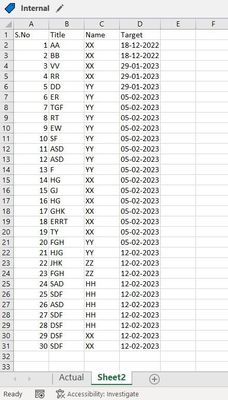
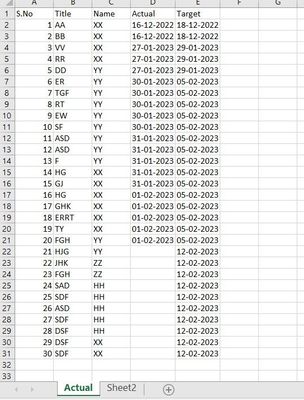
 i have given input as shown in excel sheet where for each title , name and its actual date and target date.

sheet2 create to for target.


i have create dateset that gives week number for year 2022 to 2023


created column:

Actual week number = WEEKDAY('Actual'[Actual],2)
aCTUAL WK = IF('Actual'[Actual]=BLANK(),"",RIGHT(YEAR('Actual'[Actual]+ 4 -[Actual week number]),2)&"WK" &FORMAT(WEEKNUM('Actual'[Actual],21),"00"))
 
Target week number = WEEKDAY('Sheet2'[Target ],2)
Target WK = IF('Sheet2'[Target ]=BLANK(),"",RIGHT(YEAR('Sheet2'[Target ]+ 4 -[Target week number]),2)&"WK" &FORMAT(WEEKNUM('Sheet2'[Target ],21),"00"))
 
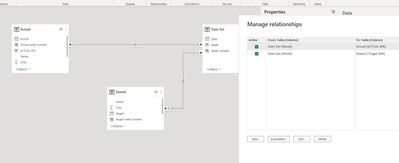
Gave relation two relation , one from data set ,week to Actual week and data set week to target week.
 
Issue 1:
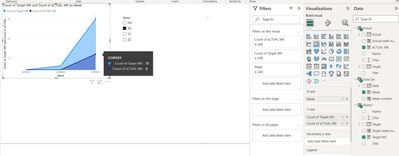
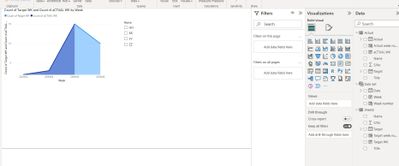
Area chart showing actual vs target correctly when name was not filter.
 
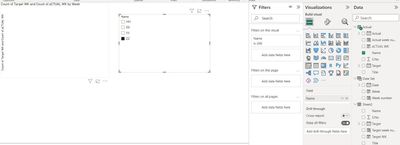
1. when "XX" is filtered, it is showing complete target count (including other name) vs XX actual count. same issue for "YY".
Q 1: I want to show only count of target "XX" VS count of actual "XX", not complete target vs XX actual.
 
Issue 2:.
For "HH" and "ZZ", only target was updated in input.
When filtered it is not showing target graph, it is showing empty..
 
Q2: i want to show target graph of "HH" and "ZZ" when filtered.
 
 
please help to solve and suggest if any changes is required.
 
i want to create actual vs target count for each week for the respective name
1 ACCEPTED SOLUTION
Anonymous
Not applicable

Hi @Jameel ,

I created a sample pbix file(see the attachment), please check if that is what you want.

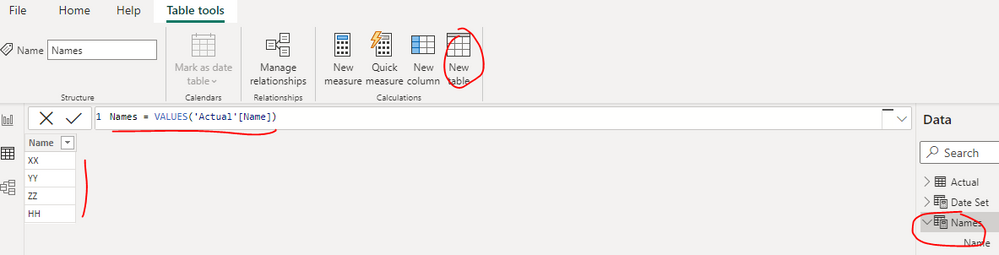
1. Create a name dimension table as below

Names = VALUES('Actual'[Name])

vyiruanmsft_1-1680507786058.png

2. Create two measures as below to get the count of [Actual] and [Target]

Count of actual = 
CALCULATE (
    COUNT ( 'Actual'[Actual] ),
    FILTER ( 'Actual', 'Actual'[Name] IN ALLSELECTED ( 'Names'[Name] ) )
)
Count of target = 
CALCULATE (
    COUNT ( 'Sheet2'[Target] ),
    FILTER ( 'Sheet2', 'Sheet2'[Name] IN ALLSELECTED ( 'Names'[Name] ) )
)

vyiruanmsft_0-1680507690812.png

Best Regards

View solution in original post

2 REPLIES 2
Anonymous
Not applicable

Hi @Jameel ,

I created a sample pbix file(see the attachment), please check if that is what you want.

1. Create a name dimension table as below

Names = VALUES('Actual'[Name])

vyiruanmsft_1-1680507786058.png

2. Create two measures as below to get the count of [Actual] and [Target]

Count of actual = 
CALCULATE (
    COUNT ( 'Actual'[Actual] ),
    FILTER ( 'Actual', 'Actual'[Name] IN ALLSELECTED ( 'Names'[Name] ) )
)
Count of target = 
CALCULATE (
    COUNT ( 'Sheet2'[Target] ),
    FILTER ( 'Sheet2', 'Sheet2'[Name] IN ALLSELECTED ( 'Names'[Name] ) )
)

vyiruanmsft_0-1680507690812.png

Best Regards

Its working. Thanks

but interaction for other visuals that i created are not working when selecting the names. I tried creating manage relationships between names and names in target sheet . But it is showing incorrect results 

Helpful resources

Announcements
Power BI DataViz World Championships

Power BI Dataviz World Championships

The Power BI Data Visualization World Championships is back! Get ahead of the game and start preparing now!

December 2025 Power BI Update Carousel

Power BI Monthly Update - December 2025

Check out the December 2025 Power BI Holiday Recap!

FabCon Atlanta 2026 carousel

FabCon Atlanta 2026

Join us at FabCon Atlanta, March 16-20, for the ultimate Fabric, Power BI, AI and SQL community-led event. Save $200 with code FABCOMM.