cancel
Showing results for 
Search instead for 
Did you mean: 

Get Fabric Certified for FREE during Fabric Data Days. Don't miss your chance! Request now

Reply
Anonymous
Not applicable

AVG New Customer Spend - DAX

Hi,


I need to calculate the average spend for new customers in the previous month. However, it needs to be only for customers that have had at least 2 visits in that previous month. 


Formula: Spend of new customers with >=2 visits in previous month / no. of new customers with >=2 visits in previous month


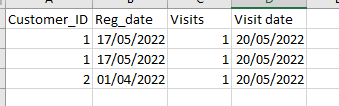
Fact table below - it also has a column for spend


Fact table:

pbi_baller_0-1655814232766.png


Date dimension is joined on visit date. 


New customer is defined by their reg date. So the dax should count customers that registered and had two visits in the previous full month. 

From the above, only customer 1 should be counted, as customer 2 didn't have a registration date in the previous month.


Any help would be appreciated. Thanks!

1 ACCEPTED SOLUTION
v-chenwuz-msft
Community Support
Community Support

Hi @Anonymous ,


Maybe you can try this code:

AVG =
AVERAGEX (
    FILTER (
        CALCULATETABLE (
            SUMMARIZE (
                FILTER ( 'FactTable', MONTH ( [Reg_date] ) = MONTH ( [Visits date] ) ),
                [Customer_ID],
                "count", IF ( COUNTROWS ( 'FactTable' ) >= 2, 1, 0 ),
                "spend", SUM ( FactTable[Spend] )
            ),
            PREVIOUSMONTH ( 'Calendar'[Date] )
        ),
        [count] <> 0
    ),
    [spend]
)

Result:

vchenwuzmsft_0-1656059665557.png


Pbix file in the end you can refer.


Best Regards

Community Support Team _ chenwu zhu


If this post helps, then please consider Accept it as the solution to help the other members find it more quickly.


View solution in original post

2 REPLIES 2
v-chenwuz-msft
Community Support
Community Support

Hi @Anonymous ,


Maybe you can try this code:

AVG =
AVERAGEX (
    FILTER (
        CALCULATETABLE (
            SUMMARIZE (
                FILTER ( 'FactTable', MONTH ( [Reg_date] ) = MONTH ( [Visits date] ) ),
                [Customer_ID],
                "count", IF ( COUNTROWS ( 'FactTable' ) >= 2, 1, 0 ),
                "spend", SUM ( FactTable[Spend] )
            ),
            PREVIOUSMONTH ( 'Calendar'[Date] )
        ),
        [count] <> 0
    ),
    [spend]
)

Result:

vchenwuzmsft_0-1656059665557.png


Pbix file in the end you can refer.


Best Regards

Community Support Team _ chenwu zhu


If this post helps, then please consider Accept it as the solution to help the other members find it more quickly.


Anonymous
Not applicable

Bumping the post. Can anyone help? Thanks

Helpful resources

Announcements
November Power BI Update Carousel

Power BI Monthly Update - November 2025

Check out the November 2025 Power BI update to learn about new features.

Fabric Data Days Carousel

Fabric Data Days

Advance your Data & AI career with 50 days of live learning, contests, hands-on challenges, study groups & certifications and more!

FabCon Atlanta 2026 carousel

FabCon Atlanta 2026

Join us at FabCon Atlanta, March 16-20, for the ultimate Fabric, Power BI, AI and SQL community-led event. Save $200 with code FABCOMM.