FabCon is coming to Atlanta
Join us at FabCon Atlanta from March 16 - 20, 2026, for the ultimate Fabric, Power BI, AI and SQL community-led event. Save $200 with code FABCOMM.
Register now!- Power BI forums
- Get Help with Power BI
- Desktop
- Service
- Report Server
- Power Query
- Mobile Apps
- Developer
- DAX Commands and Tips
- Custom Visuals Development Discussion
- Health and Life Sciences
- Power BI Spanish forums
- Translated Spanish Desktop
- Training and Consulting
- Instructor Led Training
- Dashboard in a Day for Women, by Women
- Galleries
- Data Stories Gallery
- Themes Gallery
- Contests Gallery
- QuickViz Gallery
- Quick Measures Gallery
- Visual Calculations Gallery
- Notebook Gallery
- Translytical Task Flow Gallery
- TMDL Gallery
- R Script Showcase
- Webinars and Video Gallery
- Ideas
- Custom Visuals Ideas (read-only)
- Issues
- Issues
- Events
- Upcoming Events
The Power BI Data Visualization World Championships is back! Get ahead of the game and start preparing now! Learn more
- Power BI forums
- Forums
- Get Help with Power BI
- DAX Commands and Tips
- Re: 6 columns every one contain the same drop list...
- Subscribe to RSS Feed
- Mark Topic as New
- Mark Topic as Read
- Float this Topic for Current User
- Bookmark
- Subscribe
- Printer Friendly Page

- Mark as New
- Bookmark
- Subscribe
- Mute
- Subscribe to RSS Feed
- Permalink
- Report Inappropriate Content
6 columns every one contain the same drop list How to calculate?
Hey All
I do Have a Table contain products, every prodcut go Through 6 stages . every stage is contaning the same drop down list ( not started , on progross, hang, complated)
how to biuld a musrement and become with table showing calculation in every stage and drop down list ?
Thanks
Solved! Go to Solution.


- Mark as New
- Bookmark
- Subscribe
- Mute
- Subscribe to RSS Feed
- Permalink
- Report Inappropriate Content
So, @Anonymous
you can, for example create a new calculated dimension table like
dimDropDown =
UNION(
    SELECTCOLUMNS(DISTINCT('Table'[Analyses Stage]);"dropDown";[Analyses Stage]);
    SELECTCOLUMNS(DISTINCT('Table'[BS Stage]);"dropDown";[BS Stage]);
    SELECTCOLUMNS(DISTINCT('Table'[Development Stage]);"dropDown";[Development Stage]);
    SELECTCOLUMNS(DISTINCT('Table'[RD Stage]);"dropDown";[RD Stage])
)
then add to this new tables your 6 columns:
AnalysesStageCount = calculate(countrows('Table');'Table'[Analyses Stage]=EARLIER(dimDropDown[dropDown]))BSStageCount = calculate(countrows('Table');'Table'[BS Stage]=EARLIER(dimDropDown[dropDown]))
and so on..
then just add it to the visual Matrix
do not hesitate to give a kudo to useful posts and mark solutions as solution
- Mark as New
- Bookmark
- Subscribe
- Mute
- Subscribe to RSS Feed
- Permalink
- Report Inappropriate Content
This is the Outcom

- Mark as New
- Bookmark
- Subscribe
- Mute
- Subscribe to RSS Feed
- Permalink
- Report Inappropriate Content
Hi @Anonymous
Unfortunately it is impossible to give you a correct advice without example of your data model.
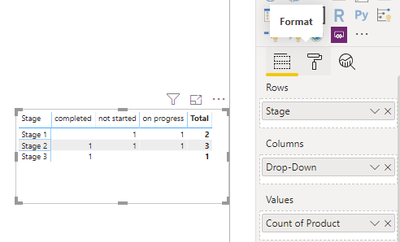
But I will try. If you have a simple table like
| Product | Stage | Drop-Down |
| A | Stage 1 | not started |
| A | Stage 1 | on progress |
| A | Stage 2 | completed |
| B | Stage 2 | not started |
| B | Stage 2 | on progress |
| C | Stage 3 | completed |
so, there is no some more easy way then to create a Matrix visual,
add Stage field as Columns,
Drop-Down field as Rows,
Product field add as Value, then pres narrow near product and choose count
then go to the Format sectin and disable row subtotals:
do not hesitate to give a kudo to useful posts and mark solutions as solution
- Mark as New
- Bookmark
- Subscribe
- Mute
- Subscribe to RSS Feed
- Permalink
- Report Inappropriate Content
Thanks alot @az38 for quick reply ,,,
let mak it more clear, i will present the same table :
| Product Type | Product Nam | BS Stage | RD Stage | Analyses Stage | Development Stage | Quarter |
| P | moon | in progress | in progress | completed | in progress | Q1 |
| S | Car | completed | completed | completed | completed | Q2 |
| E | AB | wating | in progress | completed | in progress | Q3 |
| P | DC | Hold | completed | in progress | Hold | Q4 |
| S | LM | completed | Hold | in progress | in progress | Q5 |
As you see the stages is clumns "BC Stage, RD stage ,,,,," , and every stage there is 3 status " inprogross, Complated, Hold, Waiting".
So we do start by product tyep " As oyu see we do have 3 P,S,E". And product name then stages for every product
- Mark as New
- Bookmark
- Subscribe
- Mute
- Subscribe to RSS Feed
- Permalink
- Report Inappropriate Content
So, @Anonymous
you can, for example create a new calculated dimension table like
dimDropDown =
UNION(
    SELECTCOLUMNS(DISTINCT('Table'[Analyses Stage]);"dropDown";[Analyses Stage]);
    SELECTCOLUMNS(DISTINCT('Table'[BS Stage]);"dropDown";[BS Stage]);
    SELECTCOLUMNS(DISTINCT('Table'[Development Stage]);"dropDown";[Development Stage]);
    SELECTCOLUMNS(DISTINCT('Table'[RD Stage]);"dropDown";[RD Stage])
)
then add to this new tables your 6 columns:
AnalysesStageCount = calculate(countrows('Table');'Table'[Analyses Stage]=EARLIER(dimDropDown[dropDown]))BSStageCount = calculate(countrows('Table');'Table'[BS Stage]=EARLIER(dimDropDown[dropDown]))
and so on..
then just add it to the visual Matrix
do not hesitate to give a kudo to useful posts and mark solutions as solution
- Mark as New
- Bookmark
- Subscribe
- Mute
- Subscribe to RSS Feed
- Permalink
- Report Inappropriate Content
@az38 am trying to implement your soliton and stoped here showing Error
SELECTCOLUMNS(DISTINCT('BS Road Map'[BC]);"dropDown";[BC]);
what you mean by "dropDown"
The error massage : [unexcpected exepression]
- Mark as New
- Bookmark
- Subscribe
- Mute
- Subscribe to RSS Feed
- Permalink
- Report Inappropriate Content
It’s just a new column name.
So, there could be 2 problems: first replace double quotas “ to ordinary ‘
Second, replace all ; to commas ,
Third, try both solutions 🙂 it is a system locale question
- Mark as New
- Bookmark
- Subscribe
- Mute
- Subscribe to RSS Feed
- Permalink
- Report Inappropriate Content

- Mark as New
- Bookmark
- Subscribe
- Mute
- Subscribe to RSS Feed
- Permalink
- Report Inappropriate Content
Hi @Anonymous
Do you try to add column or measure? Need a column. Do you try to add it to new table?
- Mark as New
- Bookmark
- Subscribe
- Mute
- Subscribe to RSS Feed
- Permalink
- Report Inappropriate Content
now its wokring and getting numbers ,
The calcualte CountROWS I need to find somthing deffrant than the ROWs
i have only 72 Rows and the calculated is returing 400 ,,
Helpful resources

Power BI Dataviz World Championships
The Power BI Data Visualization World Championships is back! Get ahead of the game and start preparing now!

Power BI Monthly Update - November 2025
Check out the November 2025 Power BI update to learn about new features.

FabCon Atlanta 2026
Join us at FabCon Atlanta, March 16-20, for the ultimate Fabric, Power BI, AI and SQL community-led event. Save $200 with code FABCOMM.

| User | Count |
|---|---|
| 20 | |
| 10 | |
| 9 | |
| 4 | |
| 4 |


| User | Count |
|---|---|
| 33 | |
| 31 | |
| 19 | |
| 12 | |
| 11 |


