cancel
Showing results for 
Search instead for 
Did you mean: 

Learn from the best! Meet the four finalists headed to the FINALS of the Power BI Dataviz World Championships! Register now

Reply
morizf
Frequent Visitor

vertical line in table

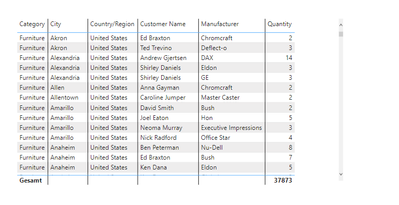
Hello together, i have a problem in the design of the table with the vertical line. I don't want the line after every column, is there a possibility to have the line only on selected columns?


morizf_0-1689925319434.png

like in the picture i can only activate the vertical lines or inactivate them..


Thanks

6 REPLIES 6
dmacdonald
Advocate I
Advocate I

Here's how I do this:

Create a Measure that a fixed value. I call my meaure |  ( The vertical pipe symbol)

| = 1

Then add the measure to your table at the location where you want the line.

And set the backgound color for the column and the header to solid black or whatver color you want.


Thank you. Yes, thats the workaround i did, too. But i thought it should be possible without using a measure or an extra column for a line in a table.

ForgotID
Advocate I
Advocate I

Hi !

Sometimes when I have to create a vertical line like this I would write a dummy measure like Vline = "2BF4AF" then use a card visulation and adjust the width and height to give a look of a vertical line

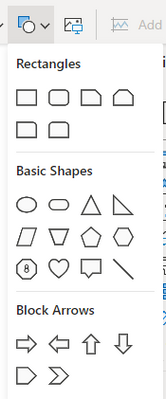
I assume you are aware of the standard shapes that can be added to a Power BI report page.


lbendlin_0-1690212371303.png


Yes we can do that too, But I wonder how we can insert it between two columns in a table

lbendlin
Super User
Super User

If this is important to you please consider voting for an existing idea or raising a new one at https://ideas.fabric.microsoft.com/?forum=2d80fd4a-16cb-4189-896b-e0dac5e08b41

Helpful resources

Announcements
Join our Fabric User Panel

Join our Fabric User Panel

Share feedback directly with Fabric product managers, participate in targeted research studies and influence the Fabric roadmap.

March Power BI Update Carousel

Power BI Community Update - March 2026

Check out the March 2026 Power BI update to learn about new features.

Top Solution Authors
Top Kudoed Authors