Join us in Barcelona for FabCon and SQLCon, September 28 - October 1, 2026.
This is best Fabric, Power BI, SQL and AI community event. How do we know? The last event sold out! Save €200 with code FABCMTY200.
Register now- Power BI forums
- Get Help with Power BI
- Desktop
- Service
- Report Server
- Power Query
- Mobile Apps
- Developer
- DAX Commands and Tips
- Custom Visuals Development Discussion
- Health and Life Sciences
- Power BI Spanish forums
- Translated Spanish Desktop
- Training and Consulting
- Instructor Led Training
- Dashboard in a Day for Women, by Women
- Galleries
- Data Stories Gallery
- Themes Gallery
- Contests Gallery
- QuickViz Gallery
- Quick Measures Gallery
- Visual Calculations Gallery
- Fabric Apps Gallery
- Notebook Gallery
- Translytical Task Flow Gallery
- TMDL Gallery
- R Script Showcase
- Webinars and Video Gallery
- Ideas
- Custom Visuals Ideas (read-only)
- Issues
- Issues
- Events
- Upcoming Events
The Fabric community is now in read-only for platform upgrade. Learn more
- Power BI forums
- Forums
- Get Help with Power BI
- Custom Visuals Development Discussion
- Re: blank custom visuals
- Subscribe to RSS Feed
- Mark Topic as New
- Mark Topic as Read
- Float this Topic for Current User
- Bookmark
- Subscribe
- Printer Friendly Page

- Mark as New
- Bookmark
- Subscribe
- Mute
- Subscribe to RSS Feed
- Permalink
- Report Inappropriate Content
blank custom visuals
Greetings,
I'm having some trouble with my custom rhtml visual. When i upload it to PowerBI and add in the data, it loads for a second, then turns out blank.
This is my first time constructing custom visuals, where i simply followed a guide on medium (Create Dynamic Custom Visual in Power BI using R, ggplot2 and plotly | by Shalabh Thakur | Medium).
output from pbiviz package (pbiviz file is compiled in dist folder), but I get a certificate warning (have installed the certificate, but this is not my strong side):
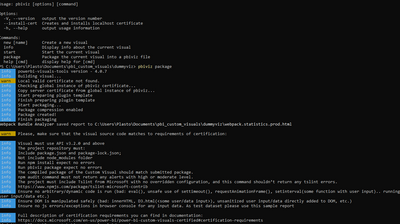
pbiviz output:
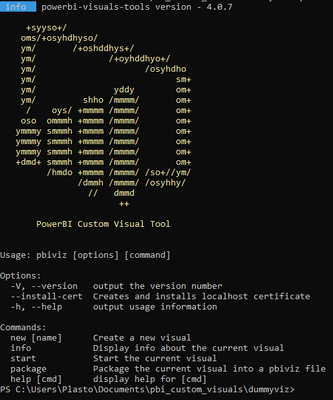
My procedure to construct a custom pbiviz:
--> go to designated folder
--> Run code: pbiviz new my_visual -t rhtml
--> Add info in pbiviz.json file
--> Alter script.r file (scriptis tested and works)
--> Run code: pbiviz package
--> Import .pbiviz from dist to Power BI
--> Add the column I want to be displayed
The R script looks like this: simple script made for testing. Should work for any numeric column
source('./r_files/flatten_HTML.r')
############### Library Declarations ###############
libraryRequireInstall("ggplot2");
libraryRequireInstall("plotly")
####################################################
################### Actual code ####################
names(Values) = "X"
g = ggplot(data = Values, mapping = aes(X)) + geom_histogram();
####################################################
############# Create and save widget ###############
p = ggplotly(g);
internalSaveWidget(p, 'out.html');
####################################################
################ Reduce paddings ###################
ReadFullFileReplaceString('out.html', 'out.html', ',"padding":[0-9]*,', ',"padding":0,')
####################################################
The only error I can observe is the certificate warning. However, the .pbiviz file is compiled (I assumed everything was okay then). I have imported the certificate by running:
--> pbiviz --install-cert
--> choose current user
--> Trusted Root Certification Authorities
* I was never prompted for any password, as the guide mentions?
Does any one have any idea what my problem may be?
I'm also running the latest version of pbi desktop.
Thanks!
Solved! Go to Solution.

- Mark as New
- Bookmark
- Subscribe
- Mute
- Subscribe to RSS Feed
- Permalink
- Report Inappropriate Content
Hi,
Your issue here is due to the certification not being set up properly. However, even if you resolved that you will still run into the blank visual problem. See my post here: https://community.powerbi.com/t5/Developer/Issue-with-R-plotly-in-pbiviz-versions-4-0-6/m-p/2940046#...
You have the most recent version of powerbi-visuals-tools installed (v4.0.7). You need to rollback to version 4.0.5 and go through the certificate install again. Then, you should be able to sucessfully set up a new rhtml template folder, package, and import.
Hope this helps!

- Mark as New
- Bookmark
- Subscribe
- Mute
- Subscribe to RSS Feed
- Permalink
- Report Inappropriate Content
thanks a lot... really has the same trouble.
- Mark as New
- Bookmark
- Subscribe
- Mute
- Subscribe to RSS Feed
- Permalink
- Report Inappropriate Content
Hi,
Your issue here is due to the certification not being set up properly. However, even if you resolved that you will still run into the blank visual problem. See my post here: https://community.powerbi.com/t5/Developer/Issue-with-R-plotly-in-pbiviz-versions-4-0-6/m-p/2940046#...
You have the most recent version of powerbi-visuals-tools installed (v4.0.7). You need to rollback to version 4.0.5 and go through the certificate install again. Then, you should be able to sucessfully set up a new rhtml template folder, package, and import.
Hope this helps!
- Mark as New
- Bookmark
- Subscribe
- Mute
- Subscribe to RSS Feed
- Permalink
- Report Inappropriate Content
Thanks a lot, saved my monday!
Here is the procedure i followed:
Followed all steps in this link:
Setting up an environment for developing a Power BI visual - Power BI | Microsoft Learn
1. Replaced "npm i -g powerbi-visuals-tools@latest" with "npm i -g powerbi-visuals[email protected]"
2. Replaced "@version" for all development libraries with latest stable version
I was now prompted with the correct certificate install aswell!

- Mark as New
- Bookmark
- Subscribe
- Mute
- Subscribe to RSS Feed
- Permalink
- Report Inappropriate Content
Hello,
I'm havign the same issue but I'm not sure exactly what I need to do to correct it. My coding skills are not great, is there a step-by-step process for
- rolling back to version 4.0.5 and going through the certificate install again.
- seting up a new rhtml template folder, package, and import ?
Thanks!
Helpful resources

FabCon & SQLCon – Barcelona 2026
Join us in Barcelona for FabCon and SQLCon, the Fabric, Power BI, SQL, and AI community event. Save €200 with code FABCMTY200.

Power BI DataViz World Championships - June 2026
A new Power BI DataViz World Championship is coming this June! Don't miss out on submitting your entry.


