cancel
Showing results for 
Search instead for 
Did you mean: 

The Power BI Data Visualization World Championships is back! Get ahead of the game and start preparing now! Learn more

Reply
lalitmohan
Regular Visitor

attribute slicer

hi


I would like to dump the data from the "atttribute slicer" custom view into a excel file or as CSV into notepad. How can i do it?


Regards


Lalit

3 REPLIES 3
v-viig
Community Champion
Community Champion

Hello @lalitmohan


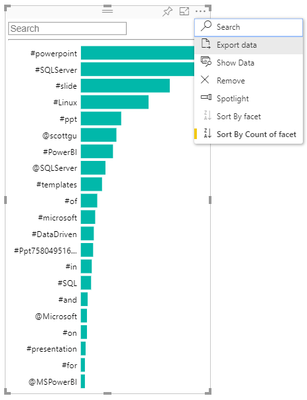
You should click "..." and then select "Export data":

image.png


After that you should click "Export" to export data as a CSV file:

image.png


Ignat Vilesov,

Software Engineer


Microsoft Power BI Custom Visuals

pbicvsupport@microsoft.com

apologies my mistake my question was about "tablesorter". I can see "..." and can also export data to CSV. but once i publish it to the PBI service for users to consume, the "..." do not show up. How can my users export data ?

Do you use Publish to web Power BI's feature?

If so, there's no way to export data.


Ignat Vilesov,

Software Engineer


Microsoft Power BI Custom Visuals

pbicvsupport@microsoft.com

Helpful resources

Announcements
Power BI DataViz World Championships

Power BI Dataviz World Championships

The Power BI Data Visualization World Championships is back! Get ahead of the game and start preparing now!

December 2025 Power BI Update Carousel

Power BI Monthly Update - December 2025

Check out the December 2025 Power BI Holiday Recap!

FabCon Atlanta 2026 carousel

FabCon Atlanta 2026

Join us at FabCon Atlanta, March 16-20, for the ultimate Fabric, Power BI, AI and SQL community-led event. Save $200 with code FABCOMM.