cancel
Showing results for 
Search instead for 
Did you mean: 

July 28 - August 9 | Final Round of the Power BI Dataviz World Championships. This is your chance. Learn more

Reply
GraceT
Regular Visitor

Word Cloud custom visual: Problem with customising data colors

Can someone help with with an issue I am habing with the Word Cloud custom visual?


I'm looking to customise the colors but the option seems to only be there when I use certain fields. 


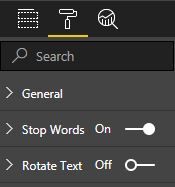
When I drop in certain fields, the option to customise data colors is missing from the "format" toolbar (see screenshot) 


Data colours option missing.JPG


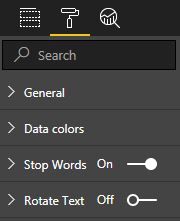
However, I drop in some other fields, you will see the "data colors" is available right below general formatting options.


Data colours option available.JPG


What makes it more frustrating is the option was there until I refreshed my data (cleaning up some rows containing invalid data) that the option disappeared. I don't notice any consistent trend in which fields this feature seems to be unavailable on but it seems to happen more often for fields containing more data.


I am using the latest version of the Word Cloud custom visual on Desktop. 

4 REPLIES 4
v-viig
Community Champion
Community Champion

It's weird issue. Can you share your report to reproduce the issue from our end?


Ignat Vilesov,

Software Engineer


Microsoft Power BI Custom Visuals

[email protected]

I've identified the cause of the issue - if my data has any blanks or null items, it seems to cause the data colour option to disappear. When I cleansed my data, some cell contents were cleared. I was able to fix this issue for myself by putting in a placeholder punctuation (which are excluded from my word cloud).


Let me know if you need any further detail. As my report contains confidential data, I would need to mask the data if I were to share it - I'd prefer not to if the above information is sufficient!

Anonymous
Not applicable

I had the same issue - copied a word cloud across as added in a different data set and the colour option vanished! Removed blank rows and the colour option was back! Thanks Grace

v-viig
Community Champion
Community Champion

Thanks for details. We'll add this issue to backlog and check it.


Ignat Vilesov,

Software Engineer


Microsoft Power BI Custom Visuals

[email protected]

Helpful resources

Announcements
FabCon and SQLCon Barcelona 2026

FabCon & SQLCon – Barcelona 2026

Join us in Barcelona for FabCon and SQLCon, the Fabric, Power BI, SQL, and AI community event. Save €200 with code FABCMTY200.

Fabric Community Sticker Design Challenge Barcelona Carousel

Fabric Community Sticker Challenge - Barcelona 2026

If you love stickers, then you will definitely want to check out our community sticker challenge, Barcelona edition!

July Power BI Update Carousel

Power BI Monthly Update - July 2026

Check out the July 2026 Power BI update to learn about new features.

Power BI DataViz World Championships carousel

Power BI DataViz World Championships - June 2026

A new Power BI DataViz World Championship is coming this June! Don't miss out on submitting your entry.