Learn from the best! Meet the four finalists headed to the FINALS of the Power BI Dataviz World Championships! Register now
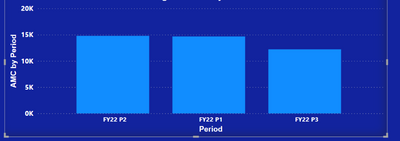
In order to avoid using dates I have added a period column as text. As I need to source through fiscal periods.
The start of the financial year is October, and that's my "FY22 P1". Unfortunately, the visualisations don't follow the periods in the order required. Any clues?
Solved! Go to Solution.
By default visuals are sorted by value. Click the ellipsis in the top right of the visual ( ... ) and then sort by period. Click it again to sort ascending.
If you have recently started exploring Fabric, we'd love to hear how it's going. Your feedback can help with product improvements.
A new Power BI DataViz World Championship is coming this June! Don't miss out on submitting your entry.
Share feedback directly with Fabric product managers, participate in targeted research studies and influence the Fabric roadmap.