cancel
Showing results for 
Search instead for 
Did you mean: 

The Power BI Data Visualization World Championships is back! Get ahead of the game and start preparing now! Learn more

Reply
Anonymous
Not applicable

To get Total in between categories.

Hi,

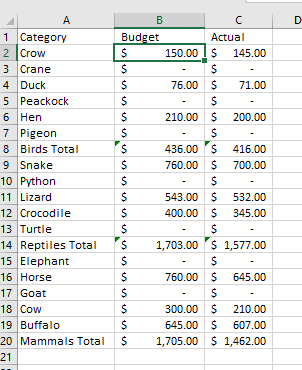
 I have a table like this in Sheet 1-

AMK5461_0-1627069811977.png


And from the sheet 1, I want to create Page 2 in Power BI which is like in Sheet 2 below-


AMK5461_0-1627068384922.png

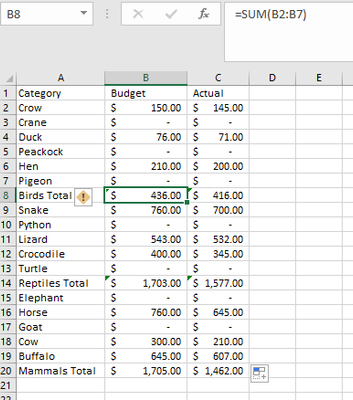
Difference is here the Total is populated through Sum formula.

AMK5461_1-1627070092663.png


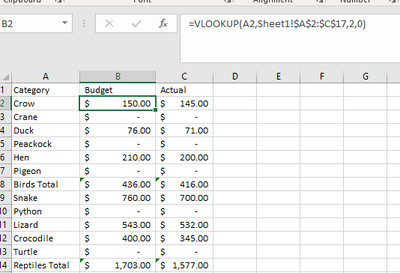
 Values have been achieved through Vlookup-

AMK5461_2-1627068040617.png

How I can do the same in Power BI by Exporting Sheet 1 and creating Sheet 2 from Sheet 1.


Thanks,


Amit Kumar


1 REPLY 1
lbendlin
Super User
Super User

You don't want to mix individual values and totals in your source data. Instead, add a category column to each detail row.

Helpful resources

Announcements
November Power BI Update Carousel

Power BI Monthly Update - November 2025

Check out the November 2025 Power BI update to learn about new features.

Fabric Data Days Carousel

Fabric Data Days

Advance your Data & AI career with 50 days of live learning, contests, hands-on challenges, study groups & certifications and more!

FabCon Atlanta 2026 carousel

FabCon Atlanta 2026

Join us at FabCon Atlanta, March 16-20, for the ultimate Fabric, Power BI, AI and SQL community-led event. Save $200 with code FABCOMM.