cancel
Showing results for 
Search instead for 
Did you mean: 

Vote for your favorite vizzies from the Power BI Dataviz World Championship submissions. Vote now!

Reply
asganesh
Microsoft Employee
Microsoft Employee

Time Series with Scatter Plot

I would like to have something similar to the below, where each blue mark represents duration of a service call at a specific start time, but the orange represents the time series in which a Node Drain is In Progress. 

asganesh_0-1603251358267.png


At the moment, I was able to get the scatter plot together, but i'm not sure how to pull in the time series:
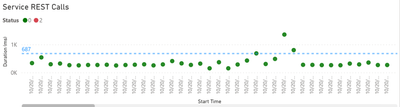
asganesh_1-1603251433316.png


My thought is i take this data and mark each second inside the index as "Node Drain In Progress". How can i splice up this time below so for each index there are multiple entries for the time the index interval is inside. For example: 

asganesh_2-1603251503171.png


So ideally, here I would have multiple entries for Index 0 where it would look like:

0 10/19/2020 10:18:31 Node Drain in Progress

0 10/19/2020 10:18:32 Node Drain in Progress

....

0 10/19/2020 10:19:30 Node Drain in Progress

0 10/19/2020 10:19:31 Node Drain in Progress


0 REPLIES 0

Helpful resources

Announcements
Power BI DataViz World Championships

Power BI Dataviz World Championships

Vote for your favorite vizzies from the Power BI World Championship submissions!

Sticker Challenge 2026 Carousel

Join our Community Sticker Challenge 2026

If you love stickers, then you will definitely want to check out our Community Sticker Challenge!

January Power BI Update Carousel

Power BI Monthly Update - January 2026

Check out the January 2026 Power BI update to learn about new features.

FabCon Atlanta 2026 carousel

FabCon Atlanta 2026

Join us at FabCon Atlanta, March 16-20, for the ultimate Fabric, Power BI, AI and SQL community-led event. Save $200 with code FABCOMM.

Top Solution Authors
Top Kudoed Authors